
Introduction
A phone is no longer just a communication device. For entrepreneurs in 2026, it’s your portable identity provider, your deal room, your travel hub, and—quietly—your most consistent exposure point.
A privacy phone for entrepreneurs matters because most real-world compromises don’t begin with movie-style hacking. They begin with one weak link: a SIM swap, a poisoned travel Wi‑Fi session, a high-credibility phishing message, or an “urgent” document that arrives at the exact wrong moment.
What’s changed is the environment. Threat actors are better organized. Cross-border travel is more common again, and so are device inspection scenarios. Regulations and compliance expectations touch more founders directly, especially if you handle investor data, customer PII, or sensitive IP. And supply-chain risk—carriers, repair channels, refurbished devices—has become part of the buyer’s calculus.
This guide is built to keep you out of extremes. Not “buy the most paranoid phone possible,” and not “assume your flagship is fine.” You’ll define your threat model, compare platform paths, build a shortlist, and make the call with a setup playbook you can actually maintain.
Define your threat model
Common risks entrepreneurs face
Most founders don’t need a spy-movie solution. They need a repeatable security posture that survives real life: travel, assistants, contractors, multiple accounts, and constant context switching.
The most common failure modes cluster into four buckets:
- Identity takeoverSIM swaps, mailbox compromise, password resets done under pressure.
- Phishing and social engineeringtailored “invoice,” “doc share,” or “calendar invite” attacks.
- Device loss and opportunistic accessa phone left in a car, a hotel, a lounge—followed by credential recovery.
- Silent exploitationrare, but catastrophic when targeted—particularly around messaging, browsing, and baseband exposure.
Key TakeawayYour phone security is mostly identity security. If your email, carrier account, and authenticator are weak, the handset won’t save you.
High-risk scenarios and travel
Your risk rises sharply when you cross borders, attend high-profile events, or operate in regions where device seizure or inspection is plausible. Even without a hostile actor, you’re exposed to:
unfamiliar carrier stores and SIM replacement workflows
public charging and accessory connections
hotel networks and captive portals
rushed decisions (the time when you click)
If you travel frequently, treat “travel mode” as a purchase requirement—not an optional habit.
What success looks like
A good outcome isn’t “perfect privacy.” It’s predictable control:
your device stays on a current, supported update track
compromise is harder, persistence is harder, and recovery is fast
your critical accounts (email, cloud, banking) remain protected even if the phone is stolen
you can maintain the posture without turning daily work into friction
If you want a deeper threat-model framing tailored to executive realities, see VERTU’s guide on privacy phone for executives.
What truly matters in 2026
Hardware and firmware support
Security is a timeline problem. A secure smartphone for business is one that receives security patches reliably, with clear end-of-support dates—and with hardware designed to support modern platform security.
Before you compare brands, ask:
How long will this model receive security updates?
Are firmware and security components updated as part of that promise?
Is the repair channel trustworthy (especially if you travel and use third-party repair)?
OS hardening and verified boot
Hardening is not one feature. It’s the sum of many small decisions that reduce exploitability and limit the damage when something goes wrong.
One concept matters more than most buyers realize: verified boot. It’s the mechanism that helps ensure the OS you boot is the OS you think you boot.
On Android, this is formalized as Android Verified Boot (AVB), which cryptographically verifies key software components at startup and supports rollback protection to prevent downgrades to vulnerable versions.
On iPhone, the security model is different, but the principle is the same: maintain a trustworthy boot chain and limit persistent compromise.
App compatibility vs telemetry
Entrepreneurs don’t buy “a phone.” You buy an ecosystem: banking, messaging, travel, identity, MDM (sometimes), and a dozen apps that keep your day moving.
The trade-off is blunt:
More compatibility often means more background services—and more telemetry exposure.
More control often means more configuration decisions—and occasional app friction.
The goal isn’t to eliminate telemetry at all costs. It’s to understand where it matters (identity, location, communications metadata) and reduce it without breaking your operating rhythm.
Key TakeawayIf “hardware kill switches phone” is on your shortlist, treat it as a control tool—not a guarantee. It can shut radios and sensors off, but it can’t replace strong identity security and good operational habits.
Platform paths at a glance
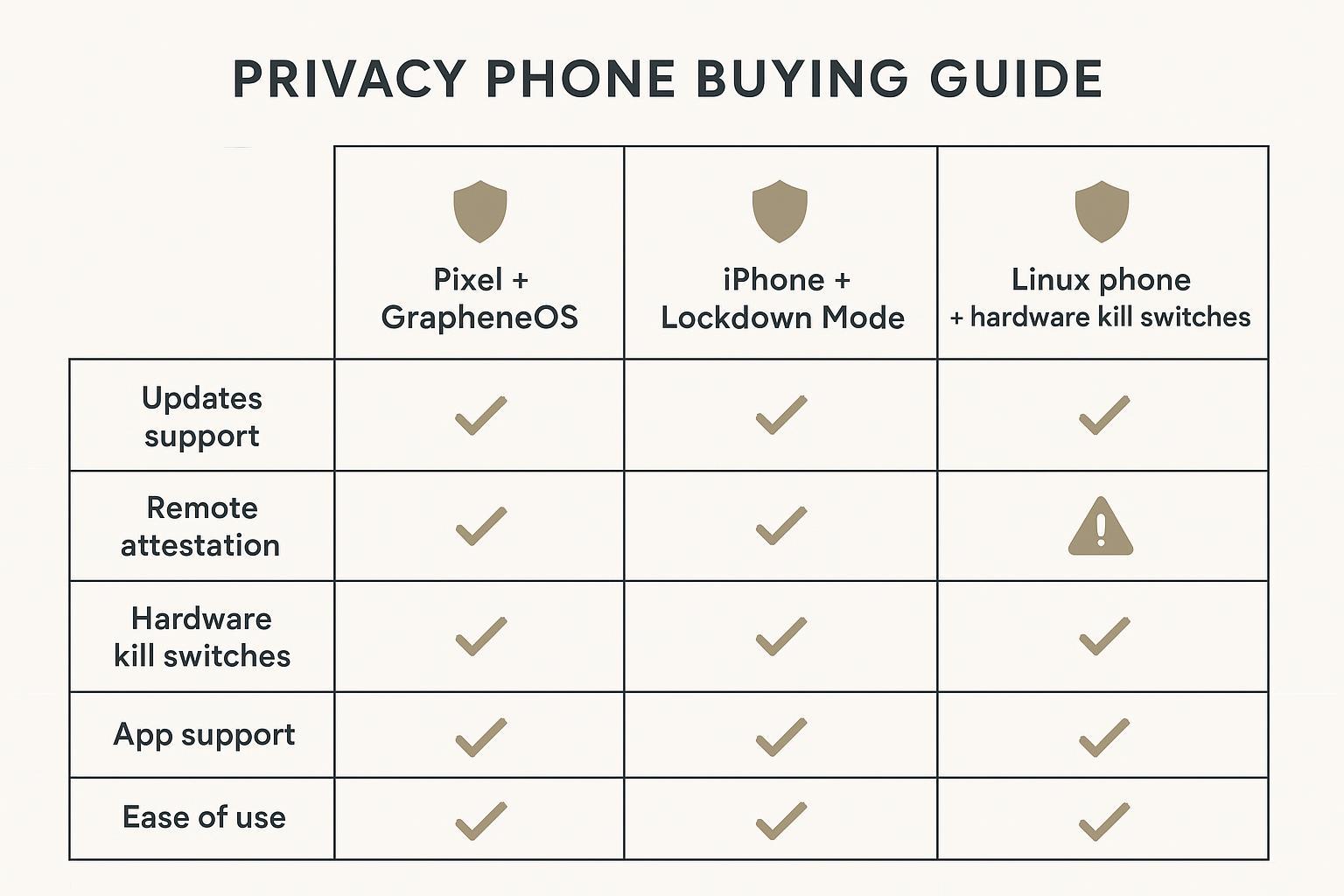
Pixel + GrapheneOS (balanced control)
If you want strong hardening while keeping modern smartphone usability, Pixel hardware with GrapheneOS is the most commonly chosen “balanced control” path.
GrapheneOS is explicit about its security posture and layered protections, including verified boot and integrity verification concepts via its Auditor/attestation tooling described in GrapheneOS Features.
A practical note on phrasing: when people say “GrapheneOS Pixel,” they usually mean exactly this setup—GrapheneOS installed on a supported Google Pixel model.
Where it fits:
you want high security and meaningful privacy improvements
you can tolerate some setup and occasional edge-case app issues
you prefer an operating posture you can audit and maintain
iPhone + Lockdown Mode (convenience-first)
If your business runs cleanly inside Apple’s ecosystem, iPhone remains a strong default—especially when your primary need is reliability plus a known security baseline.
When your risk profile is unusually high (targeted attacks, sensitive travel, or credible spyware concerns), iPhone Lockdown Mode is Apple’s extreme posture. Apple describes it as protection for a very small number of users at risk of sophisticated attacks in its About Lockdown Mode documentation.
Where it fits:
you want maximum ecosystem convenience
you want a “flip the switch” hardened posture for elevated scenarios
you accept reduced functionality while Lockdown Mode is enabled
Linux + kill switches (maximum control)
Linux phones with hardware kill switches offer a distinct advantage: physical control. When implemented properly, a kill switch can cut power to components such as the cellular modem, Wi‑Fi/Bluetooth, and camera/microphone.
Purism’s documentation explains that these switches physically prevent power from flowing to the component, and that disabling all switches can trigger an expanded lockdown posture affecting additional sensors (Purism’s Librem 5 privacy / kill switch documentation).
Where it fits:
you prioritize hardware-level isolation and transparency
you can accept meaningful usability trade-offs
you treat the phone as a controlled communications instrument, not an app hub
Build your shortlist
Feature checklist and red flags
A shortlist should be built from requirements, not brand preference.
Non-negotiables:
a clear update policy you can verify
a strong device lock (long passcode, not just biometrics)
full-device encryption enabled by default
repeatable backup and recovery
Red flags that should end the conversation:
unclear or short security update horizon
“security phone” marketing without documentation of how it’s secured
third-party ROM setups that cannot maintain a verified, supportable boot posture
Budget, support window, and carrier fit
For entrepreneurs, the real cost is not the handset. It’s downtime.
Make your budget decision around three costs:
- Support windowhow long you can stay patched without device churn.
- Carrier realitieseSIM support, roaming stability, and how easily your number can be hijacked.
- Recovery timehow fast you can restore a clean device if yours is seized, lost, or compromised.
A practical note: whichever platform you choose, invest in carrier-level account protection (PINs, number port freezes where available) and move critical logins away from SMS codes.
Collector’s note: If you’re buying for longevity, treat “support window” as a device’s provenance. A phone with unclear update commitments may look impressive today and age poorly tomorrow.
Brand insertion for luxury options
Some entrepreneurs want privacy and a service relationship—a device that is treated less like disposable electronics and more like a long-term instrument.
In that context, VERTU can sit credibly in a shortlist when you evaluate it on three non-advertorial dimensions:
First, craftsmanship as a security signal: not because leather makes you safer, but because controlled materials, controlled build, and provenance-oriented ownership reduce the “unknowns” that show up with gray-market devices and questionable refurb channels.
Second, service and continuity: founders who travel and operate on compressed schedules often need a support layer that behaves like an extension of their office—helping keep the device usable, recovered, and administratively sane. This is where a concierge relationship can be part of operational security, not just lifestyle.
Third, how digital features are governed: modern luxury ecosystems increasingly include AI and blockchain/Web3 elements. The due diligence question is not “does it have AI?” but “what is authorized, what is stored, and what is isolated?” VERTU frames this as a decision discipline in its AI privacy protection decision guide, and explores the ownership and risk logic behind Web3 & digital ownership.
If you’re considering a luxury path, treat it like any other security purchase: request documentation, verify the update/support posture, and map the service model to your travel and recovery needs.
Make the right call
Decision framework for your use case
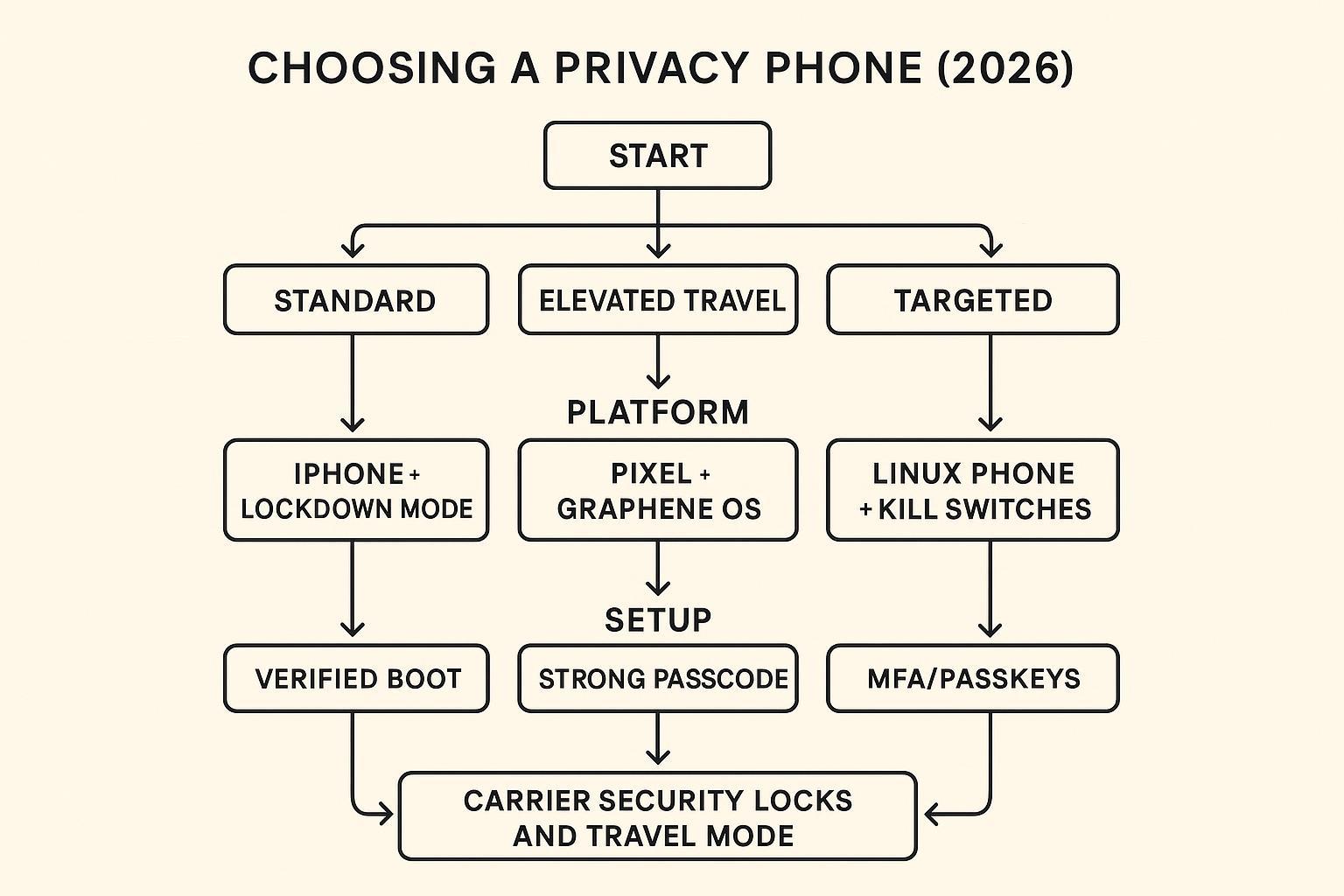
A decision becomes simple when you separate threat level from tolerance for friction.
If you need a modern daily driver with strong hardening and meaningful privacy control, the Pixel + GrapheneOS path is typically the most balanced.
If you prioritize ecosystem convenience and want an extreme posture for rare high-risk moments, iPhone + Lockdown Mode is often the cleanest operational choice.
If you want physical, hardware-level isolation and can live with trade-offs, Linux + kill switches is the most literal expression of control.
Setup and hardening basics
This is the part most “secure phone” lists skip. Your decision only becomes real after setup.
Start with the essentials:
Use a long passcode (and don’t let biometrics become your only gate).
Turn on automatic OS and app updates.
Lock down your carrier account (PIN, port protection where available).
Move critical accounts to phishing-resistant authentication (passkeys or hardware keys), not SMS.
Keep a clean, tested backup.
For a tighter, platform-agnostic checklist, VERTU’s mobile privacy protection tips are a useful baseline, and its how to encrypt your phone guide is a practical reference for verifying device encryption.
Ongoing habits and travel playbook
Your security posture should survive fatigue.
Three habits that matter more than new apps:
- Weekly reboot and update checkit’s mundane, but it closes windows that attackers rely on.
- App hygienefewer apps, fewer permissions, fewer unknown background processes.
- Travel disciplineseparate work and personal contexts where possible; minimize what’s on the device before high-risk trips; avoid “random accessory” connections.
If you regularly cross borders or attend high-profile events, consider a dedicated travel setup: a reduced-data device, hardened accounts, and a recovery plan that assumes confiscation is possible.
Conclusion
If you want to reduce breach risk now, focus on what’s durable:
choose a platform with a clear update horizon and a supportable integrity posture
align the OS path to your real threat model and your tolerance for friction
treat identity (carrier + email + authenticator) as the true perimeter
Your next three actions this week:
Write your threat model in one paragraph (standard / elevated travel / targeted) and choose the platform path accordingly.
Lock your identity layer: carrier PIN + phishing-resistant authentication for email and cloud.
Build your recovery plan: a clean backup, a restore test, and a travel-ready reduced-data mode.
Disclosure: This article references VERTU pages. Editorial judgment remains the priority.