


Introduction
You don’t need a tech obsession to choose the right Web3 luxury phone for the 2026 World Cup. You need a clear framework—one that respects how you’ll actually travel: multiple borders, dense stadiums, VIP schedules, and assets that don’t belong on a compromised device.
This guide is your concise path to a confident shortlist.
What matters most:
Tri‑country connectivity (USA/Canada/Mexico) that doesn’t collapse under roaming quirks or stadium density
Security that assumes loss, theft, and account‑takeover attempts are part of the modern travel baseline
Wallets and recovery that work when you’re away from your home safe
Concierge and AI assistance that reduce friction without expanding risk
Craftsmanship that holds up—because a phone you’re afraid to use is not luxury
Who this is for: high‑net‑worth travelers, VIP hospitality guests, and private clients who want a phone that performs like a travel instrument, not just a status object.
Key TakeawayFor World Cup 2026 travel, the “best” phone is the one that stays connected across three countries, protects keys by design, and still works when plans change at 11:45 p.m.
Connectivity essentials for a Web3 luxury phone
5G bands and eSIM
For World Cup travel, connectivity isn’t just “does it get signal?” It’s whether your specific carrier relationship grants full access—especially 5G—and whether you can keep a stable data plan as you move between the U.S., Canada, and Mexico.
Assume roaming outcomes vary by carrier, not just country. Ookla’s analysis of connectivity for traveling fans highlights that roaming performance (and sometimes 5G access) depends on home‑operator agreements—and those differences show up most painfully in high‑demand moments like stadium entry and halftime surges.
Be ready for stadium reality. Ookla’s venue-level data shows U.S. host stadium median download speeds well above some Mexico venues—useful context when you’re deciding whether to rely on roaming or bring a dedicated travel eSIM.
Treat the FIFA app as mission-critical. Ookla notes tickets are delivered through the official app—so your connectivity and battery plan is part of entry planning.
Prefer an eSIM workflow you can control. If you’re using an iPhone, Apple’s guidance on travel eSIMs is the cleanest baseline for “do this, don’t do that,” including how to set the correct data line and avoid accidental roaming spend (Apple’s guidance on using eSIM while traveling (2026)).
Practical evaluation questions (ask before you buy)
Does the phone support dual SIM in the way you actually travel (eSIM + eSIM, or eSIM + physical)?
Can you keep your primary number active for banking and VIP communications while routing data through a travel eSIM?
Do you have a frictionless way to switch data lines at the border—without digging through settings during a transfer?
How to verify: Before you travel, install a test eSIM, force it to become the data line, and confirm you can still receive calls/SMS on your primary number.
Wi‑Fi 7 readiness
Wi‑Fi matters more than people admit—especially in premium hotels, lounges, and hospitality suites where you’ll do real work between matches.
Here’s the clean way to think about it:
Prefer Wi‑Fi 6E at minimum; treat Wi‑Fi 7 as a bonus. Wi‑Fi 6E adds 6 GHz as a less congested lane in venues that support it, which is often the practical win while traveling (Cisco’s Wi‑Fi 6E vs Wi‑Fi 7 overview).
Buyer logic: Wi‑Fi 7 is a meaningful plus if you frequently rely on premium venue Wi‑Fi for large transfers, video calls, or secure work sessions. If your world is mostly 5G + hotel Wi‑Fi, Wi‑Fi 6E is still “good enough” today—provided the device is otherwise excellent.
Satellite and power strategy
Satellite isn’t a luxury feature—it’s a contingency plan.
On supported iPhones, Apple’s documentation makes the constraints clear: satellite safety features are text‑first and require clear sky view; they are not a replacement for normal connectivity (Apple’s Emergency SOS via satellite support page). If you want non‑emergency satellite messaging, Apple’s Messages via satellite notes additional constraints on what you can send and receive (Apple’s Messages via satellite feature notes).
Power strategy matters just as much:
Match day + navigation + photos + scanning tickets = battery risk.
If you run wallets, security layers, and travel apps, you need predictable endurance.
Evaluate: charging speed, thermals under hotspot use, and whether the phone’s materials make it comfortable to hold for long stadium walks.
Security and Web3 readiness
Hardware security baseline
A Web3 luxury phone isn’t “secure” because it looks expensive. It’s secure when key material is protected even if the OS is compromised.
Start with the baseline:
Hardware‑backed key storage (secure element / trusted execution environment concepts)
Strict lockscreen and biometric hygiene
A clear stance on updates, patching, and verified boot
If you’re evaluating devices explicitly positioned for Web3, insist on a secure element architecture. VERTU’s own guide frames an integrated secure element (SE) as a hardware wallet foundation, describing a secure element + TEE approach (“Key‑Box technology”) and a dual‑environment concept for sensitive Web3 operations (VERTU’s guide to buying a secure Web3 phone (2026)).
Wallets and recovery
Travel changes the risk model. Your threat isn’t just malware—it’s misplaced devices, SIM‑swap attempts, and recovery failure when you’re away from home.
Use this hierarchy:
Carry small balances on mobile. Treat mobile wallets like cash.
Keep long‑term holdings in hardware or multisig custody.
Design recovery so you don’t need to type a seed phrase into any phone—ever.
Credible guidance is blunt:
Trezor warns against entering your wallet backup digitally; the safe path is to keep recovery material off computers and phones (Trezor’s hardware wallet basics).
Unchained Capital’s travel-focused advice is clear: avoid traveling with seed backups and segregate funds by purpose (Unchained’s tips for traveling with bitcoin keys).
Charles Schwab’s overview underlines the importance of thoughtful backup and security posture for keys (Charles Schwab’s crypto wallet security guide (2026)).
Your non‑negotiables
No seed phrase photos. No cloud notes. No “I’ll delete it later.”
Prefer authenticator apps or hardware tokens; avoid SMS where possible.
Test recovery before you fly—using a small balance and a controlled flow.
How to verify: Perform a small “round trip” transaction (send, receive, swap, send again) on your travel wallet. If it’s stressful at home, it will fail in an airport.
Ticketing, QR/NFC, loyalty
At the 2026 World Cup, your phone isn’t just your camera—it’s your access layer.
Connectivity and readiness matter because:
Travel connectivity can be inconsistent by carrier agreement, and match venues are peak-demand environments.
Operational tips that actually prevent embarrassment at the gate:
Max screen brightness, disable aggressive battery saver modes before entry.
Keep your ticketing and wallet apps updated.
Use a case that doesn’t interfere with NFC.
Have a backup power plan before you leave your hotel.
Concierge and AI assistance
24/7 concierge integration
In elite travel, “assistance” means speed, discretion, and a clean handoff when a request becomes nuanced.
Good concierge integration looks like:
One-touch access without hunting for an app
Clear escalation from routine tasks to human judgment
Logs and confirmations you can reference when your schedule is tight
AI travel agent features
AI can help you move faster—if it’s bounded.
Look for features that respect approval and privacy:
Drafting itineraries and routing options
Packing and document reminders based on your calendar
Translating messages, summarizing confirmations, and extracting “what matters” from long emails
Proposing contingencies (alternate airports, earlier transfers) when a plan becomes fragile
VIP hospitality workflows
A practical World Cup workflow is rarely glamorous:
“My driver is delayed. Move dinner by 45 minutes. Confirm a quiet table. Keep it discreet.”
“We’re changing cities tomorrow. Rebook luggage pickup. Update the hotel. Share the revised schedule with security.”
This is where a luxury device can justify itself—when it turns complexity into a controlled sequence. For example, VERTU positions its Ruby Key / Ruby Talk access and 24/7 concierge model as a hybrid of AI assistance and human concierge escalation, designed for high‑touch requests where judgment matters (VERTU’s concierge service guide).
Craftsmanship and durability
Materials, IP rating, ergonomics
Craftsmanship is not a museum trait; it’s functional.
Evaluate:
Sapphire and ceramic for scratch resistance in travel wear
Titanium or high‑grade alloys for frame rigidity
Leather or textured backs for grip when you’re moving quickly
Be careful with spec-sheet bravado: don’t assume “premium” means durable. Ask for the actual durability and service terms.
Stadium‑ready camera setup
You’re shooting in challenging conditions:
harsh daylight outside
mixed lighting in hospitality suites
fast motion in stadiums
A “stadium‑ready” camera setup is less about maximum megapixels and more about:
reliable stabilization
fast focus
consistent skin tones under mixed lighting
quick access (hardware button or lockscreen shortcut)
Warranty and international service
A travel phone needs a global service mindset:
international warranty clarity
repair turnaround expectations
how replacements are handled when you’re mid‑trip
If a brand can’t explain service logistics calmly, it’s not built for private clients.
Buying guide and checklist
Market landscape 2025–2026
The market is splitting into distinct camps:
Flagships optimized for carrier performance and satellite safety features
Privacy‑oriented phones emphasizing isolation and encrypted communications
Web3 phones emphasizing secure elements, wallet workflows, and secure environments
Luxury phones that justify themselves through craft and service, not just materials
Your goal isn’t to pick a camp. It’s to pick a configuration that matches your travel reality.
Elite buyer checklist
Use this as your pre‑purchase filter:
Coverage & travel readiness
Supports eSIM + your preferred dual-SIM setup
Proven roaming/eSIM workflow you can operate in minutes
Works reliably under hotspot use
Security & wallet architecture
Hardware‑backed key protection (secure element / TEE)
Clear recovery plan that does not require traveling with seed backups
Authenticator or hardware‑token friendly; minimal SMS dependency
Access & operations
Ticketing (QR/NFC) reliability: brightness, NFC behavior, case compatibility
Secure messaging options aligned with your risk profile
Service & durability
Materials that survive travel friction
International service clarity
Collector’s note: The most expensive phone is not the most resilient. Real luxury is a device you can trust when you’re tired, late, and crossing borders.
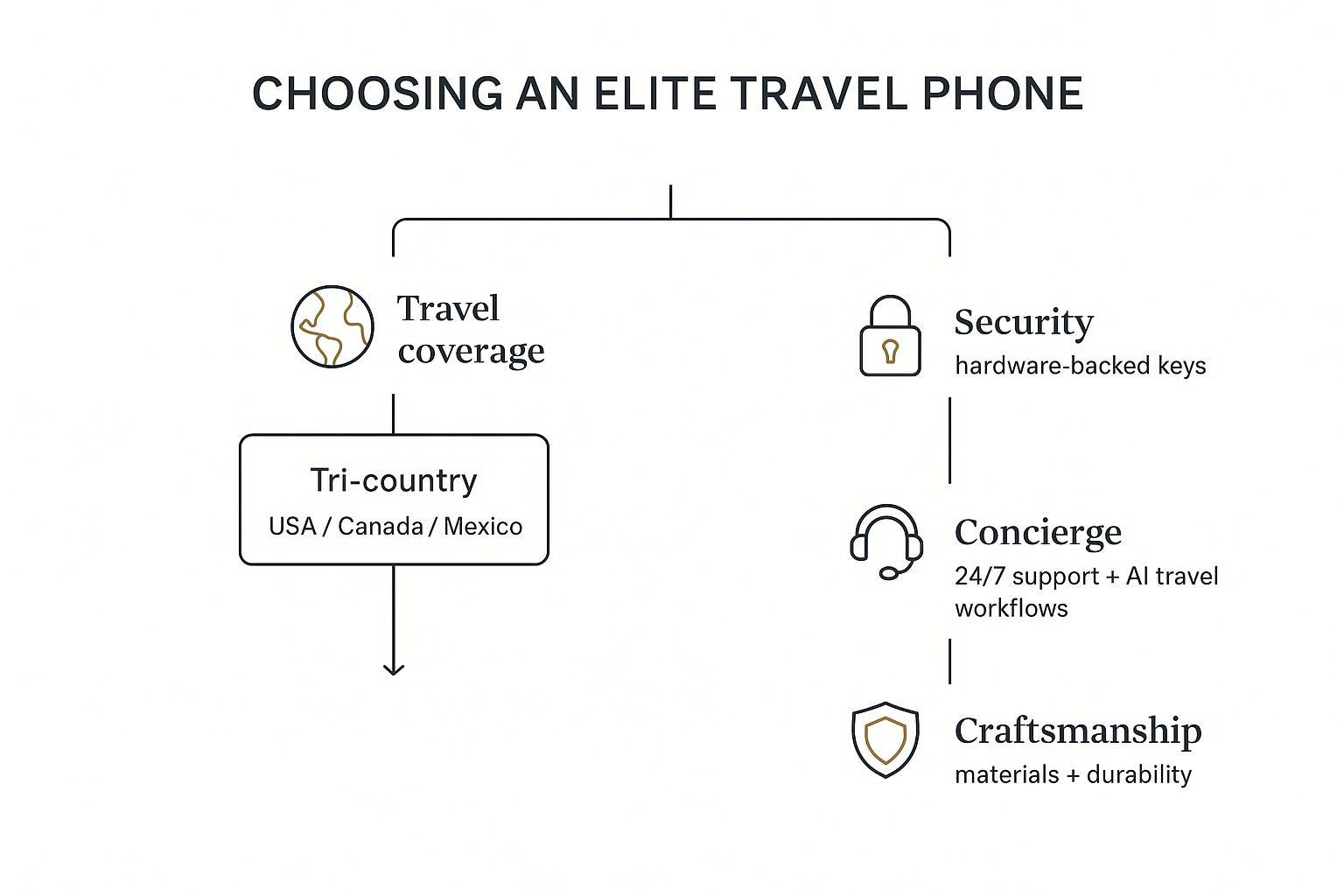
Decision pathway
A simple way to decide:
Start with travel coverage
If your phone can’t run your preferred dual-SIM/eSIM setup cleanly, stop.
Validate security and recovery
If the device can’t protect keys in hardware and your recovery plan depends on typing a seed phrase into a phone, stop.
Decide on concierge and AI boundaries
If you want help, insist on clear approvals and human escalation for sensitive requests.
Choose craftsmanship that matches use
Buy the materials you will actually hold confidently, not the ones you’re afraid to scratch.
Conclusion
Coverage, wallet security, concierge workflow, and craftsmanship define fit. Get those four right, and everything else becomes preference.
Next steps:
Verify tri‑country band/eSIM support and test the data line switch.
Run a small wallet “round trip” and confirm your recovery path.
Confirm concierge escalation paths and what happens when plans shift late.
Read warranty and service windows like you would read a contract.
Disclosure: This article references VERTU pages. Editorial judgment remains the priority.
![Top 10 Tourbillon Watches for Men [2026 Latest]](https://cdn.sanity.io/images/e0gp1l2g/production/8cb6bc45133cf9453382fc7d074465af588bb610-1800x1080.webp?w=180&h=180&q=78&auto=format&fit=crop)
![Top 10 Tourbillon Watches for Men [2026 Latest]](https://cdn.sanity.io/images/e0gp1l2g/production/8cb6bc45133cf9453382fc7d074465af588bb610-1800x1080.webp?w=800&h=450&q=82&auto=format&fit=crop)

![Top 10 Anniversary Gift Watches for Men [Full Guide]](https://cdn.sanity.io/images/e0gp1l2g/production/00dfa030a876edbe6ea7b146f6b1d8197c7656b0-3840x1860.webp?w=800&h=450&q=82&auto=format&fit=crop)