


Business risk rarely arrives as a dramatic breach headline. It arrives as a compromised executive mailbox, a credential replayed from a stolen device, or a “quick” travel setup that quietly drifts into a permanent shadow IT stack.
A smartphone with secure enclave for business is one of the few mobile security choices that changes the physics of that risk. It moves your most sensitive secrets (cryptographic keys, biometric gates, device identity) into hardware that’s designed to remain trustworthy even when the main operating system isn’t.
This guide focuses on what a secure enclave is, how it maps to Android equivalents, and how to verify the claims in a way IT and procurement can live with.
Key takeawaysA secure enclave (or its Android equivalents) matters because it keeps keys non-exportable, enables stronger device trust checks (attestation), and supports enterprise-grade controls. It does not make a phone untrackable, nor does it stop phishing.
What “secure enclave” means (and what it doesn’t)
On iPhone, “Secure Enclave” is Apple’s term for a dedicated secure subsystem designed to keep sensitive user data secure even if the application processor kernel is compromised, as described in Apple Platform Security’s “The Secure Enclave” documentation.
On Android, you’ll see parallel concepts:
- Hardware-backed Keystore in a TEEAndroid’s Keystore can delegate cryptographic operations to a Trusted Execution Environment, keeping raw key material in a secure context rather than normal app or OS memory. The architecture is described in Android Open Source Project documentation for the hardware-backed Keystore.
- StrongBox (secure element)a higher-assurance option on some devices, designed to be more resistant to remote compromise and physical attack than a general TEE.
What it doesn’t mean:
It doesn’t automatically make your apps safe. A compromised app can still trick users into approving actions.
It doesn’t remove metadata (who you called, when, where). Hardware-backed security protects keys and local secrets, not the existence of networks.
It doesn’t replace enterprise governance. Without patch policy, MDM, and offboarding discipline, the enclave becomes a well-locked door on a house with open windows.
How to choose a smartphone with secure enclave for business
A secure enclave smartphone isn’t a category you buy by “brand preference.” It’s a short list of verifiable controls.
1) Keys that are hard to steal
If an attacker can extract keys from software, they can impersonate users, decrypt stored data, or sign transactions from elsewhere.
With enclave-style designs, the goal is that key material stays non-exportable. Android’s model, for example, stores encrypted key blobs while keeping raw key material accessible only inside the secure environment that performs the cryptographic operations (per the Android Open Source Project Keystore documentation linked above).
2) Keys that are hard to misuse
For business, protection isn’t only “can you steal it?” It’s “can you use it without the right user intent?”
Hardware-backed keys can be bound to user authentication, so the device won’t perform sensitive crypto operations unless the user is actually present and authenticated.
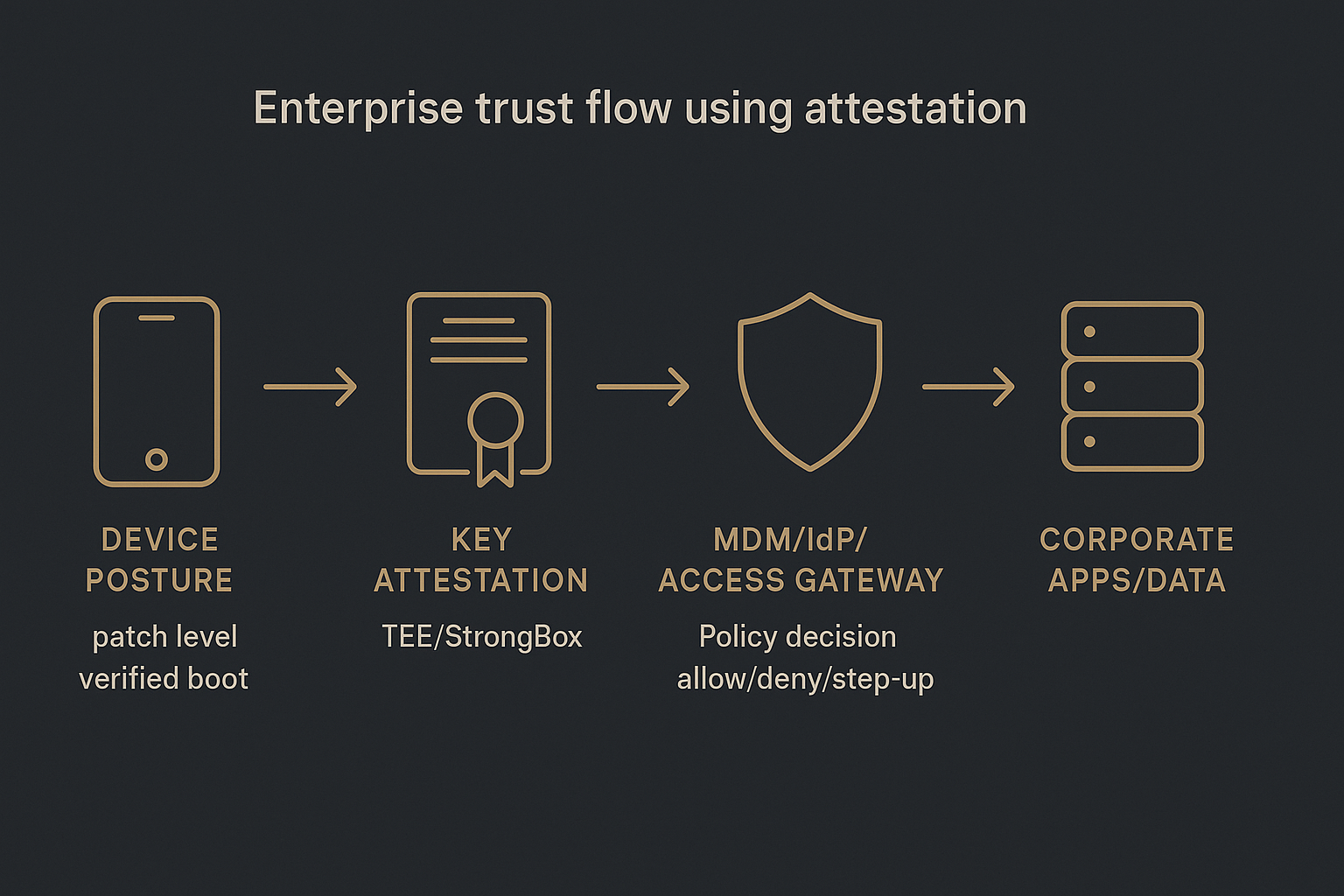
3) A path to verifiable device trust
Security teams care about what they can verify at scale.
Android supports hardware-backed key attestation that helps confirm keys are in a hardware-backed keystore and distinguishes TEE vs StrongBox via security-level fields, as explained in Android’s key attestation guidance.
Apple supports enterprise trust signals such as Managed Device Attestation, described in Apple’s deployment documentation for Managed Device Attestation.
Secure Enclave vs TEE vs StrongBox: a practical comparison
Think of this as three tiers of “where the keys live” and “what happens if the OS gets ugly.”
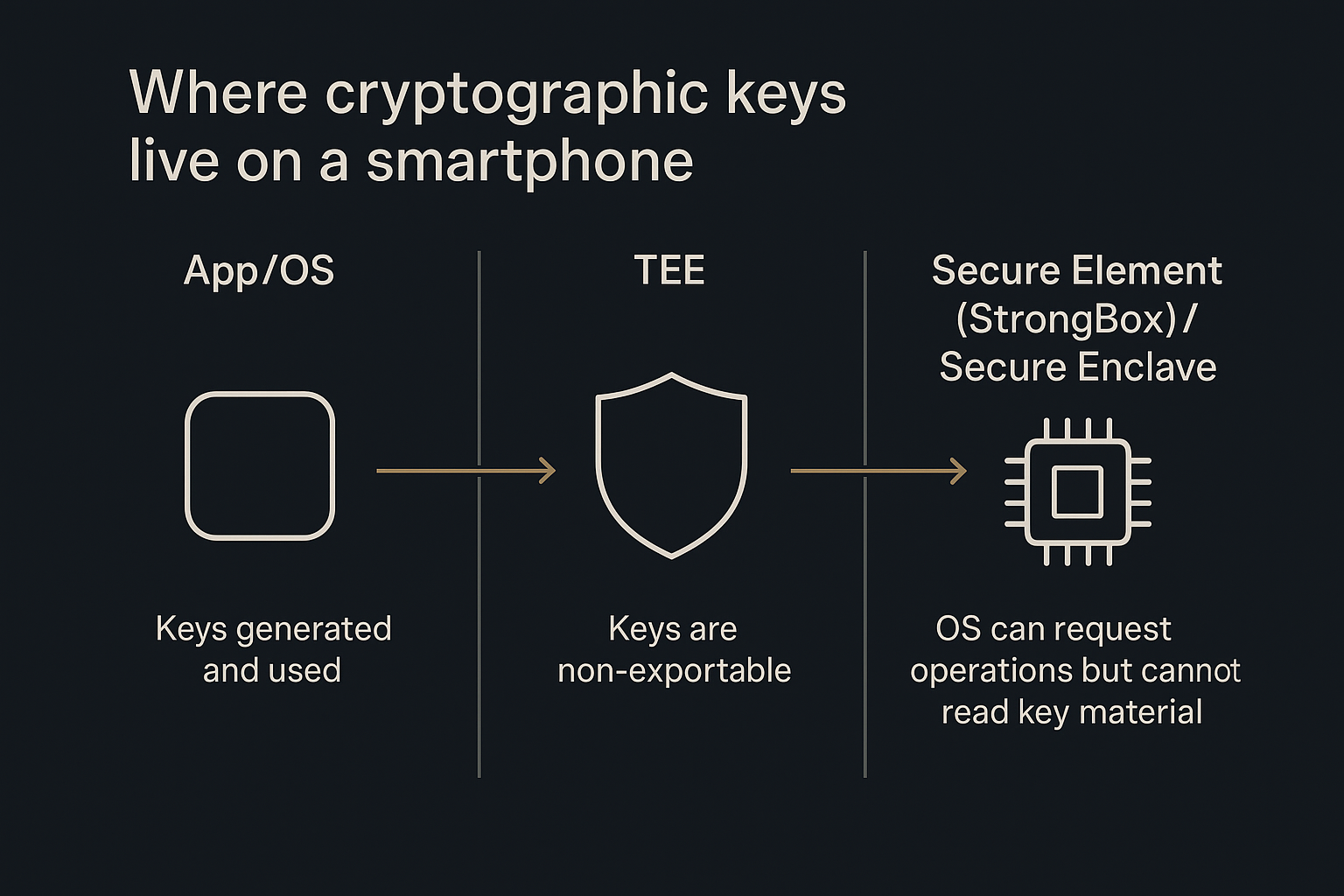
Apple Secure Enclave
Strong hardware isolation from the main processor.
Used for sensitive operations like biometric-related security and key protection.
Source: Apple Platform Security documentation (linked earlier in this article).
Android TEE-backed Keystore
Runs sensitive crypto and key handling in a Trusted Execution Environment.
The secure environment performs cryptographic operations and validates access control conditions before permitting use.
Source: Android Open Source Project Keystore documentation (linked earlier in this article).
Android StrongBox
Uses a dedicated security chip (secure element class) for key protection on supported devices.
StrongBox is a higher-assurance tier than a general TEE.
Collector’s note: In procurement, “secure enclave” is a helpful shorthand. But in technical review, you want the underlying assurance: what hardware is enforcing key use, and can you attest it?
The enterprise checklist: what to require (must-have vs nice-to-have)
Must-haves for business security
Hardware-backed key storage and operations
Evidence: platform documentation; for Android, confirm capability via key attestation flows.
Attestation support (device or key attestation)
Why: it turns “trust me” into “prove it.”
Secure boot / verified boot posture
Why: keys are less valuable if the device can be persistently tampered with.
Predictable security update policy
No enclave can compensate for a device that stops receiving critical patches.
Enterprise management (EMM/MDM) compatibility
Needed for configuration baselines, remote lock/wipe, and controlled access.
NIST frames enterprise mobile security as lifecycle management in NIST SP 800-124r2.
Nice-to-haves (depending on your threat model)
StrongBox-level hardware on Android for higher assurance.
Work/personal separation on BYOD.
Step-up user confirmation for high-risk actions (payments, signing, admin changes).
How to verify “secure enclave” claims before you buy
This is where most buyer’s guides fail. They tell you what to want, but not how to check.
Verify hardware backing (Android)
Require an app or enterprise service flow that uses key attestation.
Validate that the attestation chain is trustworthy and that the reported security level is what you expected (TEE vs StrongBox). Android’s key attestation guidance (linked earlier in this article) explicitly calls out checking the attestation security level and validating the challenge to reduce replay risk.
Verify separation (BYOD)
If you allow personally owned devices, insist on real separation between work and personal contexts.
Android’s Work Profile is designed for this model; see Android Enterprise Work Profile. In BYOD policies, you’ll often see this written explicitly as an Android Work Profile requirement so work data can be managed (and wiped) without touching personal data.
Verify management and offboarding
Confirm the device can be enrolled and governed through your EMM/MDM.
Confirm that corporate data can be wiped and access revoked without drama.
This “deployment, use, disposal” lifecycle framing is central to NIST’s enterprise guidance (linked earlier in this article).
Common misconceptions (the quiet ways teams get hurt)
“If it has an enclave, it’s secure.”
No. The enclave protects key material and sensitive operations. It doesn’t stop:
credential theft via phishing
risky cloud backup decisions
careless account recovery flows
users approving the wrong prompt
“An encrypted phone is untraceable.”
Even brands that prioritize privacy acknowledge the boundary. VERTU notes that phones can still be tracked via standard network methods, and frames the security goal as making communications and data difficult to intercept rather than making the device physically invisible, in its article Can VERTU phones be tracked?.
How to verify: Separate “can someone locate the device on a network?” from “can someone read your messages or extract your keys?” They are different problems.
Where VERTU fits (a discreet example, not a pitch)
For UHNW executives, the buying decision is rarely just about a chip. It’s about a complete operating posture: device integrity, communication hygiene, identity control, and travel mode.
VERTU frames this explicitly as an executive privacy stack rather than a single feature in Privacy phone for executives: what to buy and why.
If your environment includes high-stakes travel, sensitive negotiation, or multi-assistant workflows, that “stack” framing is often more useful than another spec sheet.
FAQ
What is a secure enclave on a smartphone?
A secure enclave is a hardware-isolated security subsystem designed to protect sensitive operations and secrets (like cryptographic keys) away from the main OS.
Is Android StrongBox the same as Secure Enclave?
Not exactly. StrongBox is Android’s higher-assurance option that stores keys in a dedicated security chip (secure element class), while a TEE-backed Keystore uses an isolated environment on the main SoC.
Does a secure enclave prevent hacking?
It reduces a specific class of risks (key extraction and misuse), but it doesn’t eliminate phishing, account takeover, or poor configuration. Business security still requires management, updates, and policy enforcement.
Do I need MDM if I buy a “secure enclave” phone?
If the phone accesses corporate systems, you typically need governance and lifecycle controls (deployment, use, disposal), as emphasized in NIST’s enterprise mobile guidance (linked earlier in this article).
Next steps
Turn this into a one-page procurement scorecard: must-haves, deal-breakers, and your required verification steps.
If you’re building an executive privacy posture (device + communications + identity + travel mode), start with a framework like VERTU’s and align it to your org’s MDM and access policies.
Disclosure: This article references VERTU pages. Editorial judgment remains the priority.


