

Introduction
Choosing the most secure luxury smartphone in 2026 is less about chasing buzzwords and more about buying a device—and an ownership model—that holds up under pressure: travel, lost luggage, urgent account recovery, and the quiet reality that other people may touch your phone (assistant, driver, family, security).
In 2026, “most secure” should mean three things at once:
A modern security baseline you can verify (hardware-backed protection, credible updates, defensible identity controls).
Luxury without operational compromise (materials that don’t sabotage connectivity; service that doesn’t create new privacy risks).
A setup and support path that makes secure behavior the default, not a hobby.
Craftsmanship, concierge, and personalization still matter—especially at this level—but they should sit on top of the baseline, not replace it.
This guide gives you clear criteria, top picks, a buyer framework, and day-one setup steps—so you can choose confidently without turning your phone into a second job.
2026 Security Baseline
Hardware root of trust
A serious 2026 security posture starts before the operating system loads.
A hardware root of trust is the device’s “first truth”—a hardware-anchored chain that verifies the boot process and protects secrets (device keys, biometrics, passkeys) from extraction.
On mainstream flagships, this typically shows up as a dedicated security subsystem:
Apple describes a dedicated secure subsystem designed to stay isolated from the main processor in Apple Platform Security — The Secure Enclave.
Samsung documents Knox Vault as an isolated security subsystem in Samsung Knox Vault technical documentation.
Android’s hardware security architecture includes dedicated chips such as Titan M, described in Android’s Titan M hardware security documentation.
What to look for as a buyer:
Hardware-backed key storage (not “software-only” claims)
Verified boot chain language and documentation
Clear separation between sensitive secrets and the main OS/apps
Key TakeawayIf a “secure luxury phone” can’t clearly explain its hardware trust model and update pipeline, treat security claims as marketing, not engineering.
OS and firmware hardening
In 2026, most successful attacks aren’t cinematic—they’re practical: phishing, malicious profiles, sideloaded apps, and outdated firmware.
Your baseline should include:
Secure boot + code signing so only trusted components load (Apple outlines this security model in Apple Platform Security — Hardware security overview).
Strong app isolation (sandboxing, permissions discipline, and least privilege).
A proven patch pipeline—not just “we update,” but a credible history of security patches.
Firmware hardening matters because the firmware layer can persist beneath the apps you can see. The most secure luxury smartphone is the one that stays current after the purchase—especially when vulnerabilities inevitably appear.
Communications and identity protection
A secure device can still fail you if identity and communications are fragile.
In practice, your baseline should emphasize:
Strong device lock (long passcode, not just biometrics)
Hardware-backed encryption at rest
Account recovery that doesn’t depend on SMS
End-to-end encrypted communications for high-sensitivity threads
VERTU’s executive-focused framework underscores a hard truth: account recovery, carrier posture, and rushed decisions can dominate real-world risk even when the phone itself is strong—see VERTU’s executive secure-phone buyer framework.
Luxury Without Compromise
Materials, build, and RF performance
Luxury materials can be a strength—when they’re engineered with signal integrity in mind.
If you travel frequently (and you do), the best secure luxury smartphone is the one that maintains reliable RF performance across:
multi-band 5G/LTE
eSIM + physical SIM scenarios
dense urban environments and high-rise interiors
A simple rule: if a device’s luxury construction compromises antenna design, you’ll feel it at the exact moment you need reliability—border crossings, secure calls, time-critical approvals.
Concierge, compliance, and audits
At the top end of the market, “security” also means how the service layer behaves.
Concierge can be an advantage if it reduces rushed decision-making—but it can also be a risk if requests are handled casually.
When evaluating concierge-linked devices and services, verify:
identity verification standards for sensitive requests
how sensitive itineraries and documents are handled
retention/deletion expectations for chat histories or requests
VERTU’s buyer guidance frames concierge ownership as service-first, with discretion as a defining requirement—see How to Choose the Best Encrypted Phone with 24/7 Butler Concierge.
Update runway and zero‑day response
Security isn’t a feature; it’s a relationship over time.
Before you buy, ask one unglamorous question: What is the update runway?
How long are security updates supported?
How quickly does the vendor patch critical issues?
What happens if you lose the device while traveling?
Luxury buyers often focus on craftsmanship and provenance. Apply the same mindset to software support: predictable, documented, and responsive.
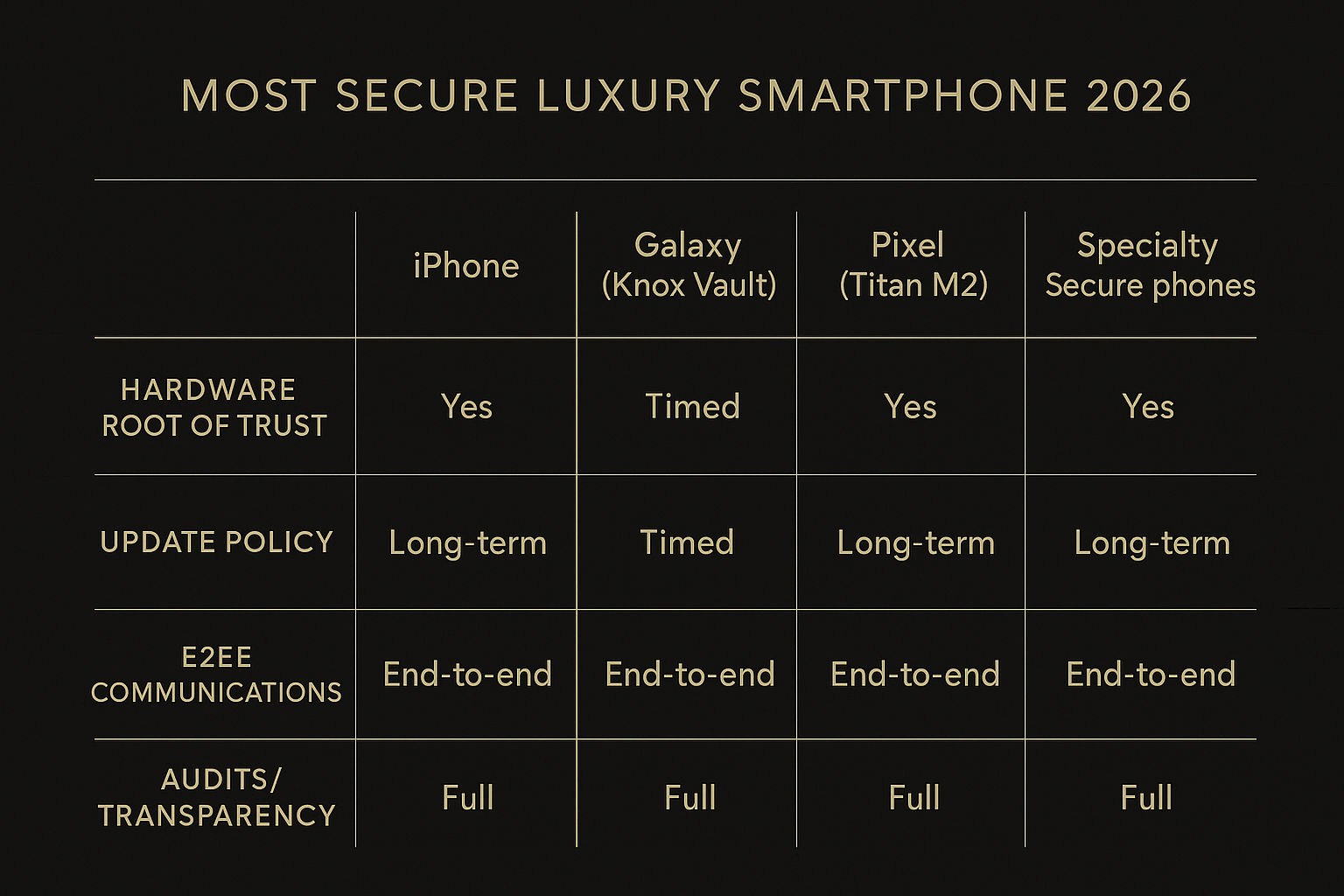
2026 Most Secure Luxury Smartphone Picks: Comparison
Key TakeawayFor most buyers, iPhone, Galaxy, and Pixel are the practical security baselines. Specialty options only win when your threat model justifies their tradeoffs—and you can verify updates.
Apple iPhone security highlights
Why iPhone remains a baseline in security conversations:
A well-documented platform security model, including a dedicated secure subsystem described in Apple Platform Security — The Secure Enclave.
Tight hardware–software integration, described in Apple Platform Security — Hardware security overview.
Best fit when:
you prioritize predictable updates and ecosystem maturity
you want a security posture that’s easy to standardize across staff/family
Tradeoffs to consider:
your security posture still depends on account recovery hygiene (especially carrier/SMS fallback)
Samsung Galaxy and Knox Vault
Samsung’s flagship security story is anchored in Knox, with Knox Vault positioned as a hardware-backed protection layer for sensitive secrets—see Samsung Knox Vault technical documentation.
Best fit when:
you want a mainstream Android experience with strong enterprise-grade security tooling
you need flexible device management options for staff devices
Tradeoffs to consider:
security posture varies by model and configuration; you need to verify the exact device and update commitment
Google Pixel (Titan M2) and specialty options
Pixel appeals to security-minded buyers because of its dedicated hardware security layer in the Titan family, described in Android’s Titan M hardware security documentation.
Best fit when:
you value timely security updates and a security-forward Android stack
you’re building a tighter “security baseline” for an Android fleet
Specialty secure phones can be compelling for certain threat models, but treat them as verify-first purchases:
Do they have a credible patch pipeline?
Is their hardening documented?
Are they usable day-to-day without forcing you into unsafe workarounds?
Buyer Framework & Checklist
Evaluation criteria that matter in 2026
Use these criteria to keep the decision grounded:
- Hardware trust modeldocumented secure enclave/vault/chip + verified boot story
- Update runwayduration and real-world patch speed
- Identity hardeningpasskeys/security keys, recovery discipline, admin controls
- Comms postureE2EE options for high-sensitivity conversations
- Isolationability to separate roles/contexts (principal vs staff vs family)
- Operational supportwhat happens during travel, loss, or urgent resets
- Luxury executionmaterials and RF reliability, not materials alone
How to verifyAsk for the vendor’s security documentation (not a brochure), then confirm the exact model’s update commitment before you buy.
Decision matrix by profile (principal, staff, family office)
Principal (primary target)
Prioritize: low-friction security, predictable updates, account recovery discipline, travel resilience.
Best pattern: choose a mainstream secure baseline, then add luxury through materials/service without compromising updates.
Staff / executive assistant
Prioritize: manageability, role separation, rapid reset capability.
Best pattern: standardized devices, enforced passcodes, minimal app footprint.
Family office / security lead
Prioritize: fleet policy, incident response, and cross-border preparedness.
Best pattern: documented controls, repeatable onboarding checklist, carrier protections.
Red flags to avoid
“Unhackable” or absolute promises
No clear update policy
Security that still relies on SMS recovery for critical accounts
A “secure” device that requires constant manual tweaking to stay safe
Luxury construction that quietly undermines signal reliability
White‑Glove Setup & Operations
Day‑one hardening and device migration
Treat day one like a controlled handover, not a casual setup.
Set a long passcode first; enable biometrics second.
Update OS and firmware immediately.
Reduce app surface area: install only what you need for the next 30 days.
Migrate accounts deliberately (email, banking, messaging) and remove legacy sessions.
For UHNW buyers, the most overlooked risk is not the phone—it’s the transition (old devices still logged in, assistants sharing credentials, rushed travel swaps). A concierge-driven onboarding can reduce those failure modes by turning setup into a repeatable checklist rather than improvisation.
This is where VERTU fits naturally: pairing high-touch ownership with concierge-driven security onboarding and discreet global support, especially when travel, device loss, or urgent resets would otherwise force hurried choices.
For a service-first view of secure ownership, see VERTU’s guide to 24/7 concierge phone ownership.
Secure communications stack
Build a small, intentional stack:
One primary E2EE messenger for high-sensitivity threads
A separate channel for staff coordination (where you can enforce boundaries)
A secure method for sharing 2FA codes and passkeys (avoid screenshots and SMS)
Pro TipDecide which conversations never belong in email or SMS (banking changes, travel docs, identity documents), then enforce that rule as a household/team standard.
Travel, eSIMs, and account protections
Travel multiplies risk: unfamiliar networks, urgent itineraries, and more reliance on your number.
Lock down your carrier account (PIN, port-out protection, high-assurance verification).
Treat eSIM changes as a “sensitive operation,” not a convenience.
Use passkeys or authenticator-based recovery where possible; reduce SMS fallback.
Maintain a travel posture: minimal apps, minimal permissions, minimal exposure.
If you regularly travel with staff support, pre-define what staff can and cannot do on your behalf (SIM swaps, account recovery, device resets). That boundary prevents “helpful” actions from becoming irreversible compromises.
Conclusion
The most secure luxury smartphone in 2026 is the one that combines:
hardware-backed trust you can verify
an update runway you can rely on
communications and identity controls that don’t collapse under travel pressure
luxury that improves ownership without weakening the baseline
Your next step: use the checklist to shortlist two mainstream baselines and one specialty option, then judge them on update policy, account recovery posture, and operational support—not marketing claims.
Over the lifecycle, security is maintained through discipline: timely updates, hardened recovery, and clear rules for how staff and family interact with the device.
Disclosure: This article references VERTU pages. Editorial judgment remains the priority.


