


Introduction
Editorial & disclosure notes
- Contact for correctionssecurity-content@vertu.com
- DisclosureThis guide references VERTU pages as additional reading. It is not sponsored content, and recommendations are based on the security capabilities described in publicly available vendor documentation.
- Update policyThis page is reviewed periodically. Material changes (attestation, key management, support windows) will be reflected in the last_updated field at the top of the page.
This guide is for US IT and security leaders who have to approve phones the way they approve laptops: with a threat model, enforceable controls, and a predictable support window.
In 2026, “a smartphone with secure enclave for business” means two things in practice:
High-value keys can be generated and used inside a hardware-isolated boundary, not just stored “securely” by the OS.
The phone can prove meaningful properties about itself through attestation so you can gate access, issue certificates, and enforce policy.
Use this guide in four passes: compare implementations, assess assurance, shortlist models, then deploy with controls.
Key TakeawayEnterprise phone assurance is hardware-backed keys plus attestation you can verify and operationalize.
Core concepts, clear terms
Secure enclave vs. TEE
A TEE (Trusted Execution Environment) is the general concept: a protected execution mode that can run a small amount of trusted code and handle secrets more safely than the normal OS. TEEs are useful, but they vary by vendor and device.
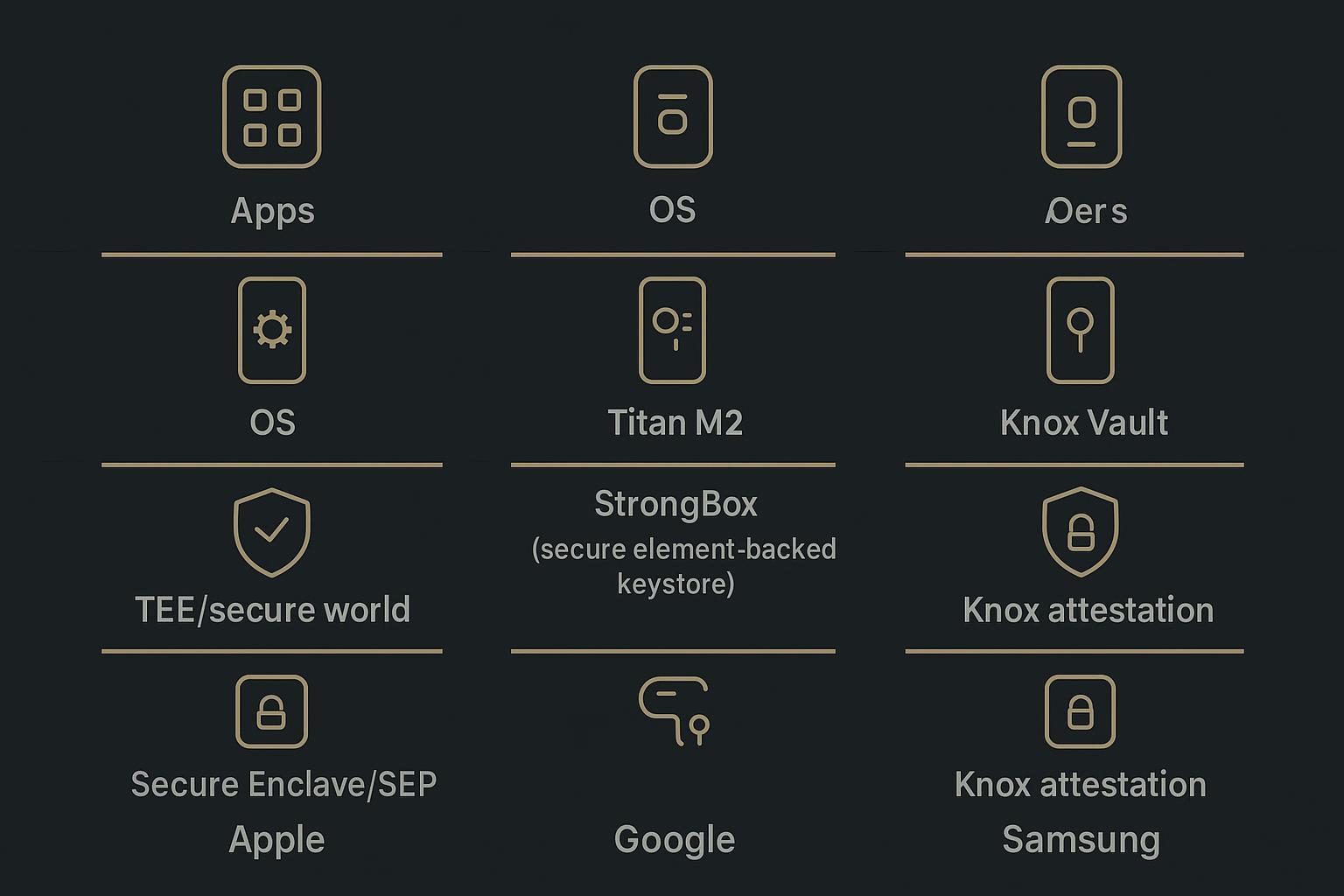
A secure enclave typically refers to a more tightly scoped security subsystem with a smaller trust boundary. On iPhone, that’s the Secure Enclave, which Apple describes as isolated from the main processor and designed to keep sensitive data secure even if the main OS kernel is compromised (Apple’s Secure Enclave overview).
For buyers, the question isn’t the marketing term. It’s: where do your identity keys live, and what still holds if the main OS is compromised?
Secure element and StrongBox
A secure element is generally a discrete, tamper-resistant component designed to store and use secrets.
On Android, StrongBox is Google’s higher-assurance keystore implementation. Android documents StrongBox KeyMint as dedicated secure hardware for key generation and storage, with its own CPU and secure storage, intended for high-value keys (Android Keystore and StrongBox (2026)).
If you’re trying to make sign-in and approvals phishing-resistant, StrongBox support is not a nice-to-have. It’s the clearest Android signal that your private keys aren’t living in general OS memory.
Threat model and trust roots
Before you compare phones, decide what you’re defending against:
Remote account takeover (phishing and session theft)
Endpoint compromise (malware, sideloading, privilege escalation)
Physical loss and coercion
Supply-chain and firmware tampering
Then map the trust roots you will depend on:
Hardware root of trust (boot integrity)
Key origin (where keys are generated, whether they’re exportable)
Attestation (what can be cryptographically proven, and to whom)
How to verifyAsk each platform what their attestation is rooted in, how replay is prevented (nonce), and which properties are cryptographically asserted versus merely “reported.”
Validation method (how to verify in procurement)
Use this section as a practical method you can run in a pilot on the exact SKU(s) you plan to purchase.
Confirm hardware-backed key storage
iOS: verify key material is Secure Enclave–backed via platform documentation and MDM-managed configurations where applicable.
Android: verify StrongBox availability and that keys are generated in StrongBox (not only TEE).
Validate attestation end-to-end (not just “supported”)
Ensure your backend/IdP/ZTNA can validate platform attestation.
Require a fresh nonce challenge from your service to reduce replay risk.
Operational checks
Confirm update/support policy for the model/SKU and carrier.
Confirm MDM enrollment flows (ADE/Android Enterprise) and compliance signals you rely on.
Note: Android capabilities (including StrongBox availability) can vary by OEM, region, and SKU. Always validate on the exact model number you will deploy.
2026 implementations compared
Apple SEP and Managed Device Attestation
On iPhone, the Secure Enclave is the anchor for hardware-backed key operations.
For enterprises, the differentiator is whether you can turn that hardware boundary into a repeatable trust decision. Apple’s Managed Device Attestation is designed to provide a cryptographic declaration of device properties for trust evaluation (Managed Device Attestation (Apple Deployment)).
In practical terms, Managed Device Attestation helps you:
Validate that a device is genuine and managed.
Use attestation as an input to conditional access.
Reduce reliance on posture signals that can be spoofed by a compromised OS.
Google Titan M2, StrongBox, and RKP
On Pixel-class Android, you’re evaluating a stack: Android’s keystore APIs, the device’s dedicated security hardware (such as Titan M2 on Pixel), and the attestation plumbing that proves key origin.
The minimum enterprise primitives to validate:
Keys are generated and used through Android Keystore, and the device supports StrongBox where required.
Your backend can validate key/device attestation and consume those signals in policy.
For the attestation side, the Android Open Source Project explains how Keystore attestation works and why StrongBox is a distinct, higher-assurance signal (AOSP: Key attestation (2026)).
In 2026, pay attention to Remote Key Provisioning (RKP) support and requirements, because it affects how some attestation keys are provisioned and managed at scale. Procurement implication: modern Android attestation is increasingly lifecycle-managed, which matters once you standardize fleets.
Procurement note: StrongBox is not universal across Android OEMs and SKUs. If your policy depends on it, validate on the exact model, not the family name.
Samsung Knox Vault and Attestation
Samsung’s enterprise story is unusually explicit about isolation.
Knox Vault is documented as an isolated, tamper-proof subsystem with its own processor and memory, running independently from the main processor that runs Android (Samsung Knox Vault architecture).
For assurance, Samsung provides Knox Enhanced Attestation (v3) for device integrity verification, including checks such as root status and unofficial firmware (Knox Enhanced Attestation (v3)).
If you run mixed Android fleets, Samsung often wins on operational clarity: an enterprise control plane plus well-documented attestation hooks.
Business value and use cases
Phishing-resistant sign-in (passkeys)
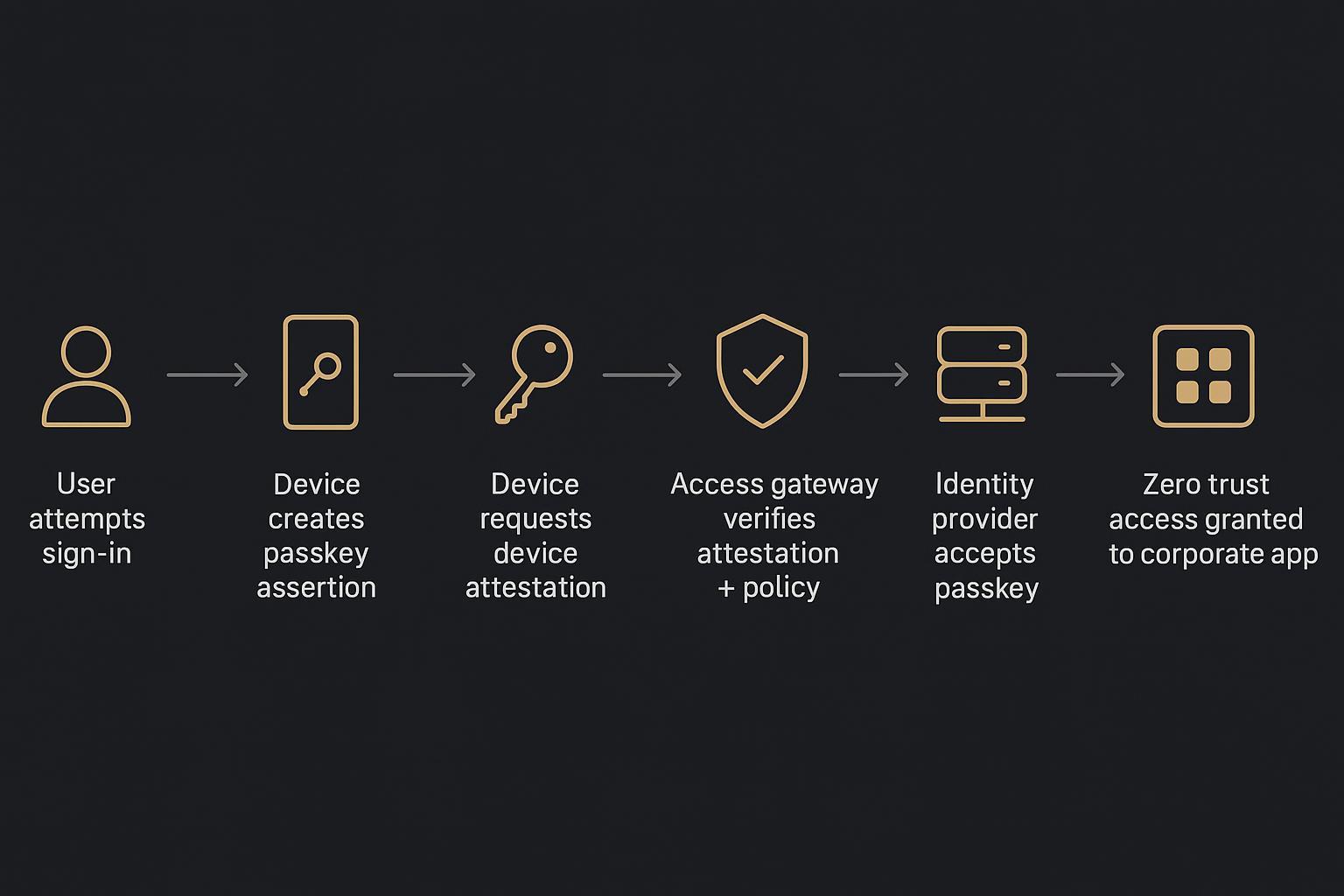
Passkeys matter because they change the dominant failure mode from “user typed the secret into the wrong page” to “user approved a cryptographic challenge on a real device for the real origin.”
The FIDO Alliance describes passkeys as FIDO credentials that let users sign in to apps and sites with the same type of gesture they use to unlock their device (FIDO Alliance: Passkeys). The relying party validates a signature from the private key, while the private key stays on the authenticator.
Hardware backing raises the bar again. If the passkey’s private key is generated and used inside a Secure Enclave / StrongBox / Knox Vault class boundary, extraction becomes materially harder even under partial device compromise.
Device attestation for zero trust
Zero trust is only as strong as its signals.
Device attestation gives you a cryptographic way to answer: “Is this a genuine device, in an expected state, holding keys inside the expected hardware boundary?” That matters for:
Issuing device certificates
Binding approvals to managed devices
Gating access to sensitive apps
A pragmatic 2026 pattern:
Require attestation for initial enrollment and certificate issuance.
Re-check on risk events (device out of compliance, update lag, root/jailbreak signals).
Use “step-up” controls for high-risk actions (re-auth, stronger device checks).
Regulated workflows and COPE/BYOD
Most organizations end up with both:
COPE (company-owned, personally enabled) for roles that handle regulated data or high-value approvals.
BYOD for roles where you need access, but you can’t justify full device control.
Hardware-backed security helps in both cases, but the governance goal differs:
In COPE, you need enforcement and reliable recovery.
In BYOD, you need blast-radius reduction without turning IT into surveillance.
The buyer insight: don’t choose a phone first and retrofit policy. Choose a policy model (identity, keys, attestation, wipe boundaries), then pick models that can support it cleanly.
Risks, gaps, and rollout controls
Fragmentation and attestation quality
On paper, many phones “support hardware-backed security.” In practice, assurance depends on:
Whether keys are StrongBox/secure-element-backed or only TEE-backed
Whether attestation is available, stable, and verifiable by your backend
Whether the security update pipeline is predictable
The control here is boring and effective: validate attestation in a pilot on the exact SKUs you’ll buy.
Updates, support windows, and TCO
Hardware isolation reduces the blast radius of some attacks. It doesn’t replace patching.
Two expensive mistakes:
A model that drifts out of policy because updates arrive too slowly
A fleet mix that forces too many exceptions (and exception handling becomes the real risk)
Treat update cadence and support policy as procurement requirements, not IT preferences.
Key recovery, escrow, and policy
If your phone is an authenticator, you need recovery that doesn’t quietly reintroduce the password problem.
Define up front:
What can be recovered, and under what approvals
Whether synced passkeys are allowed, and where device-bound keys are mandatory
How you handle travel risk (temporary restrictions, expedited replacement, step-up auth)
How to verifyRun one tabletop exercise: lost device + urgent access + remote travel. If your policy answer is “we’ll figure it out,” your real policy is downtime.
Buyer’s checklist and 2026 picks
Selection criteria that matter
Use this as a short checklist that security, IT ops, and procurement can all sign:
- Hardware-backed keysConfirm where keys are generated and stored (Secure Enclave / StrongBox / Knox Vault class isolation).
- Attestation you can consumeVerify your IdP, ZTNA, or access gateway can validate the platform’s attestation and use it in policy.
- Phishing-resistant authConfirm passkey support end-to-end (user gesture, policy enforcement, recovery).
- Lifecycle claritySecurity updates, OS support, and fleet management posture.
- MDM fitEnrollment, compliance signals, and clear COPE/BYOD boundaries.
Standardize and enroll at scale
Standardization is a security control. Pick the smallest set of models that covers your carriers and form factors, then make everything else an exception.
Operationally, the “enterprise standard” pattern is:
Enroll at activation where possible
Make attestation a prerequisite for certificates and sensitive app access
Treat update lag as a policy violation with clear remediation
If you want a plain-language resource for executive stakeholders, see: enterprise-grade privacy phone criteria (VERTU).
Shortlist approach (models depend on your verified SKU)
Rather than treating any specific 2026 model name as universally “approved,” standardize on capabilities you can verify on the exact SKU(s) you purchase. A practical shortlist in many enterprises tends to include:
- iPhone (current generation)strong single-vendor hardware/software trust chain plus Managed Device Attestation workflows.
- Google Pixel (current generation)first-party Android security posture signals and modern Android attestation primitives.
- Samsung Galaxy (current generation)Knox Vault isolation and mature enterprise attestation/control-plane options.
Procurement note: Always validate the exact model number/region/SKU in a pilot—especially on Android where StrongBox availability and enterprise features can vary.
Evidence checklist (copy/paste for pilots)
What to verify | Why it matters | How to verify (practical) | Primary references |
|---|---|---|---|
Hardware-backed key origin | Prevents key extraction under partial OS compromise | Confirm keys are generated in Secure Enclave / StrongBox / Knox Vault class hardware; validate per-model/SKU | Apple Secure Enclave; Android Keystore/StrongBox; Samsung Knox Vault |
Attestation can be validated by your systems | Lets you gate enrollment/access with cryptographic device properties | Implement a server-side attestation verification flow; require fresh nonce per request | Apple Managed Device Attestation; AOSP Keystore attestation; Knox Enhanced Attestation v3 |
Replay protection via nonce | Reduces risk of reusing old attestation tokens | Server issues nonce; reject stale timestamps; bind nonce to session/request | Platform attestation docs (above) |
Update/support window clarity | Reduces exception drift and long-term risk | Verify vendor and carrier support policies for the exact SKU and region | Vendor enterprise/deployment docs |
MDM enrollment and compliance signals | Makes controls enforceable at scale | Pilot in your MDM; confirm device state signals used by conditional access | MDM vendor docs + platform deployment guides |
References used in this guide are linked inline in the relevant sections.
Conclusion
Require three things across every approved model: hardware-backed keys, verifiable attestation, and a predictable support window. If any one is weak, your real control surface becomes exceptions.
Next steps:
Pilot 2–3 models with your MDM + IdP/ZTNA stack.
Verify attestation validation end-to-end, including replay protection via nonce handling.
Finalize the approved-model list, then enforce it with enrollment-at-activation and conditional access.
Keep policies current. In 2026, attestation roots and update cadences can change faster than procurement cycles.
Disclosure: This article references VERTU pages. Editorial judgment remains the priority.


