
Introduction
Mobile ERP used to mean “make the dashboard responsive.” In 2026, it means something tighter: the same page must stay fast, readable, and quotable (by AI answer engines) as the screen physically changes shape.
This playbook is a decision-stage guide for teams that need to ship mobile ERP experiences on foldables without taking SEO, Core Web Vitals, or measurement credibility on faith.
What you will learn and why it matters in 2026
How AI Overviews and AI Mode change what “winning” looks like: being cited, not just ranking.
How to prove E‑E‑A‑T with evidence you can ship (not claims you hope Google infers).
How foldable posture and hinge zones create new technical SEO and performance failure modes.
How to measure the work in a way that survives stakeholder scrutiny.
Who this is for and expected outcomes
SEO leads who need a technical spec they can hand to engineering.
Product and engineering teams shipping mobile ERP on foldables (web-first, app-first, or hybrid).
RevOps / analytics teams who need pipeline attribution that isn’t hand-wavy.
Expected outcomes:
A keyword and intent map that aligns SEO to pipeline.
A foldable-first technical checklist that protects CWV during posture changes.
A content format that is easier for AI systems to cite.
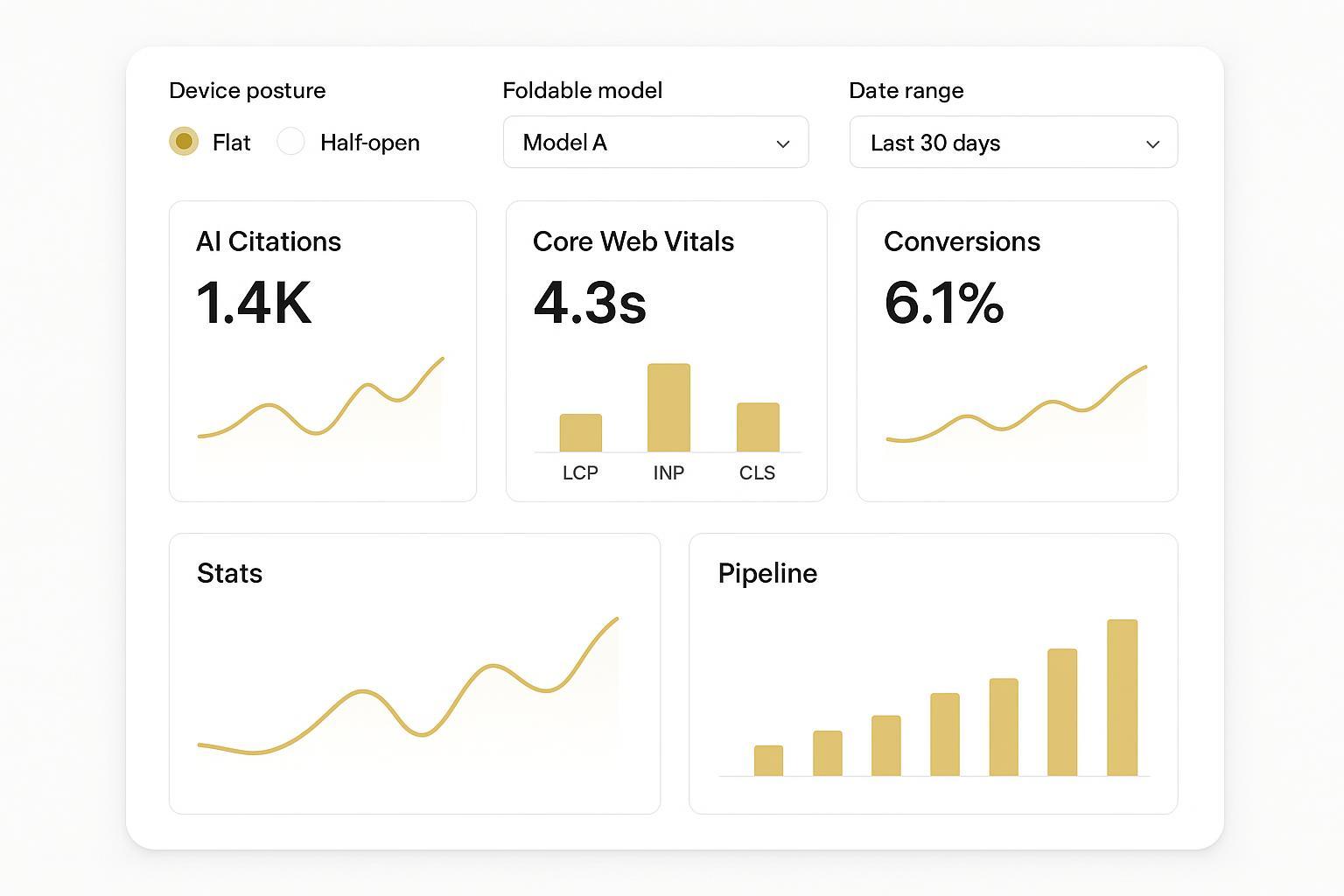
A KPI dashboard you can review weekly without argument.
How to use this playbook and measure results
Treat each H2 as a workstream you can assign to an owner.
Run it as a 30–60 day sprint: baseline → changes → validation → rollout.
Measure two things in parallel: visibility in AI answers and business outcomes.
Key TakeawayIf your mobile ERP experience breaks when the device folds, you don’t just lose conversions. You also lose the clean, stable “answer units” that AI systems prefer to quote.
Search realities 2026
AI Overviews basics
AI Overviews compress the search journey. The user’s first interaction is no longer your title tag; it’s a synthesized answer that may cite you, paraphrase you, or replace you.
Two implications matter for mobile ERP content:
Citation beats position. Ranking well but not being cited is increasingly hollow.
Answer units win. AI systems favor pages that contain clean, extractable blocks: direct answers, definitions, and clearly bounded sections.
If you’re planning for 2026, treat AI visibility as a first-class metric, not a nice-to-have. Recent industry analysis notes that Preferred Sources is now appearing inside AI Overviews and AI Mode, turning audience loyalty into a visibility signal in AI answers (Digital Applied’s Preferred Sources playbook (2026)).
E-E-A-T you can prove
“E‑E‑A‑T” is not a checklist you paste into an author bio. For decision-stage ERP searches, it’s closer to a procurement mindset: Can I trust this page enough to base a system decision on it?
Proof you can actually ship:
- Experiencescreenshots of real foldable states, test protocols, and what you observed when posture changes.
- Expertisecorrect use of platform terms (posture, segments, hinges) and accurate implementation guidance.
- Authoritativenesscitations to primary documentation, not summary blogs.
- Trustclear measurement definitions and honest limits.
A practical rule: every major recommendation should include a “how to verify” sentence. If you can’t verify it, you’re describing a preference, not an engineering requirement.
Structured data priorities
Structured data will not save weak content. But it does reduce ambiguity for machines, and ambiguity is expensive in AI search.
For an ERP SEO playbook, prioritize:
Article schema to reinforce canonical page identity.
Organization schema to connect content to a real entity.
FAQPage where you can answer real implementation questions with short, complete responses.
Keep it disciplined:
Mark up only content that exists on the page.
Avoid stuffing every possible schema type.
Treat schema as a contract: if your FAQ answers are vague, you are training machines to ignore you.
Keyword and intent map
Demand capture (BOFU)
Decision-stage “mobile ERP” searches cluster around:
rollout risk (“will it break”, “how to test”, “what KPIs prove it works”)
performance proof (“CWV impact”, “INP on mobile”, “CLS regressions”)
governance (“security posture”, “support model”, “SLA expectations”)
Your BOFU content should behave like a vendor evaluation doc, even if you’re not selling software. It should help the reader make a decision with confidence.
Demand creation (TOFU/MOFU)
TOFU and MOFU content still matters in 2026, but it has changed jobs.
Instead of “educating about foldables,” use TOFU/MOFU to:
define the new failure modes (hinge zones, segments, posture-driven layout shifts)
build familiarity with your terminology
seed the evaluation criteria you’ll later use in BOFU pages
If you only publish BOFU content, you will win a few late-stage searches and lose the larger battle for being considered “a trusted source.”
mobile ERP on foldable display
Use the phrase naturally, but don’t treat it as a single keyword. It’s a composite intent:
- mobile ERPthe reader expects secure flows, role-based access, approvals, and dashboards.
- foldable displaythe reader expects dual-pane layouts, continuity across postures, and no hinge-related UX regressions.
A simple intent map for this keyword:
“What should change when the device folds?” → foldable-first technical SEO
“How do we avoid performance regressions?” → CWV under posture changes
“How do we stay visible in AI answers?” → answer-first content + structured data + measurement
Foldable-first technical SEO
Web: posture APIs and CSS
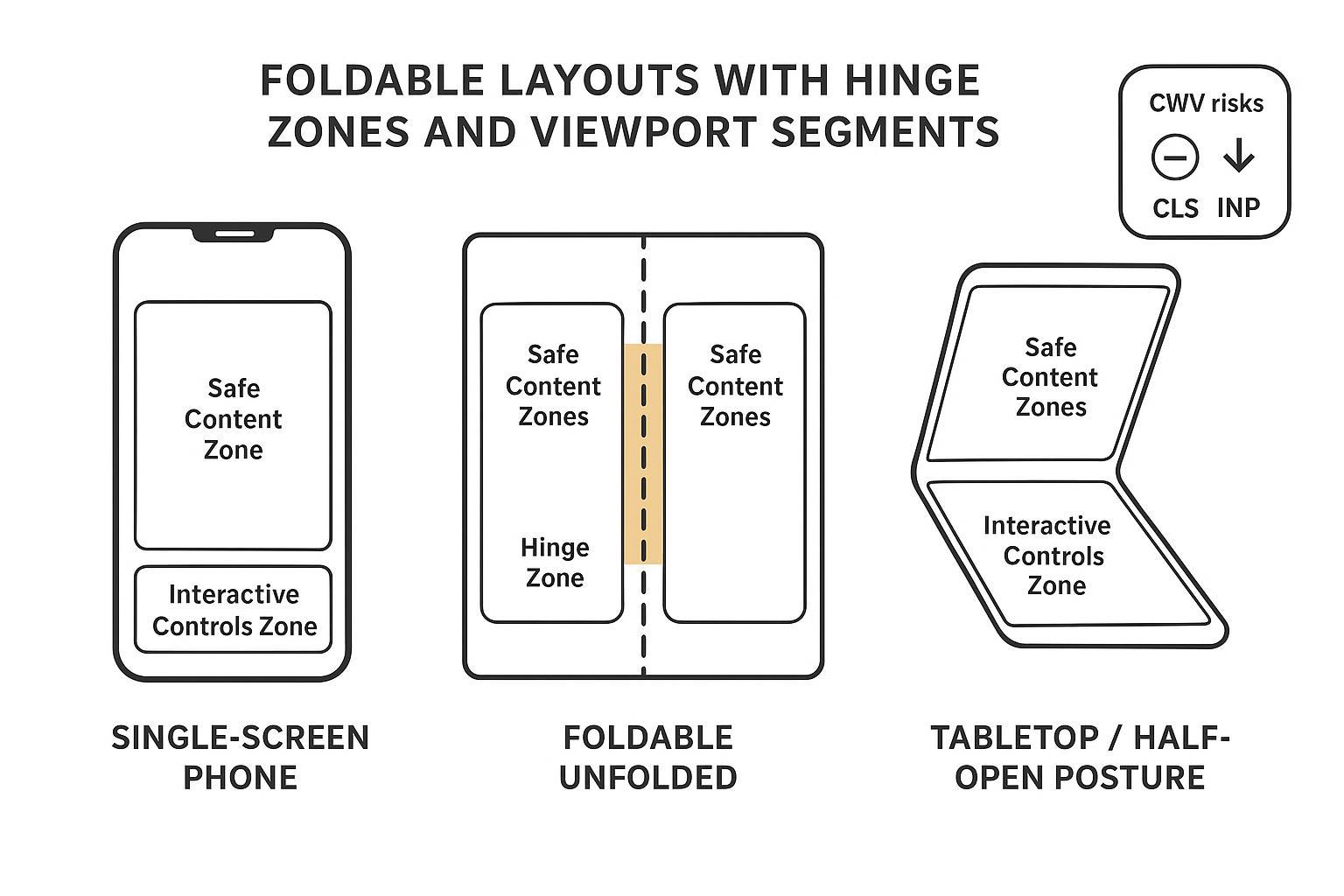
Foldables introduce a physical constraint: the screen is not a single, flat rectangle in every state. If you design as if it is, you create content that is visually awkward, hard to tap, and performance-unstable.
Start with two principles from the foldable standards work:
Don’t place controls or critical content across the fold/hinge area.
Don’t assume users will stay in one posture.
The Device Posture API defines a device-posture media feature so you can adapt layout when the device is folded.
Pair it with the Viewport Segments API when the viewport is split into logical regions by a fold or hinge.
Practical guidance for ERP UIs:
Keep the primary “decision actions” (approve, reject, submit) out of the hinge zone.
Use segments to create predictable panes: list on one side, detail on the other.
Avoid spanning dense tables across a fold; it looks “broken” even when it technically fits.
CWV under posture changes
Foldables can make CWV worse in new ways because posture changes are real-time layout events.
What to protect:
- CLS (layout stability)posture/segment changes can cause reflow, especially if the layout swaps from single-column to dual-pane.
- INP (interaction responsiveness)controls near hinge zones can cause mis-taps, retries, and longer interaction chains.
- LCP (perceived load)if the “largest element” changes with posture (hero card, chart, table), LCP becomes noisy and harder to optimize.
Foldable-specific CWV discipline:
Treat posture change as a “mini navigation.” Test it like one.
Prefer stable containers and avoid late-loading UI that shifts when the device folds.
Ensure critical interactions remain in the same segment after posture change.
How to verifyRun lab tests that intentionally trigger posture changes mid-session and watch for unexpected layout shifts and slow interactions. If your metrics swing wildly, your layout is not posture-stable.
Android WindowManager notes
If your mobile ERP experience includes an Android app (or a hybrid shell), treat fold-awareness as a platform feature, not an optional enhancement.
Android’s guidance is to use Jetpack WindowManager to detect folds/hinges and adapt layouts so content doesn’t sit in fold areas.
Key concepts that matter for product and SEO outcomes:
WindowInfoTrackerstreamsWindowLayoutInfoso you can respond to fold state.FoldingFeatureexposes posture state (flat vs half-opened), orientation, and whether the fold separates the window.Stable releases are explicitly designed to make foldable behaviors predictable enough to build around (see Android Developers Blog: WindowManager 1.4 stable (2025) and Android Developers Blog: WindowManager 1.5 stable (2025)).
Why this belongs in an SEO playbook: when your foldable UI is unstable, your web content and your app content drift into different “truths.” That fractures trust. In 2026, trust is the ranking strategy.
Content and UX for AI
Answer-first sections
AI Overviews reward clarity. So do busy humans.
For each major section of your mobile ERP foldable content, include:
one direct paragraph that answers the implied question
then supporting detail (implementation notes, edge cases, evidence)
For example, if the question is “How do we handle fold posture changes?” your first paragraph should be the answer, not a scene-setter.
Visuals for citations
Images are not decoration here. They are structure.
Foldables create spatial concepts that words struggle to carry:
segments
hinge zones
where controls should not go
what “stable layout” looks like across postures
A clean infographic makes your content easier for humans to reuse, and that reuse increases the probability of citation.
Brand context prompt
If you want AI systems (and decision-makers) to trust your mobile ERP content, give them brand context that reads like operations, not marketing.
A discreet pattern that works:
state what you protect (data, decisions, time)
state how you support it (process, boundaries, escalation)
give a verifiable example
在这一点上,你可以把品牌当作“安全与支持如何被组织起来”的例子,而不是卖点。
For instance, VERTU publishes specific, checkable descriptions of its security posture and support approach, such as the security feature set outlined in VERTU data protection and cybersecurity features and the privacy note within its VERTU concierge service (privacy note). The useful takeaway for ERP teams isn’t the brand itself; it’s the standard: be explicit about what’s protected, what’s logged, who can access requests, and how escalation works.
Measurement and KPIs
AI visibility tracking
Stop treating SEO as a single line chart.
Track AI visibility with:
citations in AI answers for your priority queries
changes in branded query behavior
opt-in loyalty mechanisms where relevant (Preferred Sources is one example noted in Digital Applied’s Preferred Sources playbook (2026))
Your goal is not “more impressions.” It’s being the source that gets referenced when a buyer asks the question.
Foldable CWV scorecards
Standard CWV reporting hides foldable failures because it assumes a device class, not a posture.
Build a scorecard that segments:
foldable vs non-foldable
posture state (flat vs half-opened)
viewport segment count where available
Then track:
CLS distribution (not just average)
INP percentiles (not just “pass/fail”)
LCP by template type (dashboard, table, approval flow)
Pipeline impact metrics
For decision-stage ERP traffic, measure the work like revenue teams do.
conversion rate from high-intent pages
assisted conversions from AI-cited content journeys
sales cycle acceleration signals (fewer “basic questions” in sales calls)
Make one rule explicit: if AI answers reduce clicks, the clicks you still receive must convert better.
Conclusion
Key takeaways and next steps
Foldables add new UX and CWV failure modes; treat posture changes as first-class test events.
In 2026 SEO, citation-worthiness matters as much as rank.
The best “E‑E‑A‑T” is operational: clear verification steps, accurate platform terminology, and transparent measurement.
Cadence for refresh and ownership
Weekly: AI visibility spot-checks + CWV posture scorecard review.
Monthly: refresh the keyword-intent map based on what sales and support are hearing.
Quarterly: revalidate foldable layouts against updated platform guidance.
Links to tools and further reading
Foldable web posture guidance: W3C’s Device Posture API (2026 draft) and MDN’s Device Posture API documentation
Viewport segments: Chrome Developers: Viewport Segments API
Android foldables: Android Developers: make your app fold aware
Disclosure: This article references VERTU pages. Editorial judgment remains the priority.


![Top 10 Tourbillon Watches for Men [2026 Latest]](https://cdn.sanity.io/images/e0gp1l2g/production/8cb6bc45133cf9453382fc7d074465af588bb610-1800x1080.webp?w=800&h=450&q=82&auto=format&fit=crop)