


Introduction
Mobile ERP used to mean “approve a PO from your inbox.” In 2026 it’s closer to a second control plane: exceptions, cash and inventory signals, and approvals that can’t wait for the next laptop session.
That changes what an executive smartphone with ERP access needs to be. You’re not just buying a premium handset. You’re choosing how identity, device posture, and network policy follow leaders across airports, boardrooms, and sites.
Ownership must be explicit. In most enterprises, IT owns endpoints, security owns risk, and business leaders own outcomes. A workable model names one accountable owner (often the CIO or CISO) and a small steering group that includes finance/ops.
Outcomes to target:
Faster approvals without lowering assurance
Real-time KPIs you trust
Resilient workflows (offline, roaming, and disrupted networks)
Key TakeawaysTreat the executive smartphone with ERP access as an enterprise endpoint: identity-led access, managed devices, and measurable rollout governance.
Why it matters
Executive impact
Executives don’t need every ERP screen. They need the thin layer where time is money: approvals, exceptions, and a small set of operational KPIs.
A well-designed executive smartphone with ERP access reduces decision latency. The recurring stalls are familiar: a supplier hold because a release isn’t approved, a high-value order stuck on credit review, an inventory exception that needs a sign-off before the next shipment window.
The risk is just as real: executive roles often carry broad permissions, and executive travel pushes devices onto public networks and unpredictable contexts. That’s why mobile ERP can’t be bolted on as a convenience feature. It must be a governed channel with least-privilege access and auditability.
Field operations
Field teams live in the gap between what the ERP says and what is happening. When mobile access works, it closes that gap:
Warehouse confirmations happen at the shelf, not at the desk.
Field service updates happen on-site, not days later.
Sales and operations work from a shared view of availability and delivery.
The catch: field conditions are harsher than the executive use case. Connectivity is intermittent, device fleets are mixed, and workarounds appear fast. One mobile strategy has to cover both worlds, or you’ll end up with two incompatible mobility programs.
Data integrity
Mobile access can improve data integrity, or quietly degrade it.
It improves integrity when the ERP remains the system of record and mobile interactions focus on confirmation and exception-handling. It degrades integrity when users copy data between apps because the ERP UX is slow, or when offline caching becomes a second ungoverned datastore on the device.
Integration options
Native apps & web
The first decision is straightforward: do you need a native mobile app, or is a browser-based experience enough?
Native tends to win when the workflow depends on device capabilities (camera scanning, offline capture, biometrics, secure storage) or when the UX must be fast under pressure.
Web tends to win when the workflow is lightweight (approvals, basic dashboards), you want rapid deployment, and you can accept limited offline behavior.
A pragmatic hybrid is common: a secure web experience for executive approvals and a native experience for field workflows.
API/iPaaS & events
Once mobility matters, integration becomes a strategy topic.
Direct APIs give you control and real-time behavior, but they demand disciplined API security, versioning, and governance.
iPaaS/middleware is often the right answer when the ERP must coordinate with multiple systems (CRM, procurement, HR, logistics), and you want integration to be managed as a product rather than a set of one-off links.
Event-driven integration is useful when the business needs timely updates without tight coupling. It’s how you get mobile-friendly ERP mobile integration notifications (for example, “order released” or “inventory exception created”) without turning the ERP into a chatty synchronous dependency.
Trade-off to state upfront: more real-time integration usually means more design rigor (and more monitoring). If your team can’t observe it, don’t over-automate it.
Legacy connectors
Legacy connectors exist for a reason: many ERP estates are heavily customized, and “modern API-first” is an aspiration.
If you must use legacy connectors, put them behind a governed integration layer where possible, measure data freshness and failure modes, and plan a migration path (even if it’s incremental). Most of the long-term cost of mobile ERP isn’t the phone. It’s keeping brittle integration healthy under change.
Security architecture
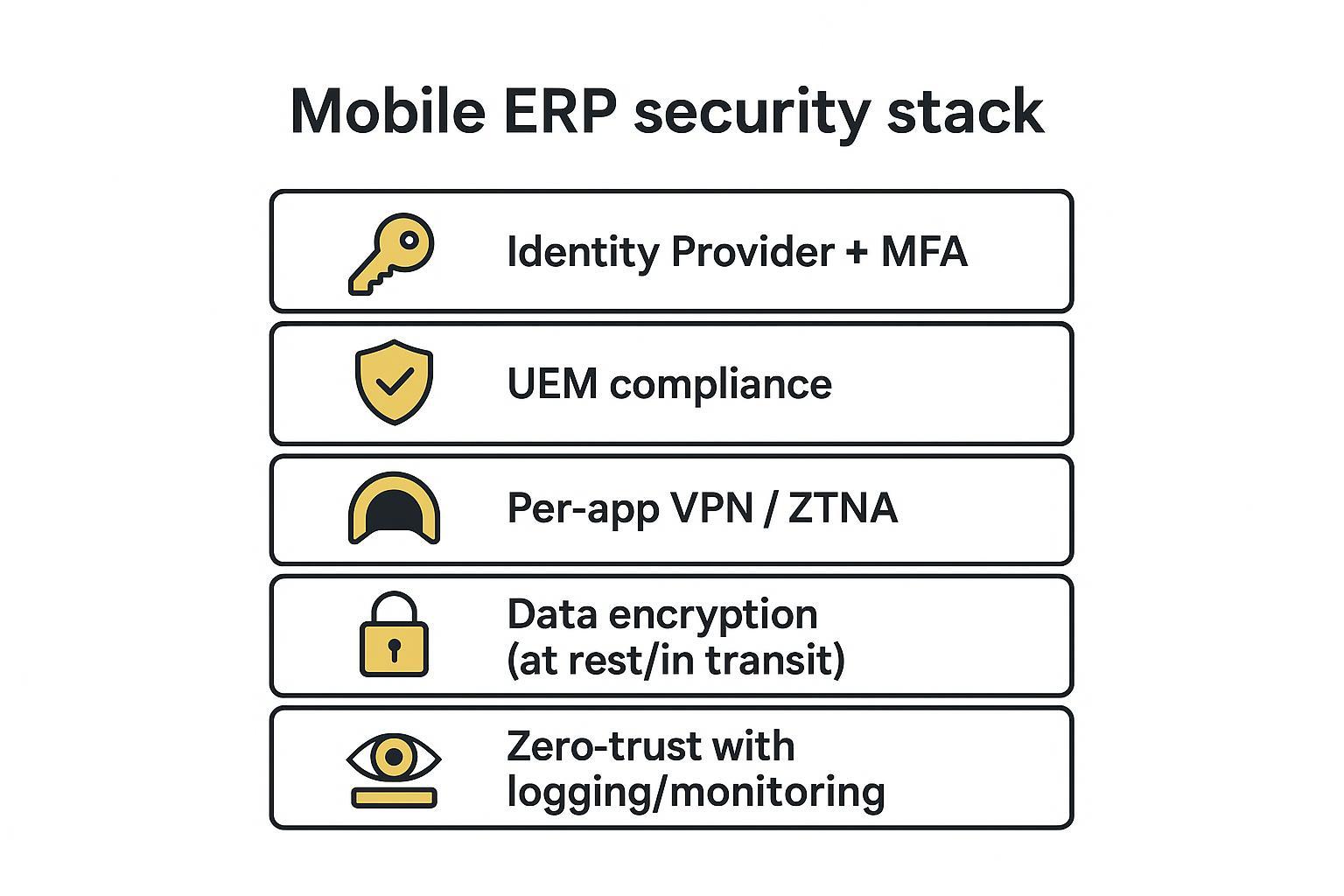
A workable model is layered: identity, device posture, network access, and data controls reinforce each other. This matches enterprise mobile guidance such as NIST SP 800-124 Rev. 2 (2023), Guidelines for Managing the Security of Mobile Devices in the Enterprise and the access philosophy in NIST SP 800-207, Zero Trust Architecture (2020).
Identity & access
Start with identity. Everything else is an amplifier.
Use SSO through your IdP and enforce MFA.
Treat privileged actions as “step-up” moments.
Enforce least privilege through roles and separation of duties. RBAC is a practical baseline; IBM’s overview of role-based access control (RBAC) is a clean reference for cross-functional stakeholders.
For an executive smartphone with ERP access, it is often sensible to limit what can be done on mobile even for senior roles: approvals, holds/releases, and curated KPI views. Keep configuration, master-data changes, and bulk operations off the phone unless you have a specific, audited reason.
Device and data
Treat the phone like any other enterprise endpoint:
Prefer managed devices for the most sensitive roles.
Enforce device compliance (patch level, encryption on, screen lock, jailbreak/root checks).
Decide how ERP data may be stored locally. If offline access is required, encrypt cached data and restrict export/sharing paths.
How to verifyIn the pilot, have security demonstrate three controls end-to-end: remote wipe, conditional access block on non-compliance, and audit logging for a sensitive approval.
Zero-trust ops
Zero trust is not a product. It’s a way of making access decisions: verify explicitly, use least privilege, assume breach.
Operationally, that means app-scoped access (per-app VPN or ZTNA), centralized logging of auth events and policy decisions, and clear playbooks for lost devices and compromised accounts.
Buying criteria & TCO (executive smartphone with ERP)
Device platform & lifecycle
Choose a platform with predictable security updates, enterprise device management support, and a lifecycle that matches your procurement cycle.
Objective note: VERTU adds handcrafted build quality, concierge support, and long-term service options that can complement executive mobility expectations.
Also decide, explicitly, which ownership model you support:
Corporate-owned, fully managed
BYOD with containerization
Dual-device for privileged roles
ERP fit & UX
A phone that is “secure” but unusable creates shadow workflows.
In evaluation, test:
- Approval claritydoes the screen show enough context to approve responsibly?
- Exception handlingcan a leader resolve a problem, not just see it?
- Notificationsare they actionable, and can they be tuned?
- Offline behaviorwhat happens on a flight, in a basement, or across roaming handoffs?
If you already have a foldable/large-screen segment in your fleet, include it in testing. The difference is often the ability to read context without risky copying into other apps.
Cost model & licenses
Model TCO as a stack, not a handset price.
Include:
Device cost and refresh
UEM/MDM licensing and operations (UEM for mobile ERP is often a separate line item)
Identity (IdP) licensing and MFA enforcement
Integration layer costs (iPaaS/middleware) if used
Monitoring/log retention and SOC effort
Training and executive support (especially for travel-heavy roles)
A useful finance question: “What is one prevented disruption worth?” The ROI is often in avoided delays and avoided incidents, not in reduced device count.
Implementation roadmap
90-day pilot
Answer 90-day pilot should prove three things: the workflow works, the controls work, and people will actually use it.
Pilot design:
Choose 10–30 users across executive + one field cohort.
Pick 2–3 high-value workflows (approvals, exception handling, KPI review).
Define “blocked actions” upfront (what cannot be done on mobile).
Scale & governance
Scaling is governance. Decide who owns access policy changes, ERP role definitions for mobile, device compliance standards, and incident response playbooks.
Create a change path that is fast but controlled. Mobile is a living surface; it will change with OS updates, vendor releases, and evolving threat models.
Metrics & improve
Track metrics that reflect reality:
Median approval time for selected workflows
Policy blocks (non-compliant device, risky login) and time-to-resolution
Offline usage frequency and sync errors
Support burden per executive user
Treat these as operational signals, not a one-time project report.
Conclusion
Prioritize secure identity, managed devices, and least-privilege access. If those are weak, every other feature is decoration.
Validate offline behavior, notifications, and UX with pilot users before scaling. The fastest way to undermine an executive smartphone with ERP program is to force leaders into blind approvals or app-switching workarounds.
Model TCO beyond the handset, including UEM, identity, and integration platforms.
For readers comparing ownership experience alongside technical controls, start with the device fleet you can manage and support confidently. If you’re exploring luxury ownership models, you can review VERTU and its phone lineup at VERTU Luxury Mobile Phones, plus service context in the VERTU concierge guide and craftsmanship background in VERTU bespoke smartphone guidance.
Disclosure: This article references VERTU pages. Editorial judgment remains the priority.


