

Introduction
A privacy-first AI phone keeps more AI processing on the device itself, so sensitive context is less likely to cross into third-party systems. A cloud AI assistant runs inference in a provider’s infrastructure, usually with stronger model capability and faster iteration, but it shifts your data boundary outward.
2026 matters because three trends have converged:
On-device models have become usable for daily executive workflows, not just demos.
Cloud providers are building stronger privacy assurances (including verifiability programs), yet still operate across complex supply chains.
Regulators and boards are treating AI as both a productivity tool and a governance surface.
This guide is written for decision-makers. The goal is not hype. It’s to make the trade-offs explicit, so your procurement team can buy once, deploy with guardrails, and avoid surprises.
Key TakeawayMost teams land on hybrid: on-device as the default for sensitive context and predictable latency, with cloud used intentionally for high-capability tasks under strict controls.
Security & privacy (privacy AI phone vs cloud AI assistant)
Data exposure and processing boundaries
The most useful mental model is simple: where does the prompt and its surrounding context get processed, and who can access it?
- On-deviceThe boundary is the handset. If designed well, prompts, intermediate context, and outputs can remain local. This reduces exposure to transit logging, server-side retention, and provider-side access.
- CloudThe boundary moves to the provider. Your prompt and attachments must traverse the network, be processed in remote infrastructure, and may generate operational artifacts (logs, safety traces, abuse monitoring signals) that become part of your compliance story.
Collector’s note: “On-device” can still leak if the app sends diagnostics, telemetry, crash dumps, or “helpful” cloud fallbacks. Treat those paths as first-class risks, not footnotes.
If you want a clean definitional contrast on device-integrated agents versus cloud-centric assistants, AI agent phones vs AI phone agents is a useful starting point for where the boundary tends to sit.
Verifiability and platform assurances (PCC, AISeal, Knox)
Executives should assume one thing: privacy is not a claim, it’s an assurance model. You’re looking for what you can verify, not what a marketing page implies.
A strong example of a verifiability posture is Apple’s Private Cloud Compute (PCC). In its 2026 security update, Apple describes requirements like stateless computation and “verifiable transparency,” including publishing binaries for inspection and enabling researcher validation via its program tooling, as detailed in Apple Security Research’s “Expanding Private Cloud Compute”.
Other platforms advertise assurance labels and hardened environments (for example, security frameworks associated with mobile device stacks such as Knox, or trust labels such as AISeal). Treat them as prompts for diligence, not proof. Ask these questions:
What data is processed where (device, private cloud, general cloud)?
What is logged, and for how long?
Can you cryptographically attest to what code ran?
Can an external party test the claims, or is it purely self-attestation?
How to verify: Request the vendor’s security whitepaper, data flow diagram, and an explicit statement of what is and is not retained (prompts, outputs, embeddings, logs, backups).
Regulatory alignment (HIPAA, GDPR/CCPA, residency)
Regulatory alignment is rarely about a single checkbox. It’s about proving that your AI workflow respects:
Lawful basis and purpose limitation (GDPR): why you process the data, and where it goes.
Access and deletion rights (GDPR/CCPA): whether you can satisfy requests across primary storage, derived data, and vendor logs.
Sensitive data rules (HIPAA for covered entities and business associates): whether protected health information can be processed, by whom, under what agreements.
- Data residency and cross-border transferswhere processing occurs, and what commitments exist when workloads shift regions.
On-device processing can reduce cross-border complications, but it does not eliminate governance. If the phone can export data, sync to consumer cloud accounts, or fall back to third-party inference, you still have a compliance surface.
Latency & Reliability
Real‑world latency ranges and tail behavior
For buyer decisions, median latency is not the story. Tail latency is. The slowest 5 percent of requests (p95) is where frustration, abandonment, and “I’ll just paste it into a different tool” begins.
In practical planning terms:
On-device AI often feels like “instant” for short tasks when the device is cool and idle.
Cloud assistants can be fast in ideal conditions, but variability (network, queueing, cold starts, peak load) shows up as long tails.
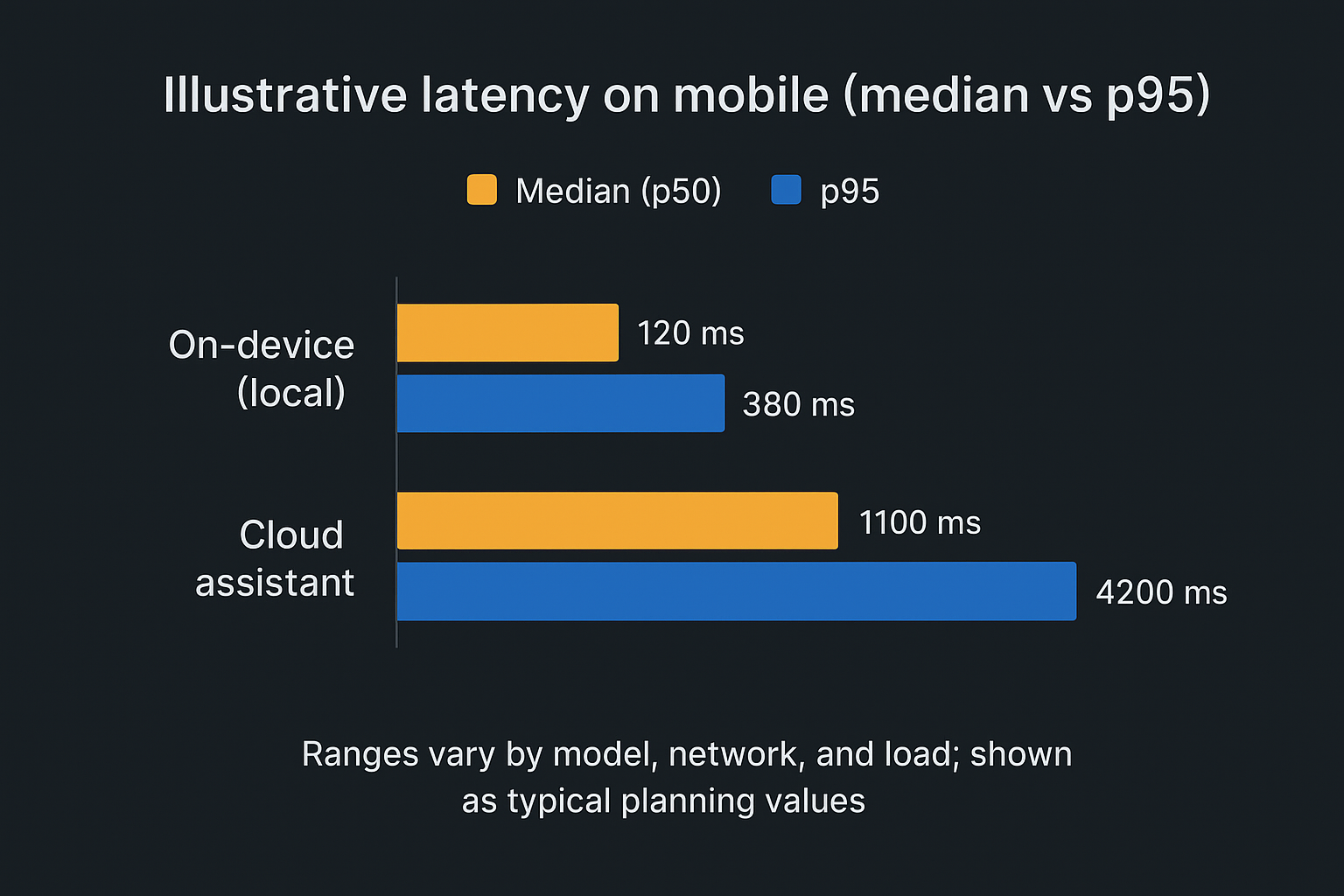
Tail drivers to pay attention to:
- Network volatilitymobile handoffs, congestion, hotel Wi‑Fi, and international roaming.
- Queueing and batchingcloud systems trade throughput for responsiveness at peak.
- Cold starts and model loadinga known source of worst-case delays in LLM stacks, discussed in NVIDIA’s 2025 note on reducing cold start latency for LLM inference.
Offline resilience and failure modes
If you travel, negotiate, or work in controlled environments, offline behavior isn’t a corner case. It’s a requirement.
On-device can degrade gracefully: fewer features, smaller models, but still usable.
Cloud often fails hard when connectivity drops: no inference, no tool calls, sometimes no access to the conversation state.
The more your assistant is integrated into your workflow (calendar, documents, travel, CRM), the more you should ask: what happens on a bad day?
Outage at the provider
Rate limiting during peak events
Policy changes that block a once-allowed workflow
Thermal, battery, and service availability considerations
On-device capability comes with physics.
Sustained local inference can trigger thermal throttling and drain battery faster.
Background multitasking can reduce performance consistency.
Device refresh cycles matter: older handsets may not run the same on-device models reliably.
Cloud shifts these concerns to the vendor, but replaces them with SLA realities: incident response, regional availability, and what “degraded service” means in practice.
Capability & Ecosystem
Reasoning depth, context windows, and tool access
Cloud assistants typically win on:
Larger models and faster upgrades
Longer context windows
Broad tool access (search, connectors, enterprise apps)
On-device systems can be more constrained, but they can still be excellent for local work (a genuinely useful local AI assistant for executives): summaries that never leave the device, drafting from local notes, and quick decisions where you want speed and containment.
The question is not “which is smarter.” It’s which intelligence you can afford to trust with the context you plan to feed it.
Cross‑device memory and orchestration vs device‑level control
Cloud platforms are built for orchestration: memory across devices, shared workspaces, and team collaboration. That’s helpful. It’s also a governance decision.
A private cloud AI assistant is the middle ground some buyers prefer: off-device compute with tighter assurances and clearer boundaries than general multi-tenant inference.
On-device approaches favor control. A well-run on-device AI assistant is easier to bound: clearer local data boundary, fewer external dependencies, and less exposure to shared-service incidents.
Hybrid designs often work best for executives:
Keep sensitive “personal corpus” local (board notes, deal drafts, private health details).
Use cloud selectively for complex reasoning, external research, and collaborative outputs.
Integration depth and admin controls
This is where most buying decisions fail. A tool can be “secure” and still be ungovernable.
For cloud assistants, ask for:
Admin policy controls (who can use what, and when)
Audit logging (prompts, outputs, tool calls, connector activity)
Retention and deletion controls
Data residency commitments
For privacy AI phones, ask for:
Permission boundaries for device-level actions
Managed-device posture (UEM/MDM fit, policy enforcement)
Separation of personal and work contexts
As a workflow example: VERTU pairs device-level actions with explicit approvals and concierge escalation for ambiguous requests, keeping automation useful without surrendering control.
Cost & Governance
TCO models: hardware premium vs per‑request cloud spend
Total cost of ownership behaves differently across the two models:
On-device concentrates cost into hardware premium and refresh cycles, plus internal device management.
Cloud concentrates cost into ongoing usage, which can rise quietly with adoption.
The hidden cost is not only spend. It is governance labor: policy work, legal review, audits, and incident response.
Admin policy, audit, and retention controls
Cloud can be easier to govern at scale because policy and logging are centralized. That’s also why cloud can be riskier when unmanaged: shadow usage appears fast.
Palo Alto Networks’ definition of shadow AI is useful framing: if your employees can route sensitive information into unsanctioned assistants, you lose traceability.
On-device approaches reduce some third-party exposure, but they demand rigor in endpoint management: device posture, app permissions, backup behavior, and separation of spaces.
Contractual safeguards and data residency commitments
For cloud assistants, procurement should require contractual clarity on:
Data use (training, fine-tuning, evaluation, human review)
Logging and retention (what exists, for how long, and how it can be exported)
Subprocessors and supply chain
Breach notification timelines and evidence access
Residency and cross-border transfer controls
If the vendor cannot answer in writing, treat it as a red flag.
Decision Framework
Use‑case matrix: when on‑device, cloud, or hybrid wins
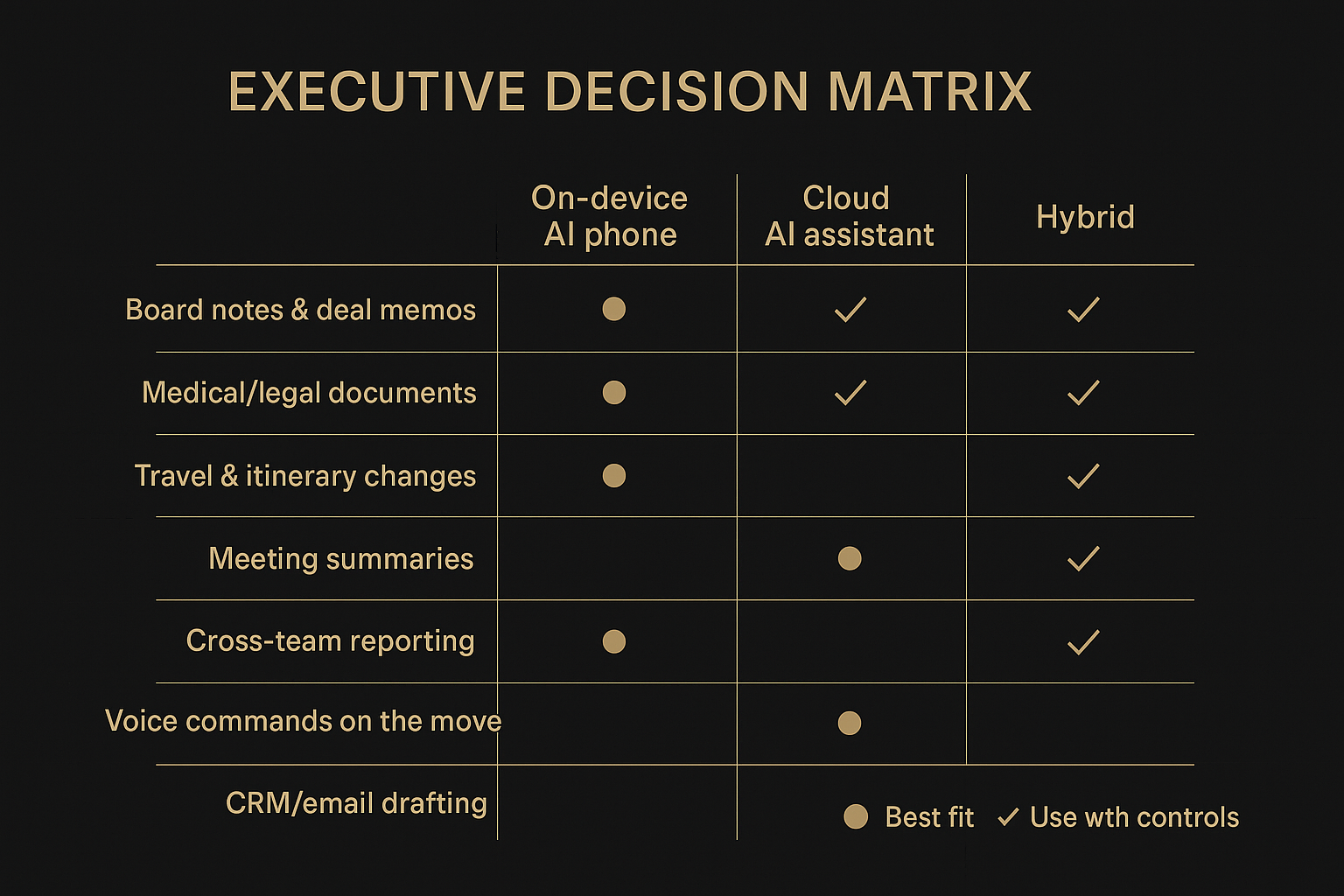
Use the matrix as a default, then override based on your own constraints:
Regulatory environment
Threat model
Need for offline continuity
Need for collaboration
Risk assessment: data sensitivity, latency criticality, outage impact
A clean risk assessment uses three questions:
- Data sensitivityIf this prompt leaked, what is the real impact (legal, reputational, commercial)?
- Latency criticalityIf the assistant takes 5 seconds instead of 500 ms, what breaks? (Voice control, live meetings, travel changes.)
- Outage impactIf the provider or connectivity fails for 24 hours, do you have a fallback?
High sensitivity + high outage impact is where on-device and hybrid designs tend to dominate.
Implementation checklist for pilots and procurement
A pilot should be run like a security project, not a novelty rollout.
Define what data classes are allowed and forbidden.
Document the data flow (inputs, outputs, logs, backups).
Require admin controls and audit exports before broad rollout.
Test tail latency in real travel conditions (airport, hotel, roaming).
Define fallback behavior (offline mode, degraded mode, manual escalation).
Set success metrics: time saved, error rates, policy violations, and user adoption.
Conclusion
A privacy AI phone reduces third-party exposure and can deliver more predictable latency, especially when offline or in volatile networks. Cloud AI assistants usually offer deeper reasoning, broader tool ecosystems, and easier centralized governance, but they expand your trust boundary and increase dependency on vendor controls.
Hybrids are the pragmatic center: keep sensitive context local by default, and use the cloud intentionally for the tasks where it earns its access.
Next steps are straightforward: shortlist vendors, demand written answers on boundary, retention, and residency, and run a pilot with success metrics that reflect both productivity and risk.
Disclosure: This article references VERTU pages. Editorial judgment remains the priority.


