Key Takeaways
- The best phone for GPS navigation balances location reliability, map coverage, battery endurance, screen readability and a secure mount.
- Dual-frequency GNSS, including GPS L1/L5 support, is a useful specification to check, but does not guarantee better route accuracy in every environment.
- Google Maps can provide offline driving directions within downloaded areas, but offline mode has limits, including no live traffic or alternate routes.
- A foldable display can make a map overview easier to read; it does not establish GPS performance or vehicle-mount compatibility.
The best phone for GPS navigation is one that runs your preferred map app reliably, lasts through your route, stays readable in your vehicle and fits a secure mount. For commuting, quick route updates may matter most; for road trips, offline coverage and sustained use become more important. If you plan to keep maps and other travel files on your device, VERTU’s guide to planning phone storage for travel can help you budget for offline use.
This guide focuses on daily commuting and road travel. It does not compare phones with cycling computers or handheld hiking GPS devices, which are built around different use cases.
What should a phone for navigation do well?
A navigation phone should provide dependable location updates, run maps that cover your destinations, last through your longest typical journey, and remain readable and secure in its mount. Assess these factors together: no single GPS specification or screen measurement guarantees a good experience on the road.
| What to check | Why it matters | How to test it |
|---|---|---|
| GNSS and location support | Navigation depends on the phone and app maintaining useful location updates in your actual surroundings. | Test a familiar route, including open roads and dense urban streets. |
| Maps and regional coverage | Apps, map data and features can vary by country, region and connectivity. | Check your preferred app and destination coverage before relying on it. |
| Offline maps | Downloaded areas can help when mobile data is unavailable, but offline features are more limited. | Download the relevant areas and test them before departure. |
| Battery and charging | Navigation can keep the screen, location services and data connection active for long periods. | Run a realistic session with your usual brightness, audio and charging setup. |
| Screen readability | Glare, viewing angle and text size affect how quickly you can understand directions. | Check the map in daylight and at night from the intended mount position. |
| Mount fit and vehicle integration | A phone that shifts, blocks controls or cannot connect to a compatible car display may not suit your routine. | Test the exact phone, mount, vehicle and connection method together. |
What do GPS, GNSS and L1/L5 mean on a phone?
GPS is one satellite navigation system; GNSS is the broader term for satellite systems such as GPS, Galileo, GLONASS, BeiDou and QZSS. Dual-frequency support means a receiver can use signals on more than one frequency, such as GPS L1 and L5. It is a useful specification to compare, not a guarantee of navigation accuracy.
Some Android phones support L1 and L5, but specifications and implementation vary by model. Android’s GNSS documentation describes multi-frequency support and notes that available measurement fields can depend on the chipset. Check the exact handset rather than assuming that every phone supports the same signals.
Do not read “dual-frequency” as a promise that a phone can simply identify and remove every reflected signal near a tall building. Receiver and antenna design, software, signal blockage, satellite geometry and map data all affect the result. A compass is a separate heading sensor: it can help orient a map while stationary, but it is not a substitute for satellite positioning. For a buying decision, a real route test is more informative than a feature label alone.
Will Google Maps work offline?
Yes. Google Maps can provide offline driving directions when the entire route is within a map area downloaded in advance. Offline mode does not provide live traffic information or alternate routes, and map downloads and features can vary by region.
Before a road trip, download the destination areas over a reliable connection, check that the downloads have completed and confirm that your route fits within them. Offline maps may need updating, so review them again before you leave. Read Google Maps’ instructions for downloading areas and navigating offline for current steps and limitations.
Offline access does not mean every search, place detail or rerouting feature will be available without data. If the route is important, keep a second reference or a vehicle navigation option rather than treating one app as your only fallback.
How much battery life do you need for navigation?
There is no dependable universal hourly battery-drain rate for phone navigation. Choose a phone that completes your longest typical route with reserve for delays, using the display, mobile connection and audio settings you expect to use.
Battery capacity alone does not predict navigation runtime. Screen brightness, mobile signal, app behaviour, audio output, temperature and charging conditions all affect use. Test the phone with your real map app and route; a short commute may not reveal how it performs during a long drive with the screen continuously visible.
Also consider overheating while charging. Navigation, charging and direct sunlight can combine to raise device temperature; thermal protections may dim a screen, slow charging or pause it, depending on the phone. Check the manufacturer’s charging guidance and your vehicle charger’s compatibility rather than treating a particular wattage as a universal minimum. Keep the phone out of intense direct sun where practical and avoid a position with poor ventilation.
How readable should the screen be in a car?
A readable navigation screen makes the next turn, lane guidance and route overview easy to recognise at a glance. Peak brightness is one specification to compare, but it does not by itself prove sustained readability through a windscreen; reflections, viewing angle, automatic brightness and map design matter too.
Test the display from the position where it will be mounted. Check route labels in daylight, the map’s night mode after dark and whether the screen remains legible with your usual dashboard lighting. Choose a size that makes directions clear without obstructing your view or making the phone difficult to secure.
For OLED phones, long periods showing the same high-contrast navigation interface at high brightness can be relevant to image retention or burn-in. The risk and mitigation depend on the display and model, so check the manufacturer’s guidance. Automatic brightness and avoiding maximum brightness when it is not needed are sensible habits; a single navigation session is not a useful universal test of screen longevity.
Can phone navigation replace Android Auto or Apple CarPlay?
Sometimes, but phone-only navigation and Android Auto or Apple CarPlay are different setups. A mounted phone uses its own display, while Android Auto or CarPlay requires a compatible phone and vehicle to show supported apps on the car’s display.
A phone mount may be a practical alternative when the vehicle does not support projection or when you prefer using the phone directly. A car display may be easier to glance at and can reduce dependence on a separate mount. Verify compatibility for your exact phone, vehicle, connection method and region; Google’s Android Auto setup guidance explains the phone and vehicle checks.
Will the phone fit your car mount?
Mount compatibility is a physical check, not something to infer from a phone’s category or screen size. Test the exact phone in the intended mount and orientation; make sure it stays stable, remains visible and leaves essential controls accessible.
For a foldable, test both folded and unfolded use if you expect to navigate in both states. Confirm that the mount holds the device securely without making it awkward to position or charge. Place the screen where it does not block the road, mirrors or vehicle controls, and set the route before starting to drive.
A practical phone-navigation test before you buy
A repeatable test is more useful than comparing headline specifications alone. Use the same map app and, where possible, the same route on each phone you are considering.
- Check map availability. Confirm that your preferred app and destination maps are available in the places you travel.
- Compare GNSS specifications. Look for the listed satellite systems and any dual-frequency support, then treat these as comparison points rather than accuracy guarantees.
- Test location updates. Follow a familiar route and notice lag, position drift or repeated recalculation.
- Assess screen readability. Check labels and turn prompts from the intended mount position in daylight and at night.
- Run a realistic battery session. Use your ordinary brightness, audio and mobile-data settings for a journey comparable to your longest regular drive.
- Test charging and mounting. Check the phone, mount and charger together, and watch for heat or screen dimming during use.
- Prepare offline access. Download the required map areas and confirm what your chosen app can do without a connection.
VERTU ALPHAFOLD: a larger map canvas, with specific checks still needed
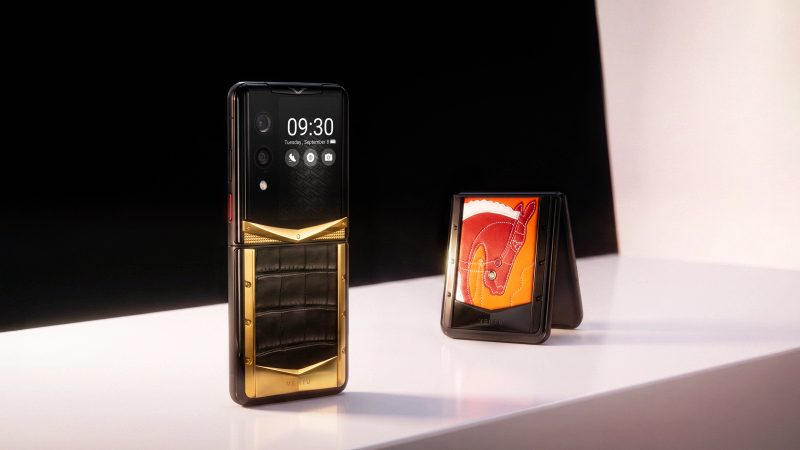
VERTU ALPHAFOLD is relevant to navigation buyers who value a foldable display and travel-oriented app workflows. The VERTU product knowledge base lists a 6.53-inch outer display and an 8.05-inch inner display, and describes maps and travel among supported-app scenarios. VERTU’s official page also presents Google Maps routing as part of a travel-planning flow. These details make ALPHAFOLD a relevant example of a larger screen for reviewing route context and travel information.
The larger display is a viewing characteristic, not proof of better GPS reception. VERTU’s published materials do not establish a navigation-specific GNSS or compass specification, offline Google Maps behaviour, tested route accuracy or compatibility with a particular car mount. The official page lists peak display brightness up to 5,000 nits; that peak figure does not guarantee sustained readability in every vehicle or lighting condition. Check the current configuration and test the map app and mount you plan to use on the official VERTU ALPHAFOLD product page.
For navigation, evaluate ALPHAFOLD by the same criteria as any other phone: location behaviour, map coverage, battery during continuous routing, screen readability and physical mount fit. Its foldable screen may suit someone who values a broader map view, but it should not be described as the best GPS phone without product-specific navigation evidence.
FAQ
What features matter most in the best phone for GPS navigation?
The most important features are reliable location updates, suitable map coverage, battery endurance, screen readability and secure mount fit. Compare them together on routes and with apps you actually use; no single GPS label or brightness figure guarantees better navigation.
Does dual-frequency GNSS improve phone navigation?
It can be a useful capability, but it does not guarantee more accurate directions in every setting. L1/L5 support is one specification to check; receiver design, software, signal conditions and the map app still affect the result.
Can Google Maps navigate offline?
Yes, for driving routes contained within a downloaded map area. Offline Google Maps does not provide live traffic or alternate routes, and availability can vary by region.
Can a phone replace Android Auto or Apple CarPlay?
A phone mounted on the dashboard can provide standalone navigation, but it is not the same as projecting supported apps onto a compatible car display. Check phone, vehicle and regional compatibility before relying on Android Auto or CarPlay.
Is a foldable phone a good choice for GPS navigation?
It can be useful if you value a larger map view, but screen size alone does not establish location performance, battery runtime or mount fit. Test the phone in the form and mount you plan to use.
Conclusion
The best phone for navigation is the one that works reliably with your routes, vehicle and travel regions—not simply the one with the biggest screen or the most prominent GPS claim. Compare location support, map availability, battery endurance, screen readability and mount fit as one system, then test offline access before departure.
If a foldable is on your shortlist, consider how its inner and outer displays fit the rest of your routine as well as navigation. VERTU’s guide to foldable phone workflows offers another perspective on the larger-screen trade-off.