


Your phone has spent the last decade getting better at one thing: running more apps.
The next shift is quieter. The phone becomes the control plane for your work, not another place you check notifications. The “SaaS phone” is what happens when an AI workflow assistant can read the moment you’re in, pull the right context, and dispatch the next actions across your stack.
That is the real promise of AI workflow automation on phones: fewer tabs, fewer dropped handoffs, more momentum.
A “SaaS phone” isn’t a phone with apps. It’s a phone that dispatches work.
App switching is a tax on high-trust work.
Every time you move from Calendar to email to a doc to a chat thread, you rebuild context. You repeat the same decisions. You lose the thread right before you need to act.
A SaaS phone flips the default interface:
You state intent once.
The device gathers context from your connected tools.
It proposes a plan, asks for approval where it should.
Then it executes across the apps you already use.
That orchestration layer is the difference between “a smart phone” and a phone built for outcomes.
Key TakeawayThe SaaS phone replaces app switching with a single layer that can plan, coordinate, and execute actions across your tools.
The shift: from automation in one app to AI workflow management across all of them
Most mobile automation today is local. A shortcut triggers a script. A rule files an email. A meeting note becomes a task.
Useful, but narrow.
AI workflow management is broader. It is the system that coordinates:
what the assistant is allowed to read and do
what has to be confirmed
what gets logged
what happens when the context is incomplete or the network is unreliable
This is where “AI powered workflow” stops being a demo and becomes something you can trust on a phone you carry everywhere.
A clean way to define the underlying model is IBM’s: agentic automation is “automation powered by AI agents that can make decisions and take actions autonomously.” That definition matters because the work is not just writing or summarizing. It is action. It touches systems with real consequences. See IBM’s definition of agentic automation.
What an AI powered workflow on a phone actually needs to do
On a phone, the constraints are different. Smaller screen. More movement. More interruptions. Higher privacy sensitivity.
A usable AI workflow assistant needs four capabilities.
1) Capture intent fast (voice, brief text, context-aware prompts)
On the move, the best interface is short.
“Brief me for the next call.”
“Turn this email into three decisions.”
“Protect the afternoon. Move everything else.”
The assistant should be able to accept intent without demanding a perfect prompt.
2) Retrieve context from your tools, with permission and audience awareness
The assistant has to pull:
last relevant email thread
the doc you referenced last week
the meeting invite, attendees, and prior notes
the chat decisions made in a channel
But it must do that with scoping. If you’re in a shared chat channel, it cannot reveal details that everyone in that channel shouldn’t see.
3) Orchestrate the plan, then stop at the right boundaries
The best systems are not fully autonomous. They are well-governed.
They draft.
They propose.
They ask.
And only then do they execute.
4) Execute across connected apps, then leave an audit trail
Execution means tool calls. And tool calls need logs.
Not because you want bureaucracy, but because you want control. If the assistant schedules a meeting, edits a doc, or sends a message, you should be able to answer two questions instantly:
What did it do?
What did it rely on?
A practical evaluation framework for AI workflow automation on phones
If you are evaluating a “SaaS phone” experience, don’t start with model names.
Start with governance.
Permission model: can you enforce least privilege per workflow?
Your assistant inherits the security of everything it can read and do.
If it has broad permissions across email, files, and chat, a mistake becomes a breach.
Look for:
per-app permission scopes
per-action scopes (read vs write vs send)
ability to grant access for a moment, then revoke
Approval gates: does it pause before irreversible actions?
A good default:
drafts are fine
sending is confirmed
sharing permissions are confirmed
deletions are confirmed
If a vendor cannot explain where approvals happen, assume they don’t.
Audit logs: can you review tool calls, context sources, and outcomes?
Auditability is not a compliance feature. It is a trust feature.
You want to see:
what content was retrieved
what instruction was followed
what actions were taken
who approved what
Confidentiality: does it prevent channel-based leaks?
In chat tools, the risk is often not the model. It is the audience.
If an assistant can fetch private context using one user’s access but then post it into a broader channel, that is a design failure.
Travel resilience: does it degrade gracefully when the network is weak?
Executives do not work from perfect Wi‑Fi.
A phone-first assistant should:
keep a safe “read-only mode” when offline
queue actions instead of failing silently
surface what it could not verify
Pro TipAsk vendors to demo the same workflow in three modes: perfect connectivity, weak connectivity, and no connectivity.
One phone-first orchestration scenario (meetings + email + docs + chat)
Here is what the SaaS phone feels like when it is working.
You have a meeting in 20 minutes. You’re leaving a car. You don’t want to hunt.
You say: “Brief me for the 11am. What’s unresolved, what’s the risk, and what do I need to decide?”
A well-built AI workflow assistant can do the following, using the tools you already live in:
Pull the invite and attendee list from your calendar.
Retrieve the most recent email thread with the key stakeholder.
Find the working doc (proposal, contract, deck) and extract the unresolved sections.
Summarize the last decision in a chat thread and draft a message that asks for confirmation.
Prepare the follow-up email as a draft, not a send.
The important detail is not that it can summarize. It is that it can prepare the next step across systems and then stop for approval.
In a mature orchestration layer, you can point it at Slack or Microsoft Teams, Gmail, Google Calendar, and Google Drive as representative endpoints of a modern stack. Whether a specific device supports each app by name depends on its connector list, but the evaluation criteria remain the same.
Security is the make-or-break issue for the SaaS phone
Giving an assistant access to email, documents, and chat is powerful. It is also fragile.
Indirect prompt injection is the real risk on mobile
On a phone, the assistant often reads untrusted content: emails, attachments, web pages, chat messages.
That content can contain hidden instructions that try to override what the assistant is supposed to do.
OWASP describes this class of attacks clearly, including indirect prompt injection, in OWASP GenAI LLM01:2025 Prompt Injection.
Microsoft also outlines defensive approaches in Microsoft’s MSRC guidance on indirect prompt injection (2025).
If you want a plain-language definition, IBM’s overview is concise: IBM’s explanation of prompt injection attacks. The video below is a practical companion that shows what these attacks look like in the real world.
The controls that matter (and why)
Least privilege limits blast radius.
Approvals stop damage before it becomes permanent.
Audit logs let you verify, investigate, and improve.
If a platform talks about “autonomy” without explaining these controls, treat it as a prototype.
AlphaFold as an example: a phone designed around orchestration and privacy
A SaaS phone is a category, not a single product.
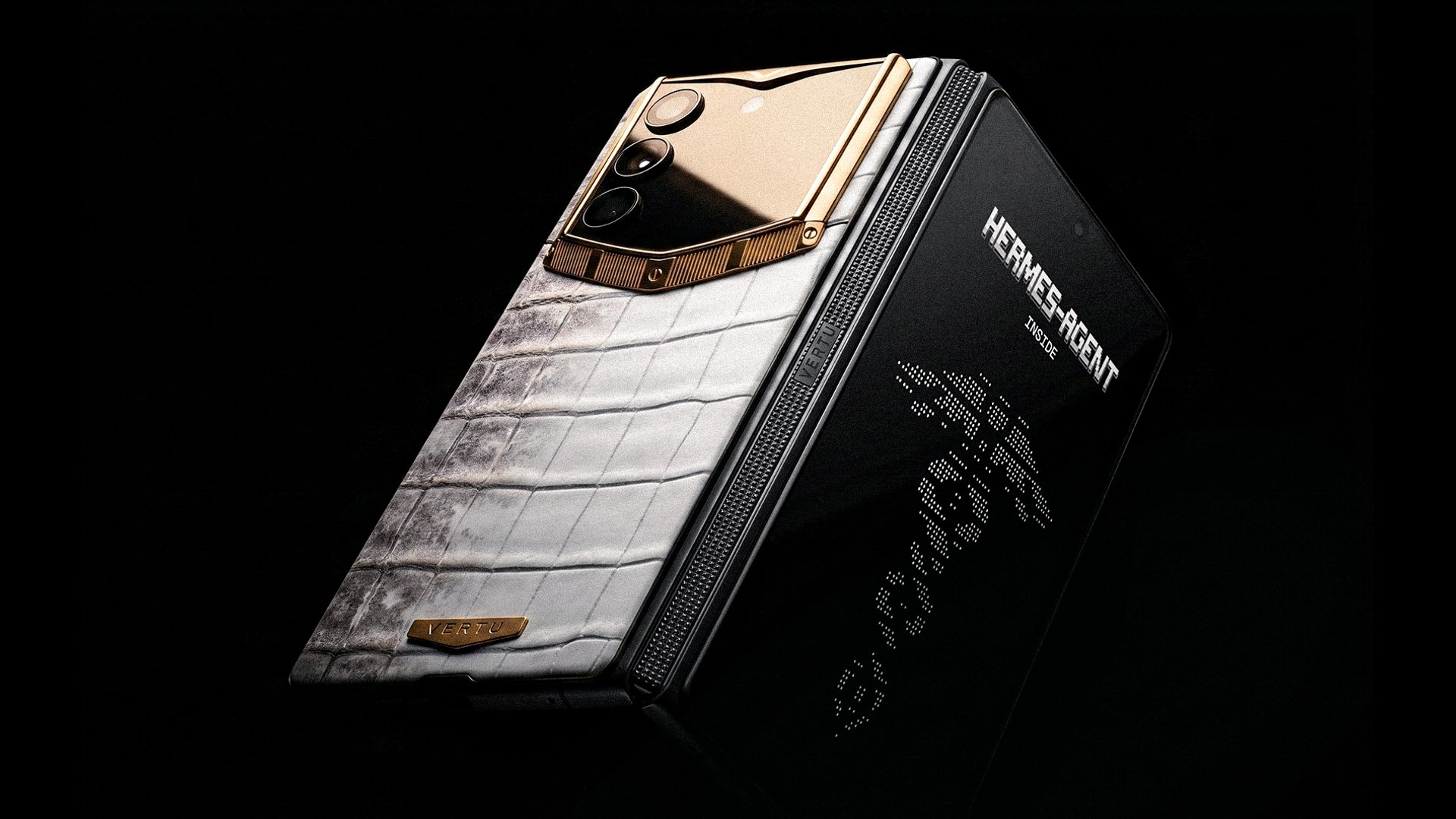
One example of the phone-first approach is VERTU’s AlphaFold with its built-in Hermes Agent.
On the official product page, VERTU states that Hermes Agent “connects 70+ supported apps and turns voice commands into actions,” and lists security features including Private Space, end-to-end encryption, encrypted V‑Talk, and triple-system isolation. See VERTU ALPHAFOLD.
VERTU’s own guide frames Hermes Agent as a command-terminal style layer that prepares actions, asks for confirmation, and then executes within compartmentalized spaces. See Hermes Agent inside AlphaFold.
If you want the governance argument stated without soft language, VERTU also publishes a direct warning about over-privileged agents and prompt injection risks, plus mitigations like human-in-the-loop policy and local preprocessing. See AI agent security risks and how to keep autonomous AI under control.
This is the direction the category is moving toward: a device where workflow capability is paired with hard boundaries.
FAQ: AI workflow automation on phones
What’s the difference between AI workflow automation and an AI assistant app?
An assistant app usually helps inside one surface: drafting an email, summarizing a doc, or suggesting a reply.
AI workflow automation coordinates multiple steps across tools, then executes with governance.
What should “AI workflow management” include, at minimum?
At minimum: least-privilege permissions, approval gates for sensitive actions, and audit logs for tool calls.
Without those, you don’t have workflow management. You have a chat interface with access.
Will an AI workflow assistant replace executive assistants or operators?
It changes the work.
It can prepare context, draft communications, and keep the machine moving. But discretion, judgment, and relationship handling remain human advantages, especially in high-stakes environments.
Which apps should a SaaS phone support first?
Start with the primitives:
email
calendar
documents
chat
If those are orchestrated well, everything else becomes easier to add.
Next steps
If you’re considering this category, do one small test first: choose a recurring workflow you do weekly (a client call, investor update, or board prep) and score any solution against the framework above.
If you’d like an example of a phone-first approach that pairs orchestration with privacy posture, explore VERTU ALPHAFOLD and the concept behind Hermes Agent inside AlphaFold.
Disclosure: This article references VERTU pages. Editorial judgment remains the priority.


