
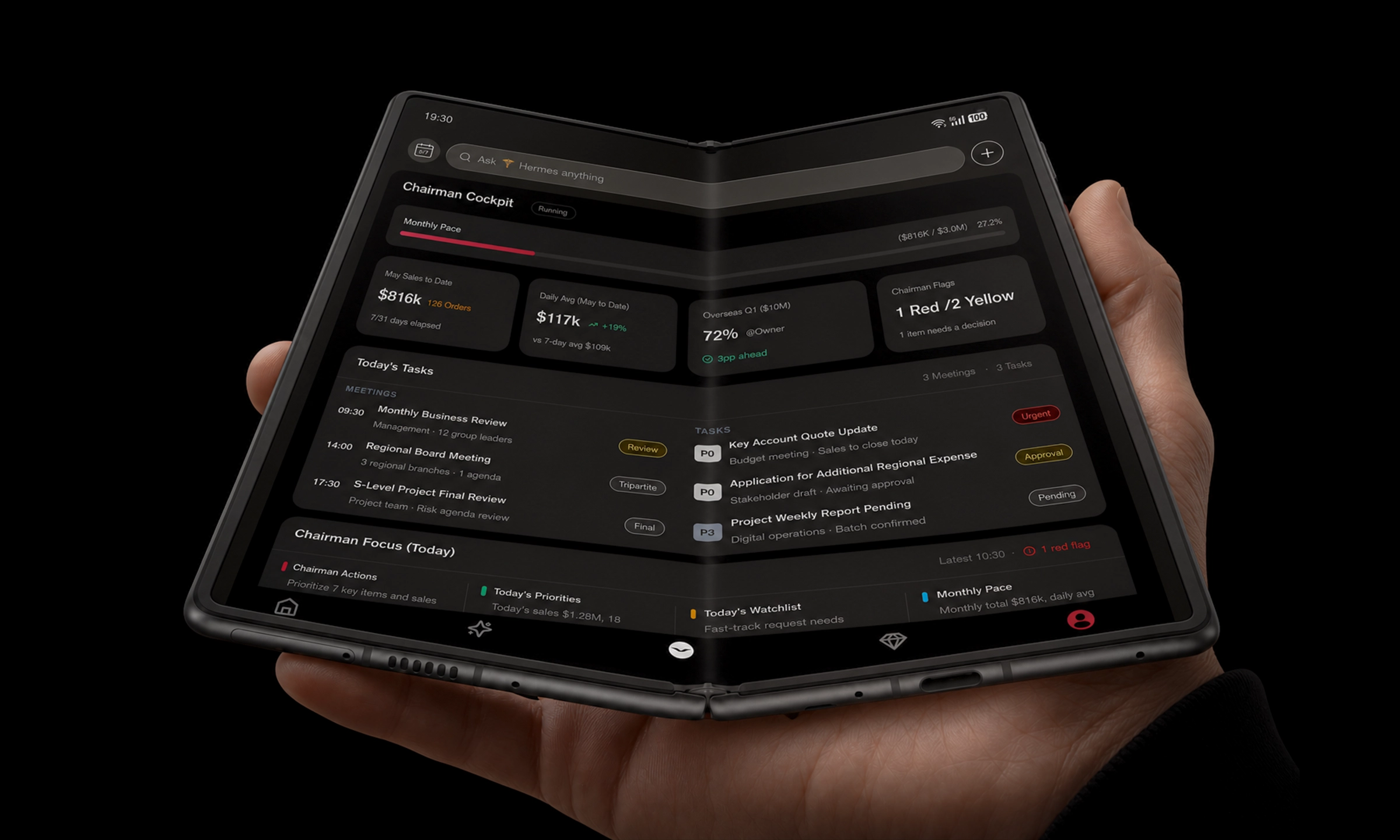
Most “AI on mobile” experiences are still apps: you open them, ask a question, get an answer, close them, repeat.
A decision-stage AI management system is different. It’s what you choose when you’re done with novelty and you want control: one place to coordinate tasks, consolidate context, gate sensitive actions, and execute across the tools that actually run your day.
Key Takeaway: If it can’t manage tasks, data, alerts, approvals, and cross-app execution as one system, it’s not an AIMS—it’s a feature.
What a mobile AI management system actually is (and isn’t)
An AI management system on mobile (often shortened to AIMS) is best understood as a control layer—a “command centre” that helps you plan and supervise AI-assisted work, not merely chat with an assistant.
In practice, it behaves more like the “unified control plane” language you’ll see in enterprise agent operations than like a single chatbot screen. Collibra, for example, positions its offering explicitly as an AI Command Center “unified control plane” for governing and overseeing agentic systems (Collibra’s AI Command Center ‘unified control plane’ (2026)). Microsoft uses similar framing with fleet-level visibility and governance in (Microsoft’s Agent 365 control plane (2025)).
What an AIMS is not:
A prettier chat UI.
A bundle of isolated “AI features” scattered across apps.
An automation tool that runs blindly without approvals, logs, or boundaries.
If you’re buying, your first question shouldn’t be “How smart is the model?” It should be: What does the system let me control—and how safely?
From apps to command centres: the five layers of a true AIMS
A mobile AIMS earns its name when it integrates five layers into a single operating model: tasks, data, reminders/alerts, approvals, and cross-app execution.
1) Tasks: the system must turn intent into an owned workflow
A command-centre AIMS starts with intent (“prepare the board packet,” “arrange the trip,” “close the week”) and turns it into a workflow with owners, deadlines, dependencies, and a visible “done” state.
This is where mobile matters: you’re approving and delegating between airports, meetings, and car rides. The system has to keep tasks legible in short windows of attention.
What to demand:
Task decomposition into steps you can inspect.
A clear “next action” view for you and for your assistant/PA.
The ability to pause, re-route, or escalate when reality changes.
2) Data: unified context, not another inbox
If you’re still hunting context across email, calendar, messaging, docs, travel apps, and finance tools, you don’t have a management system—you have more work.
A true AIMS aggregates the minimum useful data into a single operational view:
the relevant messages, not every message
the right documents, not a full drive mirror
the current state, not a history lesson
This is also where privacy begins: data unification must be paired with strict boundaries, because “one view of everything” can become “one leak of everything.” A practical security baseline is to insist on clear disclosure of AI endpoints and data flows; NowSecure’s guidance on AI risks in mobile apps is explicit about tracking endpoints, permissions, and compliance implications (NowSecure on AI risks in mobile apps (2025)).
3) Reminders and alerts: interruptions should become decisions
Mobile isn’t short of notifications. What you want is actionable signaling:
anomalies (“this approval has stalled,” “the itinerary changed,” “the payment terms differ”)
risk (“this action would expose sensitive data”)
confidence (“this step is safe to run unattended”)
A command-centre AIMS should let you tune alert thresholds and reduce noise. Otherwise, it will fail quietly—until it fails loudly.
4) Approvals: the “human in the loop” is not optional
The most important capability in a decision-stage AIMS is the ability to stop and ask—in the right moments, with the right context.
Human-in-the-loop patterns exist because agentic systems can be fast and wrong at the same time. If an AIMS can execute cross-app actions, approvals are not a “nice to have”; they are the brake pedal.
Cloudflare’s agent guidance treats human review steps as a deliberate control you insert into workflows (Cloudflare Agents: Human-in-the-Loop controls). That same idea should be a first-class mobile experience.
Approval quality is the difference between oversight and performative prompts. Your approver screen should show:
what action will happen (and where)
what data it will touch
what the blast radius is (external message? payment? deletion?)
what the rollback path is
Collector’s note: For UHNW buyers, approvals are also delegation infrastructure. A strong AIMS lets your PA approve low-risk actions while routing high-risk actions to you—without sharing standing credentials.
5) Cross-app execution: where AIMS becomes real—or breaks
Cross-app execution is the point where the system stops being a planner and starts being an operator.
But this is also where most “agentic” demos get brittle. Mobile interfaces change. Permissions vary by region, device, and policy. Even small UI shifts can break automation.
Your requirements should separate three modes:
- Suggestit drafts; you execute.
- Guideit drives with your confirmation step-by-step.
- Actit executes unattended within policy, then logs outcomes.
A management system should support all three—and make it obvious which mode you’re in.
If you want evidence that mobile agents struggle with real-world tasks, look for evaluations that test across varied apps and states (not curated demos). AIMultiple, for example, reviews mobile AI agents across real tasks and emphasizes the practical challenge of robust app control (Mobile AI Agents tested across real-world tasks).
The “Alpha Fold” thesis: a foldable isn’t an app container—it’s an intelligent gateway
When you shift from “apps” to “command centre,” the physical device starts to matter again.
A foldable form factor (“Alpha Fold” as a category idea) becomes valuable not because it’s fashionable, but because it changes the operating model:
You can keep context visible.
You can run side-by-side workflows (brief on the left, approvals on the right).
You can turn a phone into a tabletop console in minutes.
Samsung’s enterprise mobility writing makes the productivity case in practical terms—foldables reduce friction when teams need mobility and multi-window work in one device (Samsung Knox on foldables for productivity (2022)).
Here’s the deeper point: a foldable command centre lets an AIMS behave like a cockpit, not a notification stream.
Tasks become a Kanban-like control view instead of a list.
Data becomes a two-pane briefing: “what changed” alongside “what you should do.”
Approvals become safer because you can review more context before you authorize action.
This is why “Alpha Fold” shouldn’t be framed as a container for more apps. It should be framed as a gateway into the systems that govern your personal and business life—schedule, travel, finance ops, legal docs, client communications—without forcing you back to a laptop for every decision.
Buyer’s checklist: how to evaluate an AIMS in 30 minutes
Use this as a decision-stage scorecard. If a vendor can’t answer cleanly, you have your answer.
Needs assessment (2 minutes)
Which three workflows would you trust it with first? (Travel + calendar, exec comms, approvals for your team/PA.)
Which two data classes must be treated as sensitive? (Client identifiers, financial instructions, legal documents.)
Who approves what: you, your PA, or a team lead?
Requirements checklist (the real test)
Task orchestration
Can it break an intent into steps and show you the plan before it runs?
Can it resume safely after a failure, or does it restart and duplicate work?
Data unification
Can it pull the minimum useful context into one view without over-collecting?
Can you restrict which apps/data sources it can access?
Reminders and alerts
Can you define alert thresholds and escalation paths?
Does it distinguish noise from risk?
Approvals and auditability
Can you enforce human approval gates by policy (not by prompts)?
Do you get a tamper-evident log of what happened, when, and who approved it?
Can you require “fail-closed” behavior when approvals time out?
Cross-app execution
Which apps can it act inside—and how does it stay reliable when UIs change?
Does it support “suggest/guide/act” modes with clear boundaries?
Privacy and security
Where does data go (endpoints, regions, subprocessors), and what’s retained?
Can you disable training/retention for sensitive workflows?
How are permissions handled on-device, and what appears in lock-screen notifications?
For governance vocabulary and guardrails, it’s worth cross-checking vendors against established enterprise agent controls like least privilege and full traceability (see Securiti’s enterprise AI agent governance guidance (2026)).
Red flags that make “AIMS” dangerous on mobile
These are deal-breakers for privacy-first buyers.
- No real approval layerit “asks nicely” but can’t enforce gates.
- No meaningful audit trailyou can’t reconstruct what happened.
- Permissions are all-or-nothingit demands broad access to contacts, storage, or messaging to function.
- Sensitive details appear in notificationslock-screen leakage is treated as “user error.”
- It can act, but it can’t roll backno pause/resume, no safe checkpoints.
- It’s a demo, not a systemgreat prompts, no operational ownership, no policy versioning.
⚠️ Warning: The fastest way to lose trust is an agent that sends one wrong message to one wrong person. On mobile, that blast radius is often immediate.
A pragmatic pilot plan for privacy-first teams
If you’re close to buying, don’t start with “full autonomy.” Start with control.
Pilot one workflow with “guide” mode
Example: weekly travel + calendar + briefing packet.
Define your approval policy before the pilot
What requires approval, who approves, what timeouts do.
Measure only a few metrics
task completion rate
approval turnaround time
exception rate (where humans had to intervene)
data leakage incidents (should be zero)
Expand scope only when logs and controls hold up
Autonomy should increase with evidence, not optimism.
Where VERTU fits (as an example, not a pitch)
If you’re evaluating command-centre devices for privacy-first workflows, it’s reasonable to look at brands that treat security and service as part of the operating model—not as add-ons.
For context, VERTU positions security services as a dedicated layer (VERTU information security protection services) and frames its concierge layer as an always-available gateway that can evolve toward AI-assisted workflows (VERTU’s AI Agent portal and concierge layer). For foldable hardware framing, VERTU’s Vertu Quantum Flip is a relevant reference point for readers who want a foldable form factor with privacy-forward positioning.
Next steps
If you’re buying: turn the checklist above into a one-page scorecard and run it against your top two options.
If you’re building: treat AIMS as a control plane first—approvals, audit logs, and permissions—and only then chase autonomy.
Disclosure: This article references VERTU pages. Editorial judgment remains the priority.


![Top 10 Tourbillon Watches for Men [2026 Latest]](https://cdn.sanity.io/images/e0gp1l2g/production/8cb6bc45133cf9453382fc7d074465af588bb610-1800x1080.webp?w=800&h=450&q=82&auto=format&fit=crop)