

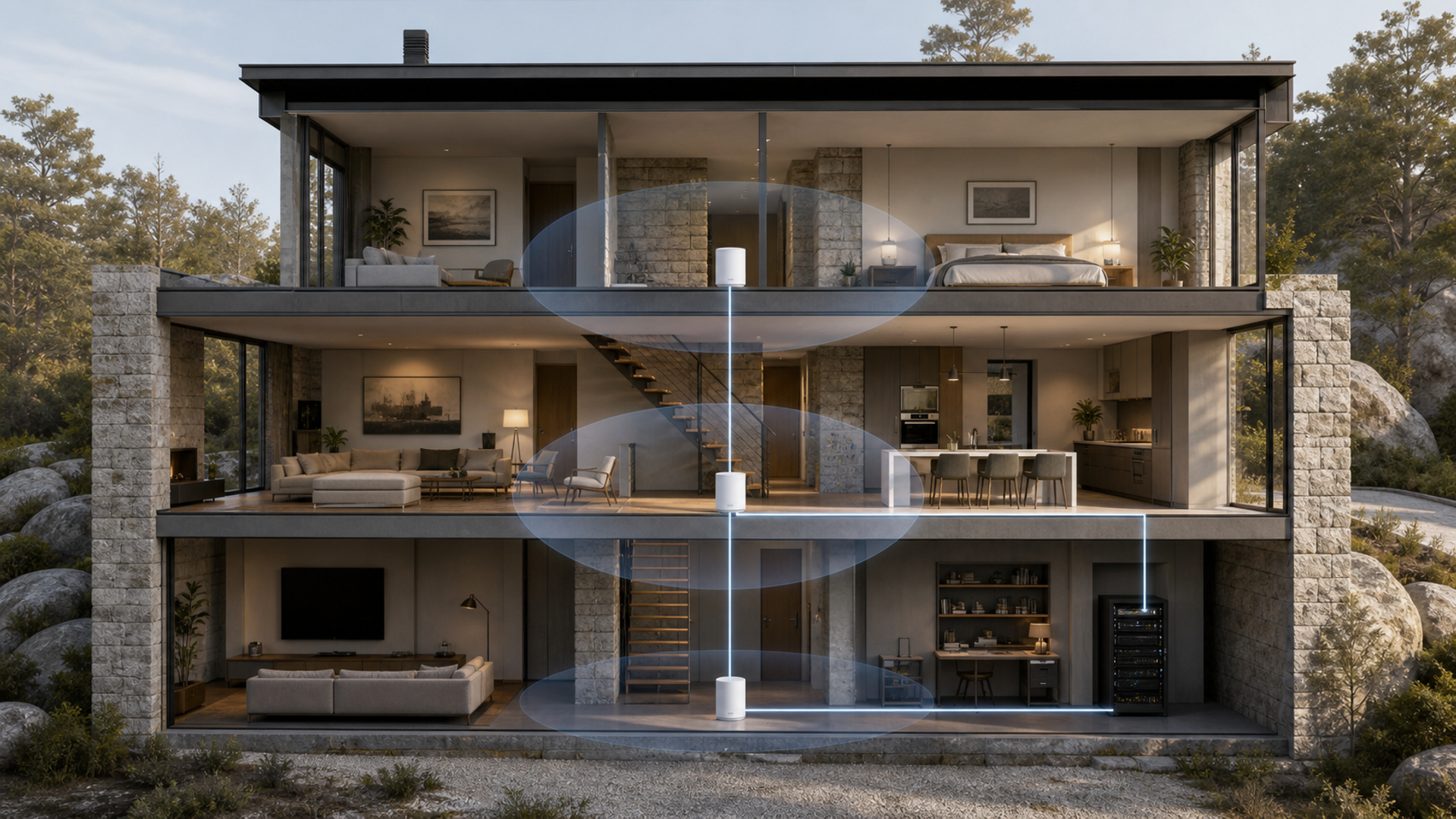
Mesh Wi-Fi does not remove the physics of walls, distance and interference. It gives a network more places to transmit and a coordinated way to move devices between them. A premium system can still be slower than a well-placed ordinary access point if nodes rely on a weak wireless backhaul or sit behind stone, mirrored glass and underfloor heating.
The short answer by building
Choose a tri-band wireless mesh when cabling is impossible and one radio can support backhaul, a Wi-Fi 7 multi-band system when compatible devices and multi-gig services justify the cost, or wired access points when Ethernet can be installed. Place nodes around obstructions rather than at the centre of a dead zone, and keep guest and smart-home devices separated from sensitive work systems.
| Decision factor | Tri-band wireless mesh | Wi-Fi 7 premium mesh | Wired access points |
|---|---|---|---|
| Building constraint | No Ethernet is available | Multi-gig and new devices justify premium radios | Cabling can reach strategic ceilings or rooms |
| Backhaul | Dedicated or dynamic radio stays strong | MLO or extra band supports node links | Ethernet removes wireless backhaul cost |
| Internet speed | Sub-gigabit service dominates | Multi-gig WAN and LAN are used | Controller and switches match service |
| Device mix | Mostly Wi-Fi 5 and 6 clients | Wi-Fi 7 clients are arriving | Stable mixed fleet values placement |
| Privacy control | Guest and IoT networks are available | Multiple SSIDs and update policy are verified | Local administration and VLANs are controlled |
| Expansion | Matched nodes can be added | High-cost nodes are justified by layout | Additional access points follow cabling plan |
This best mesh Wi-Fi 2026 matrix is the article's working value object. Read the best mesh Wi-Fi 2026 rows together: the decisive failure mode depends on this topic's evidence, operating context and reader objective.
Understand fronthaul and backhaul
Evidence 1. Wi-Fi Alliance describes Wi-Fi 7 capabilities including 320 MHz channels, Multi-Link Operation and 4K QAM, but client, region and channel conditions determine which features are available.
Evidence 2. ASUS lists ZenWiFi BQ16 Pro as a quad-band Wi-Fi 7 mesh platform with 10-gigabit ports and multiple radios, illustrating the high-capacity wireless-backhaul route.
Evidence 3. CISA's wireless-network guidance recommends secure configuration, encryption, updates and separation of sensitive devices rather than relying on a new Wi-Fi generation alone.
Evidence 4. A node placed inside the existing dead zone may have no strong upstream link; effective placement usually sits between the main router and the problem area.
Reader-visible sources checked for this article:
wi-fi.org — reader-visible current or official evidence
asus.com — reader-visible current or official evidence
cisa.gov — reader-visible current or official evidence
fcc.gov — reader-visible current or official evidence
For best mesh Wi-Fi 2026, these sources establish only the claims inside their documented scope. Recheck every changeable specification, availability condition, price, policy or service term in the relevant market before acting.
Survey the house before buying node count
Read building constraint as a stop/go test: no Ethernet is available supports the first option; multi-gig and new devices justify premium radios supports the second; and cabling can reach strategic ceilings or rooms supports the third. Record which source proves the condition and when it was checked.
A buyer can resolve backhaul without starting from a brand preference. Ask whether dedicated or dynamic radio stays strong; compare that with whether mLO or extra band supports node links; then use ethernet removes wireless backhaul cost as the third route's safeguard. An unknown condition stays unknown.
On internet speed, popularity is not enough. The evidence for option one is that sub-gigabit service dominates. Option two means multi-gig WAN and LAN are used. Option three is rational where controller and switches match service. Recheck any changeable term immediately before commitment.
The decision changes at device mix. Choose the first path only if mostly Wi-Fi 5 and 6 clients; move to the second when wi-Fi 7 clients are arriving; use the third when stable mixed fleet values placement. Save the downside that would make this row fail.
For privacy control, the first route works when guest and IoT networks are available; the second requires multiple SSIDs and update policy are verified. The control for the third is local administration and VLANs are controlled. Verify this row against the exact product, property, account or environment before it can reverse the decision.
The expansion row exposes a practical boundary. Route one assumes matched nodes can be added, while route two is defensible only when high-cost nodes are justified by layout. Route three depends on additional access points follow cabling plan. If that evidence is absent, keep the more reversible option.
Facts that would reverse the current choice
Reversal control 1 — Building constraint. Before choosing Tri-band wireless mesh, write down how the decision changes if “No Ethernet is available” proves false. Do the same for Wi-Fi 7 premium mesh and “Multi-gig and new devices justify premium radios”. Keep the Wired access points route available until “Cabling can reach strategic ceilings or rooms” is verified. This control belongs to best mesh Wi-Fi 2026; update it from the cited source or exact supplier rather than copying a generic checklist.
Reversal control 2 — Backhaul. Before choosing Tri-band wireless mesh, write down how the decision changes if “Dedicated or dynamic radio stays strong” proves false. Do the same for Wi-Fi 7 premium mesh and “MLO or extra band supports node links”. Keep the Wired access points route available until “Ethernet removes wireless backhaul cost” is verified. This control belongs to best mesh Wi-Fi 2026; update it from the cited source or exact supplier rather than copying a generic checklist.
Reversal control 3 — Internet speed. Before choosing Tri-band wireless mesh, write down how the decision changes if “Sub-gigabit service dominates” proves false. Do the same for Wi-Fi 7 premium mesh and “Multi-gig WAN and LAN are used”. Keep the Wired access points route available until “Controller and switches match service” is verified. This control belongs to best mesh Wi-Fi 2026; update it from the cited source or exact supplier rather than copying a generic checklist.
Reversal control 4 — Device mix. Before choosing Tri-band wireless mesh, write down how the decision changes if “Mostly Wi-Fi 5 and 6 clients” proves false. Do the same for Wi-Fi 7 premium mesh and “Wi-Fi 7 clients are arriving”. Keep the Wired access points route available until “Stable mixed fleet values placement” is verified. This control belongs to best mesh Wi-Fi 2026; update it from the cited source or exact supplier rather than copying a generic checklist.
Reversal control 5 — Privacy control. Before choosing Tri-band wireless mesh, write down how the decision changes if “Guest and IoT networks are available” proves false. Do the same for Wi-Fi 7 premium mesh and “Multiple SSIDs and update policy are verified”. Keep the Wired access points route available until “Local administration and VLANs are controlled” is verified. This control belongs to best mesh Wi-Fi 2026; update it from the cited source or exact supplier rather than copying a generic checklist.
Reversal control 6 — Expansion. Before choosing Tri-band wireless mesh, write down how the decision changes if “Matched nodes can be added” proves false. Do the same for Wi-Fi 7 premium mesh and “High-cost nodes are justified by layout”. Keep the Wired access points route available until “Additional access points follow cabling plan” is verified. This control belongs to best mesh Wi-Fi 2026; update it from the cited source or exact supplier rather than copying a generic checklist.
Draw construction before counting square feet
Mark concrete, stone, metal-backed insulation, mirrors, lift shafts, underfloor heating and exterior spaces. Add the fibre or modem entry, office, media room, cameras and high-traffic bedrooms. Square-foot coverage claims cannot represent those obstacles. Start with the fewest nodes that can create strong overlapping cells. Too many high-power nodes can increase interference and roaming ambiguity rather than improve service.
Measure backhaul separately from client speed
Stand at each proposed node location with a wired or diagnostic device and measure the link back to the main router. A fast client beside a remote node is still limited by that node's upstream path. Dedicated radios, Multi-Link Operation or extra bands may help, but regional 6 GHz rules and wall loss matter. Where practical, Ethernet backhaul is more predictable and frees wireless capacity for clients. Document which ports negotiate at one, 2.5 or 10 gigabits.
Plan privacy and administration before setup
Identify whether the vendor account is mandatory, where configuration is stored, how long updates are promised and whether remote administration can be disabled. Create separate guest and smart-home networks and prevent untrusted devices from reaching work systems where the platform supports it. Use strong administrator credentials and multifactor authentication. Keep recovery codes offline and record how ownership is transferred when property managers or installers change.
Validate roaming with real calls
Walk the normal route during a video call while logging which access point serves the device. Test phones, laptops, cameras and older smart-home products because roaming decisions are partly client-driven. Check garden, gate and garage only if they have a defined need. Save configuration and label nodes. Re-test after firmware updates or furniture changes. The correct system is the one that remains predictable at the application's required latency, not the one with the largest speed-test peak.
Three homes that need different networks
The stone townhouse without Ethernet
A well-placed tri-band mesh can work if each node has a strong radio path and the number of hops remains small. Define the fact that would reverse this recommendation before committing.
The new multi-gig smart home
A premium Wi-Fi 7 mesh is rational where multi-gig ports, compatible clients and multiple SSIDs are genuinely used. Define the fact that would reverse this recommendation before committing.
The renovated large residence
Wired access points usually produce the most stable backhaul when cable can be designed into ceilings and service spaces. Define the fact that would reverse this recommendation before committing.
Action checklist
Map walls, floors and radio obstacles.
Mark modem, office, media and camera locations.
Test proposed node backhaul positions.
Choose wireless or Ethernet backhaul.
Confirm regional 6 GHz support.
Match WAN and LAN port speeds.
Create guest and IoT separation.
Secure administrator and cloud accounts.
Walk-test calls and roaming.
Save configuration and re-test after updates.
Continue the decision
The linked VERTU articles expand adjacent parts of the best mesh Wi-Fi 2026 decision. They do not substitute for the external evidence above.
The mesh Wi-Fi verdict
Choose a tri-band wireless mesh when cabling is impossible and one radio can support backhaul, a Wi-Fi 7 multi-band system when compatible devices and multi-gig services justify the cost, or wired access points when Ethernet can be installed. Place nodes around obstructions rather than at the centre of a dead zone, and keep guest and smart-home devices separated from sensitive work systems.
Keep the best mesh Wi-Fi 2026 decision reversible until its material cost, safety, access, privacy and compatibility facts are verified. Unknown evidence stays unknown; it is never silently scored as favourable.


