An ai powered virtual assistant can help a business user find authorised information, prepare a response or move a defined task toward completion. The useful question is not whether it can hold a conversation, but whether it understands the right context, respects the user's permissions and shows when a person must review the result. This guide explains how to define an assistant's job and evaluate it with real work.
Key Takeaways
- Give the assistant a narrow task, clear audience and approved sources.
- Distinguish answering a question from changing a business record.
- Test ambiguous requests, missing information, permissions and escalation.
- Measure verified outcomes and correction effort alongside speed.
What does an AI-powered virtual assistant do?
A virtual assistant may answer questions, summarise a document, draft a message, locate a record or initiate a workflow. These tasks differ in consequence. A summary can be reviewed before use; a message sent to a customer or a change to an order affects other people immediately. The assistant's role should therefore be written as a set of permitted tasks, data sources and escalation rules, not as a vague promise to “handle everything”.
Begin with a user story: “When a project lead asks why a milestone is late, the assistant should identify the latest authorised task update, name the blocker and link to the source.” That is testable. “Be a helpful project assistant” is not. Specify the audience too: an executive may need a decision brief, while a project contributor needs the next action and its owner.
Build the assistant around three boundaries
Information boundary
List the repositories, records and documents the assistant may search. Verify that its answers reflect the requester's access rights. A person who cannot open a restricted finance file should not learn its contents from a generated summary. Test both direct questions and indirect prompts that might reveal the same information.
Action boundary
Separate read-only help, preparation and execution. An assistant may draft a proposed status update without being authorised to publish it. If it can call tools, define what each tool may change, who approves an action and how a mistake is reversed. Microsoft's enterprise agent identity guidance highlights identity, approved data access and human approval as practical checks before agents act.
Confidence boundary
The assistant should say when it cannot verify a fact. If two documents conflict or a source is unavailable, an honest “I need a current record” is more useful than a polished guess. Ask vendors how citations, timestamps and uncertainty appear to the user, and whether a reviewer can open the evidence without changing screens repeatedly.

Test a virtual assistant with a small question set
Collect requests from the people who will use it. Include a routine question, a request with missing context, a question about a restricted record, an outdated policy, conflicting figures and an action that requires approval. Write the expected behaviour before testing. For each request, record whether the answer is accurate, whether the source is accessible, whether the assistant asks a useful follow-up and whether it escalates at the right point.
Do not score only the final wording. A fluent answer that cites an obsolete document is a failure. An assistant that declines a prohibited action and points to the correct reviewer may be a success. Include an ordinary user in the evaluation, because experts who know where every record lives can unintentionally fill gaps the assistant leaves.
Five realistic business uses
Find the current policy
The assistant can locate the approved document, give a short answer and link to the relevant passage. It should identify the version or update date where available. If no approved document is found, it should direct the user to the responsible team rather than invent a rule.
Prepare a meeting brief
It can combine authorised project updates into a draft summary of milestones, blockers and open decisions. The meeting owner should review the source links and correct any missing context before distribution.
Draft a customer response
It can prepare a response from an approved customer record and current product information. A human should check commitments, price or delivery claims before sending. The assistant should not invent an entitlement because a similar customer received one.
Route a task
It can propose an owner and due date based on a defined workflow. If the assignment affects another person's workload or a formal approval, the system should expose the proposal and let the responsible person decide.
Review an exception
It can surface a late item, the last source update and the person with decision authority. The valuable outcome is a faster, better-informed decision, not simply an automated alert.
Where VPS belongs in this picture
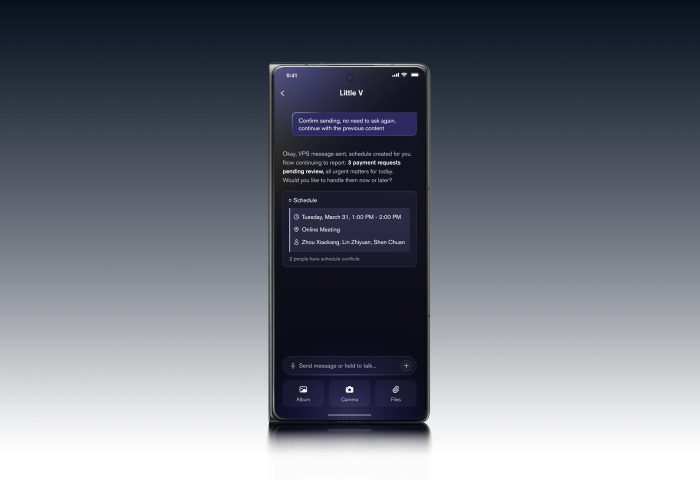
VERTU presents VPS as an AI-native enterprise interface. Its public page shows business context, knowledge, project tasks and customer conversation examples. This makes it relevant to executives seeking an assistant that works across authorised business context. A buyer should verify the particular sources, permissions, available actions and approval steps in their proposed configuration. The public page is not evidence that every possible integration is available by default.

There is no measured labour-saving figure for the business or VERTU deployment described here. To produce one, select five repeatable tasks, run ten representative cases for each, and record human-only time, assisted time, correction time, accuracy and any escalation. That creates a 50-case pilot design, not a claim that 50 tasks can be automated or that a specific number of hours will be saved. Repeat the sample after permissions, source documents or workflows change.
| Task | Cases | Human-only minutes | Assisted minutes incl. review | Verified result |
|---|---|---|---|---|
| Policy lookup | 10 planned | Measure | Measure | Correct source and answer? |
| Meeting brief | 10 planned | Measure | Measure | Missing decisions? |
| Customer draft | 10 planned | Measure | Measure | Human-approved text? |
| Task routing | 10 planned | Measure | Measure | Right owner? |
| Exception review | 10 planned | Measure | Measure | Correct escalation? |
Measure results after the pilot starts
Write an escalation contract
Define the circumstances in which the assistant should ask for missing information, route the request to a person or stop. Include a named destination and a useful hand-off note: what the user asked, which sources were checked and what remains uncertain. A dead-end refusal frustrates users, while an overconfident continuation can spread an error. Test the hand-off during working hours and when the usual owner is unavailable.
Review changes to the source environment
An assistant may perform well in a pilot and degrade when a policy is replaced, a folder moves or an integration loses access. Assign someone to review failures and update the test set after these changes. Keep the correction record close to the workflow owner so that the business can judge whether an answer remains useful, not merely whether the system returns a response.
Record the baseline time and error rate for the chosen task. After launch, measure time saved only for answers that users can verify and use. Count corrections, inappropriate disclosures, failed escalations and the effort to maintain sources. Review a sample each week, especially after a policy or workflow changes. A good assistant should become easier to trust because its limits and corrections are visible.
NIST's AI Risk Management Framework emphasises defined tasks, ongoing measurement and human oversight. For a business assistant, that translates into a clear task contract, a representative test set and a person who owns the response when the assistant cannot complete the work safely.
FAQ
Can a virtual assistant act without approval?
That depends on the action and the organisation's rules. Read-only answers and drafts may need less control than changes to official records or external messages. Define approval per action and test it.
Does an AI assistant need access to every company system?
No. Give it only the sources needed for its task and enforce the requester's permissions. Broad access can make both answers and governance harder to manage.
How should we handle wrong answers?
Capture the question, sources and output; identify whether the problem came from a stale record, missing document, retrieval or model behaviour; then retest after correction.
Conclusion
Evaluate an ai powered virtual assistant through a real task with known sources, permission boundaries and a named reviewer. The best result is a useful answer or prepared action that people can verify, correct and approve at the right moment. Begin with a small pilot and expand only when that standard holds under ambiguous and difficult cases.