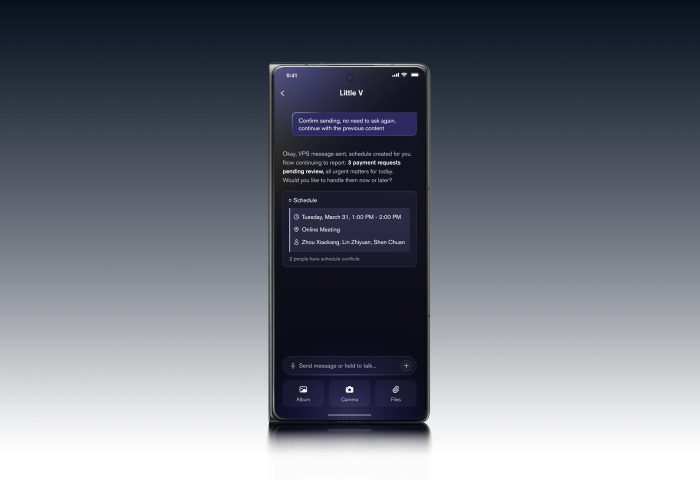
A task management app should make the next action clear when work moves between a desk, a meeting and a phone. The useful test is whether an owner can capture an action, see its context, respond to a change and confirm completion without creating a second, conflicting record.
Key Takeaways
- Test capture, ownership, reminders and review in a real workday, not only a product demonstration.
- Check how the app behaves across devices, weak connections and notification overload.
- Separate a personal checklist from work that needs shared evidence and approval.
- Choose adoption measures such as missed hand-offs and time to accepted completion over download counts.
What should a task management app do?
At its simplest, the app records a task, an owner and a due point. Team work adds context: what outcome is expected, where supporting information lives, who can change the task and what counts as done. A useful app lets people act on that information at the moment of work. If it merely sends reminders while the decision lives in another channel, the team still has to reconcile two versions of the truth.
Start with three journeys. First, capture a new request while away from the desk. Second, find the current owner and next step after a meeting changes priorities. Third, close the task with enough evidence for the requester to accept it. Ask different users to complete all three without a guided tour. Their mistakes and workarounds reveal more than a feature list.
Mobile use: capture without losing context
Mobile entry should be fast, but speed is not enough. A title such as “follow up” is almost useless a week later. An effective capture flow keeps the outcome, owner, relevant project and deadline visible. If the user cannot add those details immediately, the app should make incomplete items easy to revisit before they become invisible backlog.
Examine the small moments: Can a user identify a task from a notification without opening several screens? Is an accidental tap recoverable? Does the app explain what has synchronised after connectivity returns? These are evaluation questions, not promises that every product supports offline editing. Test them on the devices and networks the team actually uses.

Notifications that prompt decisions
More alerts do not necessarily mean better follow-through. Map each notification to a decision: an assignment asks the owner to accept or clarify; an approaching deadline asks whether the plan needs to change; a review request asks the approver to accept, return or escalate. If an alert offers no clear action, it is a candidate for a digest or removal.
During a pilot, record the number of alerts that cause useful action, the number ignored and the reasons. Check quiet hours, delivery controls and the visibility of urgent work. A reminder policy should distinguish a task that is merely due from a task blocking a customer or another team. Otherwise the loudest workflow wins attention, regardless of importance.
Personal tasks and shared work need different controls
A personal checklist may need only a name, date and completion mark. Shared work needs accountable ownership, permissions, status definitions and a review trail. The same app can support both if it makes the boundary clear. A team should know when a private note becomes an assigned commitment and who may see related information.
Define a small status vocabulary before rollout. For example: proposed, accepted, in progress, blocked, in review and completed. Agree who can move an item into each state and which states require a reason or evidence. This prevents a reassuring “done” label from hiding unfinished approval. Keep the rules proportionate; a routine reminder does not need the governance of a contract sign-off.
How to test cross-device consistency
- Create: add a task on one device with an owner, due date and source.
- Change: update its priority or deadline during a meeting on another device.
- Notify: verify that the right person sees the change, and that an outdated alert does not mislead them.
- Resolve: attach or link evidence, request review and confirm that all users see the accepted outcome.
- Recover: repeat a change after a poor connection or accidental edit and examine what the app reports.
Record each failure as a workflow issue, a configuration issue or a product limitation. That distinction matters: an interface can be sound while unclear ownership rules still create duplicate tasks. Also test accessibility with the people who will use the app. Readable text, clear labels and keyboard or assistive technology support affect daily adoption.

Where VPS fits in the evaluation
VPS presents an AI-native business environment that connects project tasks with wider business context, including Business 360. That positioning can be relevant when a team wants more than a standalone personal checklist. Evaluate the current product experience against the journeys above rather than assuming any particular mobile, offline, integration or automation capability. Verify access, permissions and commercial terms directly before committing a team.
For a broader buying framework, read our task management software guide. If the problem is missed updates across a team, the task tracking workflow guide offers a closer look at ownership and hand-offs.
A two-week adoption pilot
Choose one team with a repeatable workflow and a manageable number of tasks. Set a baseline for missed hand-offs, time from assignment to acceptance, overdue tasks and the number of places people check for status. Then run the same work through the app for two weeks. Avoid using download count or daily opens as the main success measure; activity can rise while clarity falls.
At the end, interview the requester, task owners and reviewers separately. Ask which information they trusted, which alerts helped and where they returned to chat or a spreadsheet. Review a few completed tasks for proof of acceptance. Expand only when the app saves coordination effort without burying people in administration.
Frequently asked questions
What is the difference between a task app and a to-do list?
A to-do list usually helps one person remember actions. A team task app can also coordinate ownership, shared status, context, review and permissions. The product label matters less than the workflow it reliably supports.
Should every task have a due date?
No. Use a date when timing affects a decision or dependency. For other work, a priority and a regular review may be more honest than an arbitrary deadline.
How many notifications should we enable?
Start with assignments, meaningful changes, blockers and requests for review. Add alerts only when a pilot shows they lead to action; let routine updates use a digest where suitable.
Can an app replace team meetings?
It can reduce meetings held only to reconstruct status. Complex decisions and trade-offs may still need conversation; record the agreed action and owner afterward.
Conclusion
Pick a task management app by observing ordinary work across devices: capture, ownership, changed priorities, useful reminders, review and accepted completion. A short pilot should show that people trust the same current record and spend less time chasing updates. The best choice is the one your team can use consistently when a busy day disrupts the plan.