


Introduction
Your phone is now the most exposed asset you carry.
In 2026, that’s not because you’re careless. It’s because modern attacks don’t need you to click anything, don’t need your laptop, and don’t need to break into your home. A well-timed message preview, a carrier account change, or a minute of physical access can be enough.
This guide is a deployment playbook: how to choose a secure smartphone, harden it, run a private communications stack, and operate safely during travel.
It’s written for you and the people who actually keep your life moving: your family office, protection team, and the executive assistants who end up owning “make it work” when the unexpected happens.
Key TakeawayTreat your phone like a high-value access badge. The device matters, but the operating model matters more.
Your risk landscape
Targeted spyware and zero-click threats
If you’re a predictable target, your highest-risk events rarely look like “hacking” on the surface.
They look like a normal day: an inbound message, a missed call, a calendar invite, a hotel Wi‑Fi prompt. The goal isn’t to smash and grab. It’s to persist quietly and collect.
Apple describes Lockdown Mode (Apple Support) as an “extreme, optional protection” designed for the small set of people who may be personally targeted by sophisticated attacks. That framing matters: if you don’t think you’re in that group, don’t break your daily workflow for security theatre. If you are, you should consider controls that reduce attack surface even if they feel strict.
For most people reading this, the decision is practical: enable iPhone Lockdown Mode during higher-risk periods (travel weeks, high-profile negotiations, custody uncertainty), and run a normal profile the rest of the time.
What you do about it is less about paranoia and more about pre-commitment:
Decide in advance when you will operate in hardened mode (travel weeks, high-profile negotiations, custody uncertainty).
Reduce the number of apps and accounts that can become a pivot point.
Make it easy for your support team to reset and re-provision quickly.
How to verify: You are taking the right threat model seriously if your plan includes “what we do when the phone is suspicious” — not just “how we lock it down.”
SIM swap and number-port fraud
For high net worth individuals, carrier fraud is less an annoyance and more a gateway drug.
If someone can move your number to a SIM they control, they can intercept SMS-based logins, reset accounts, and pressure staff into “just approving” a request that looks legitimate.
Call it what it is: SIM swap protection is a control surface, not a checkbox.
The FTC’s consumer guidance on SIM swap scams (FTC Consumer Advice) and the FCC’s alert on port-out fraud (FCC) converge on the same principle: add friction at the carrier and remove SMS as a recovery channel anywhere it matters.
Theft, passcode capture, and doxxing pressure
A stolen device is not just a hardware loss.
If your passcode is observed (or coerced), the theft becomes an account takeover attempt. Apple introduced Stolen Device Protection to specifically reduce the impact of a stolen iPhone when the passcode is known, by requiring biometrics and imposing a security delay for high-risk changes in unfamiliar locations.
Doxxing and social pressure add a different risk: the attacker may not need to defeat cryptography. They may only need a moment where you’re tired, in public, and someone is “helping.” The defensive move is to reduce what can be done quickly on-device and to route high-risk actions through a slower, verified process.
Pick the right platform
There is no perfectly secure phone.
There is a phone whose security architecture you can explain, whose updates arrive reliably, and whose failure modes you can manage.
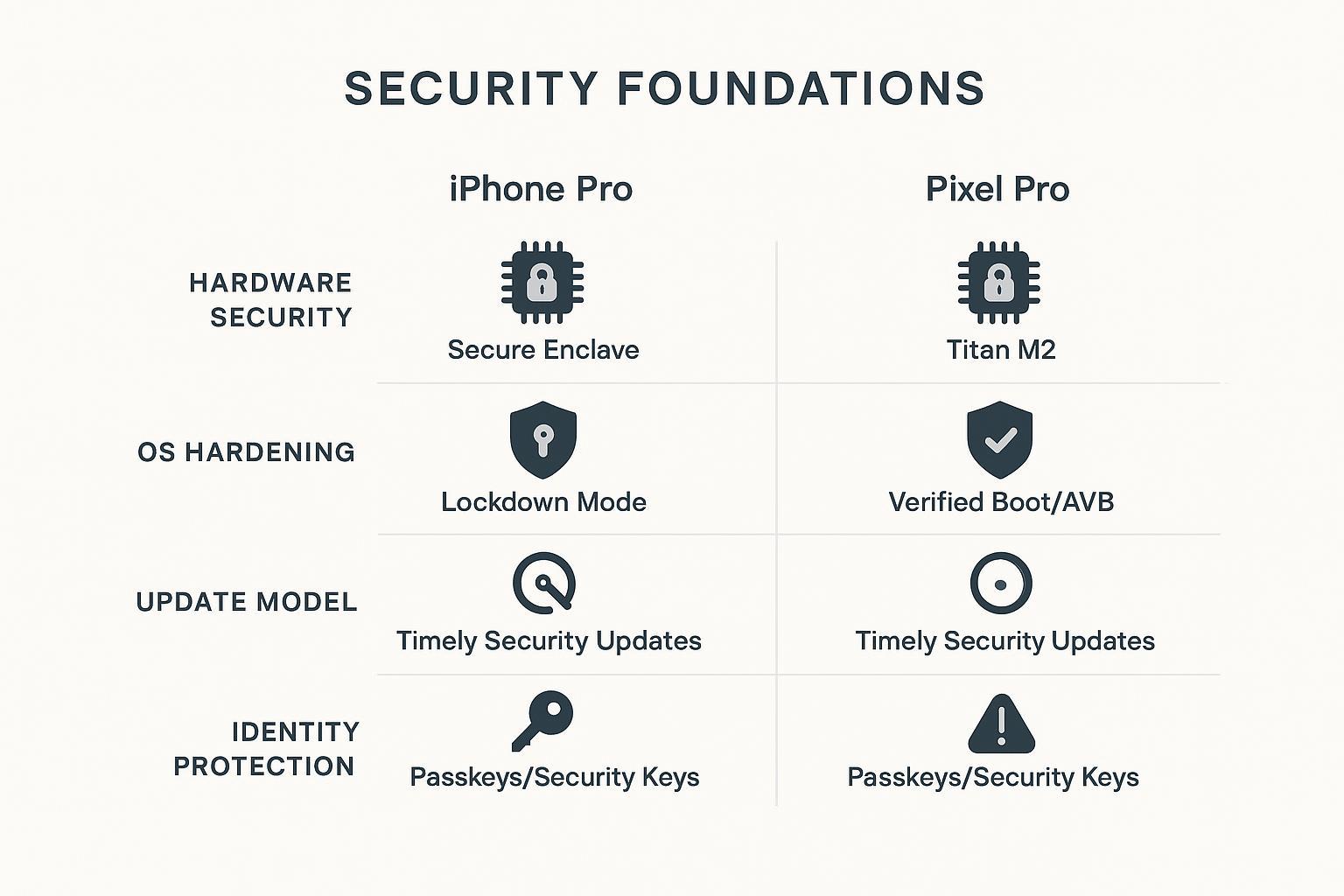
iPhone Pro with Lockdown Mode and SDP
An iPhone Pro-class device is a strong default when you want consistent security updates and a mature ecosystem of protective features.
For high-risk users, two options are worth treating as “baseline when appropriate,” not as exotic add-ons:
- Lockdown Modereduces attack surface by restricting common vectors (attachments, web technologies, inbound requests), as described in About Lockdown Mode (Apple Support).
- Stolen Device Protectionadds biometric-only gates and a delay for high-impact account changes, per Apple’s Stolen Device Protection guidance.
Cloud posture matters too. Apple’s iCloud data security overview (Apple Support) explains Advanced Data Protection, which expands end-to-end encryption to more iCloud categories. The key operational point: you’re trading “Apple can help recover” for “Apple can’t access.” Your team needs a recovery plan.
Pixel Pro with Titan M2 and Verified Boot
A Pixel Pro-class device is compelling when you want an Android flagship with a clear, security-forward narrative.
On Android, focus on the chain of trust: you want confidence that the device is booting untampered software.
The Android Open Source Project documentation on Verified Boot (AOSP) frames it plainly: the goal is ensuring the device runs software from a trusted source rather than something modified by an attacker.
Pixel devices add a hardware-backed security layer (commonly referred to as Titan M2) that supports verified boot, key protection, and brute-force resistance. This matters most when your threat model includes physical access windows.
Lifestyle fit and support model trade-offs
The right answer is the one your life can sustain.
If your inner circle is predominantly iMessage/FaceTime, an iPhone simplifies coordination.
If your security team already standardizes Android management and policies, a Pixel can be easier to govern.
If you frequently travel, your operational resilience (replacement, provisioning, and support responsiveness) can matter more than marginal hardware differences.
Secure setup and authentication
This section is about controls you can enforce.
Not “settings to consider,” but the baseline you and your support team can standardize.
Secure smartphone for high net worth individuals: setup checklist
This is the implementation core of the guide. Your objective is a device posture your assistant team can reproduce, and your security lead can audit.
Baseline device hardening you can enforce
Start with a clean foundation.
Start from a known-good state
If the phone is new, that may mean “set up as new” rather than restoring everything automatically. If the phone has been out of custody, reset it.
Done when: you can account for every installed app, every profile, and every account on the device.
Lock screen discipline
Use a long passcode (not 4 digits). Reduce what’s visible on the lock screen (message previews, sensitive widgets). Set a short auto-lock.
Done when: a stranger looking at your locked phone learns nothing useful.
Update posture
Enable automatic security updates and install them promptly. Many targeted campaigns rely on known, already-patched vulnerabilities.
Done when: your OS version is current and update prompts are not “someone’s problem later.”
App surface reduction
Every app is a potential attack path.
Keep an allowlist mentality: fewer apps, fewer permissions, fewer third-party keyboards, fewer “helper” VPNs, fewer message clients.
Done when: you can name why every app is on the phone.
Phishing-resistant sign-in with passkeys and security keys
Passwords are not enough for high-risk accounts.
CISA frames phishing-resistant MFA as the “gold standard” in its guidance on More than a Password (CISA) and its fact sheet on implementing phishing-resistant MFA. The practical takeaway is simple: prefer authentication methods that bind to the real site and can’t be replayed to a fake one.
Your hierarchy for high-value accounts (email, Apple/Google account, password manager, banking portals) should be:
Passkeys where supported.
Hardware security keys for your most sensitive accounts.
Operationally, make this survivable:
Register at least two authenticators (a primary and a backup) and store the backup securely off-person.
Eliminate SMS as a recovery method for critical accounts.
Train your assistant team on what a legitimate sign-in prompt looks like and what “never approve” means.
Carrier controls against SIM swaps
Do not treat this as a “call the carrier once” task.
Treat it as a control with verification.
Set a carrier account PIN / passcode.
Enable number/port-out locks where available.
Require in-person verification for changes when feasible.
Done when: the carrier cannot move your number without an additional factor you control.
See SIM swap scams (FTC Consumer Advice) and port-out fraud (FCC).
Private communications stack
The goal is not “encrypt everything.”
The goal is to reduce how many parties can see content, and to make account takeover measurably harder.
Signal first, iMessage with CKV for Apple contacts
For sensitive 1:1 and small group coordination, make Signal your default.
For Apple-heavy circles, iMessage can be reasonable — but you should harden it.
Apple’s security engineering team describes iMessage Contact Key Verification (Apple Security Research) as a mechanism to help detect sophisticated attacks against iMessage key distribution and to let users verify they are messaging who they think they are.
This is not a magic shield.
It’s a targeted protection against a specific class of high-end adversary behavior. It belongs in a high-risk playbook.
Collector’s note: If your private circle insists on iMessage, treat CKV as the “quiet upgrade” that matters for principals who are predictable targets.
Passwords, email, and vetted app allowlists
Three decisions reduce your exposure quickly:
Use one password manager, and treat it as a crown jewel.
Lock it behind passkeys/security keys where possible. Require a strong master password. Keep recovery codes offline.
Separate “public” from “private” inboxes.
The inbox used for travel bookings and vendor coordination should not be the inbox used for financial resets. You’re reducing blast radius.
App allowlist > app cleanup.
Instead of periodically deleting apps, define which categories are allowed at all: communications, travel, banking, identity, and a small number of approved utilities.
Network hygiene at home, office, and travel
Network discipline is boring. That’s why it works.
Avoid public Wi‑Fi for sensitive work.
Use a trusted hotspot or managed connectivity.
Keep Bluetooth off unless required.
VERTU’s field-oriented guidance for high-profile travel emphasizes custody and network hygiene as core controls, including avoiding public Wi‑Fi and enforcing strict app sources. See its secure communication phones for VIPs guide (VERTU).
Pro Tip“Auto-join” is an attack surface. Turn it off and delete venue networks after major events.
Travel and border protocols
This is where most security plans fail.
Travel compresses time, breaks routines, and creates custody gaps. You need a protocol you can execute when you’re tired.
Pre-travel clean device and briefing
For higher-risk trips, consider a “clean travel device” posture.
That means:
Minimal apps.
Minimal contacts.
Separate accounts where possible.
Pre-staged recovery plan held by a trusted team member.
Done when: if the device is lost on day one, your core accounts are still safe and your team can recover operations quickly.
At checkpoints and in-country operations
Assume the phone is observed.
Reduce what can be read or triggered from the lock screen. Keep radios conservative. If you must join a network, treat it as hostile and use a VPN.
If something feels wrong — a sudden service loss, unexpected prompts, a device behaving strangely — your best move is often to stop making it “work” and isolate it.
Post-travel integrity checks and resets
Post-travel is not “go back to normal.”
It’s an integrity check.
Rotate credentials used during travel.
Remove temporary eSIMs and travel VPN profiles.
If custody was uncertain, reset and re-provision.
Treat this as travel phone security hygiene: you’re closing out a high-risk operating period and returning to a known-good state.
VERTU’s travel-oriented deployment playbook includes the blunt but useful standard: if the principal isn’t holding the phone, treat it as a security event and consider factory reset and re-provisioning when risk is elevated.
Concierge operations and SLAs
Security for high net worth individuals is not just “settings.”
It’s service.
If your phone fails during a travel week, the question isn’t whether you know what Verified Boot is. The question is whether your team can restore a trusted device quickly without improvising in public.
Bespoke provisioning and rapid replacement
A concierge-grade operating model looks like this:
Devices are provisioned to a standard (apps, accounts, recovery, carrier locks) before they ever reach you.
Replacement is planned: spare device(s), known-good configuration, pre-staged credentials.
Transfers are controlled: you don’t hand a phone to a hotel staff member to “help.”
In this context, VERTU can be used as a practical reference point for service access patterns. VERTU describes concierge services accessed via the Ruby Key and offered 24/7 in its overview of VERTU local guide and concierge services. The security lesson isn’t “buy X.” It’s that your support model should be reachable instantly and should have a clear handoff process when you need help.
24/7 incident response playbooks
Define in writing what happens when something goes wrong.
A minimal incident playbook covers:
Lost phone.
Suspected spyware (strange prompts, battery/network anomalies, unknown profiles).
SIM swap / service loss.
Border event / custody uncertainty.
Done when: your EA can trigger the process and your security lead can execute it without waiting for you to make decisions.
Legal liaison and border event handling
Border events are operational, legal, and human.
Your team should decide in advance:
Who speaks at checkpoints.
What devices/accounts travel.
When the right move is to power down, isolate, and replace.
Keep this practical and jurisdiction-aware. This guide is not legal advice; treat it as a trigger for counsel-approved playbooks.
Conclusion
You don’t need a “perfectly secure” phone.
You need a secure smartphone blueprint your life can sustain.
Choose a platform with a clear security architecture and reliable updates.
Enforce baseline hardening and phishing-resistant authentication.
Treat carrier security and account recovery as first-class controls.
Run a communications stack designed for takeover resistance.
Operate a travel protocol that assumes custody gaps.
Back it all with a service model: provisioning, replacement, and incident response.
Next steps:
Have your assistant and security lead run a one-hour “device posture review” quarterly.
Standardize your recovery kit (backup security key, offline recovery codes, spare device plan).
If you want a concierge-grade support layer, define the SLA first: response time, replacement time, and escalation paths. (Some owners use VERTU Concierge as a reference model for 24/7 availability; the operational discipline is the real win.)
Disclosure: This article references VERTU pages. Editorial judgment remains the priority.


