

Introduction
A private phone isn’t just a “secure phone.” It’s a program: device choice, operating-system controls, number ownership, and a travel playbook that still works when you’re exhausted and moving fast.
In 2026, business leaders are targeted for speed and leverage. A single compromised mailbox, one hijacked phone number, or one silent mobile implant can expose board materials, derail a transaction, or trigger wire fraud.
This guide is designed to help you buy and configure executive mobile security without turning the phone into a daily annoyance. You’ll get a practical evaluation framework and a setup path your team can maintain.
If you’re evaluating a private phone for business leaders, treat the first week as a test of operational reality: patching speed, number protections, and whether your assistant can execute recovery without improvisation.
Use it in a short working session with your CISO (controls), IT (deployment and mobile device management), and your executive assistant (delegation and recovery). If a control can’t survive delegation, it won’t survive reality.
Key TakeawayA private phone program wins on three things: fast patching, number control, and a recovery path that doesn’t rely on SMS.
The 2026 mobile threat picture
Zero-click spyware and messaging/baseband exploits
The most dangerous category for executives is the compromise that doesn’t require a mistake. Zero-click attacks typically arrive through messaging, calling, or media parsing, then pivot into higher-privilege components.
You can’t train your way out of that risk. Your controls need to reduce attack surface and shorten the time a known weakness stays open.
On iPhone, Apple frames Lockdown Mode as an “optional, extreme protection” for the very small number of people who may be personally targeted by sophisticated threats, and it does that by restricting functionality across Messages, web browsing, FaceTime, configuration profiles, and more (Apple Support: About Lockdown Mode, 2026).
For many executives, the operational use-case is “high-risk windows,” not permanent activation: sensitive travel, negotiations, or a suspected targeting event.
SIM and eSIM swap and port-out fraud exposure
Number takeover is still treated like “carrier support” until it happens. In practice, it’s an identity breach.
SIM swapping and port-out fraud aim for the same outcome: control your number long enough to intercept one-time codes and reset accounts. The U.S. FCC describes how port‑out fraud transfers a victim’s phone number to another provider without authorization and can enable account takeovers (FCC consumer alert on port‑out fraud).
If your executive identity still relies on SMS for recovery, your phone number is effectively a master key.
Cross-border risks and travel-time attack surface
Travel increases risk because you’re on unfamiliar networks, you’re rushed, and your device is more likely to be handled by other people.
Border crossings also create their own constraints. The ACLU’s guidance on device searches focuses on practical minimization: carry less data, reduce what’s locally stored, and treat the “clean phone” approach as a real option for high-risk travel (see ACLU guidance on border device searches).
Device selection and OS hardening
Device selection is not about “most secure.” It’s about the device your organization can keep:
patched,
policy-enforced,
recoverable,
and usable.
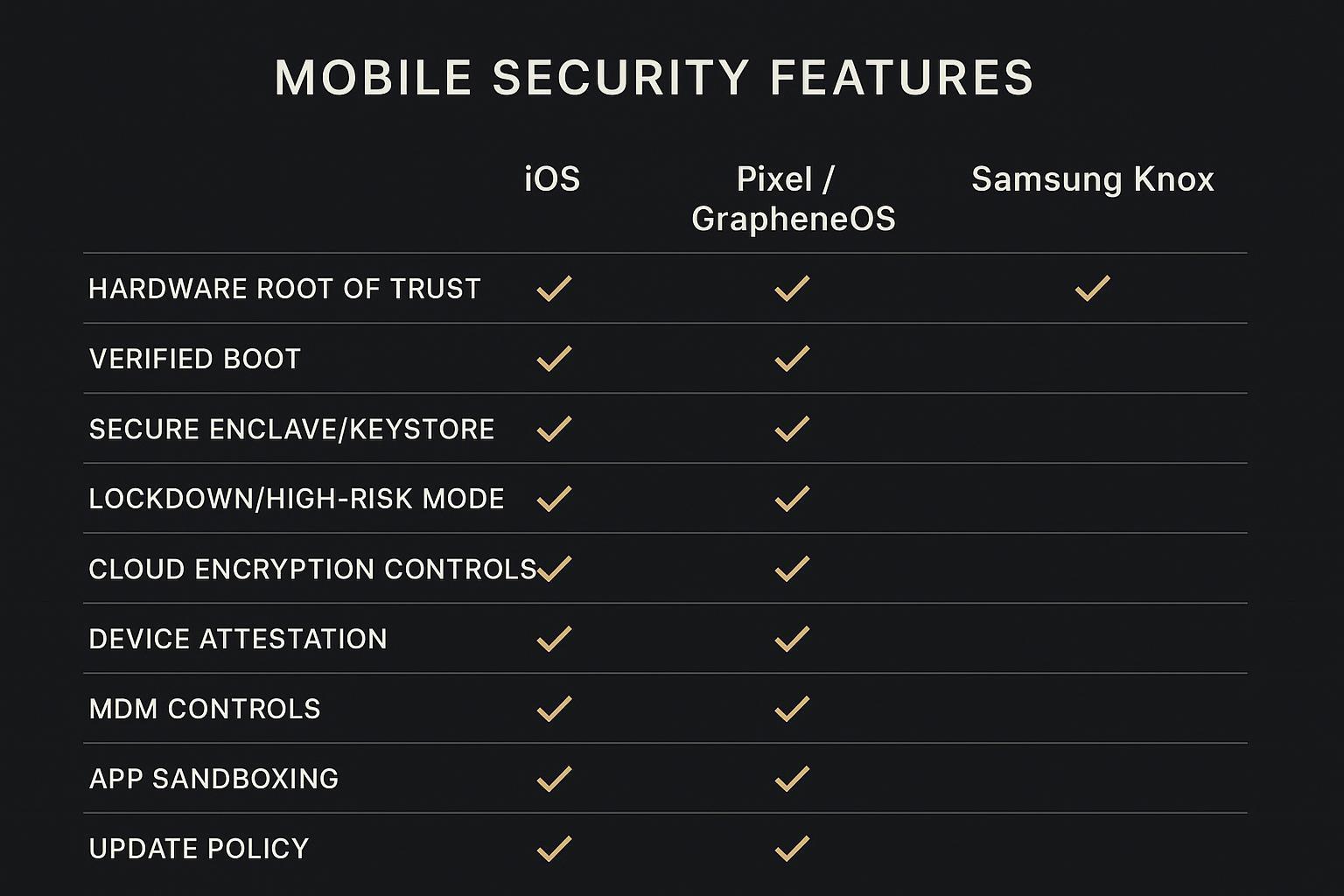
Below is a pragmatic comparison of three mainstream paths.
iPhone 15/16 Pro: Lockdown, Stolen Device Protection, ADP, CKV
iPhone remains the most common executive baseline because it’s operationally consistent: predictable updates, mature MDM, and a clear set of controls.
A high-signal configuration for 2026:
- Stolen Device ProtectionApple explains it adds security when the phone is away from familiar locations, and can require biometric-only checks plus a one-hour security delay for sensitive actions (including some account changes) (Apple Support: About Stolen Device Protection).
- Advanced Data Protection (ADP)ADP expands end-to-end encryption to most iCloud categories, while iCloud Mail, Contacts, and Calendar remain not end-to-end encrypted due to interoperability needs (Apple Platform Security: Advanced Data Protection for iCloud). That matters for executives because email and calendars often contain the most sensitive timeline data.
- iMessage Contact Key Verification (CKV)Apple describes CKV as an additional layer that helps detect sophisticated threats against iMessage servers and helps verify you’re messaging the intended person (Apple Support: About iMessage Contact Key Verification, 2026).
A simple rule: if your team standardizes on iPhone, standardize the security posture too. “Some executives harden, some don’t” creates the weakest-link problem.
Collector’s note: The best executive phone is often the one your team can recover fast. A stronger setup that breaks workflows becomes a liability during travel.
Pixel 8/9 or GrapheneOS: Titan M2, verified boot, reduced services
The Pixel path is usually chosen when an organization wants Android flexibility with strong platform integrity signals.
At the platform layer, Android’s integrity story starts with Verified Boot, which the Android Open Source Project describes as cryptographically verifying the OS code and data before use, with rollback protection to prevent downgrades to vulnerable versions (Android AOSP: Verified Boot documentation).
GrapheneOS is a separate choice. Its documentation emphasizes reducing attack surface and strengthening exploit resistance (for example, hardened memory allocation and reduced services) while staying compatible with many Android apps (GrapheneOS features overview).
The tradeoff is supportability. If you pick a less common executive configuration, you need a real support model for app compatibility, updates, and emergency recovery.
Samsung Galaxy S24/S25: Knox Vault and Suite controls
Samsung’s enterprise posture is anchored in Knox.
Two components are especially relevant in a consideration-stage evaluation:
- Knox VaultSamsung describes it as an isolated secure subsystem with its own processor and memory for storing sensitive secrets (including keys) and designed to remain protected even if the main OS is compromised (Samsung Knox docs: Knox Vault).
- Integrity attestationSamsung’s Device Health Attestation is positioned as a way for enterprises to detect compromised devices (for example, rooted or running unofficial firmware) and act before granting access (Samsung Knox: Device Health Attestation deep dive).
If your organization already runs Samsung, the question is often “tighten controls.” If you don’t, the question is “introduce a second executive platform, or standardize?”
Numbering and eSIM strategy
Most executive compromises that turn into real financial harm include an identity handoff: the attacker gets control of the number and then resets the accounts.
Treat numbering as architecture, not a billing detail.
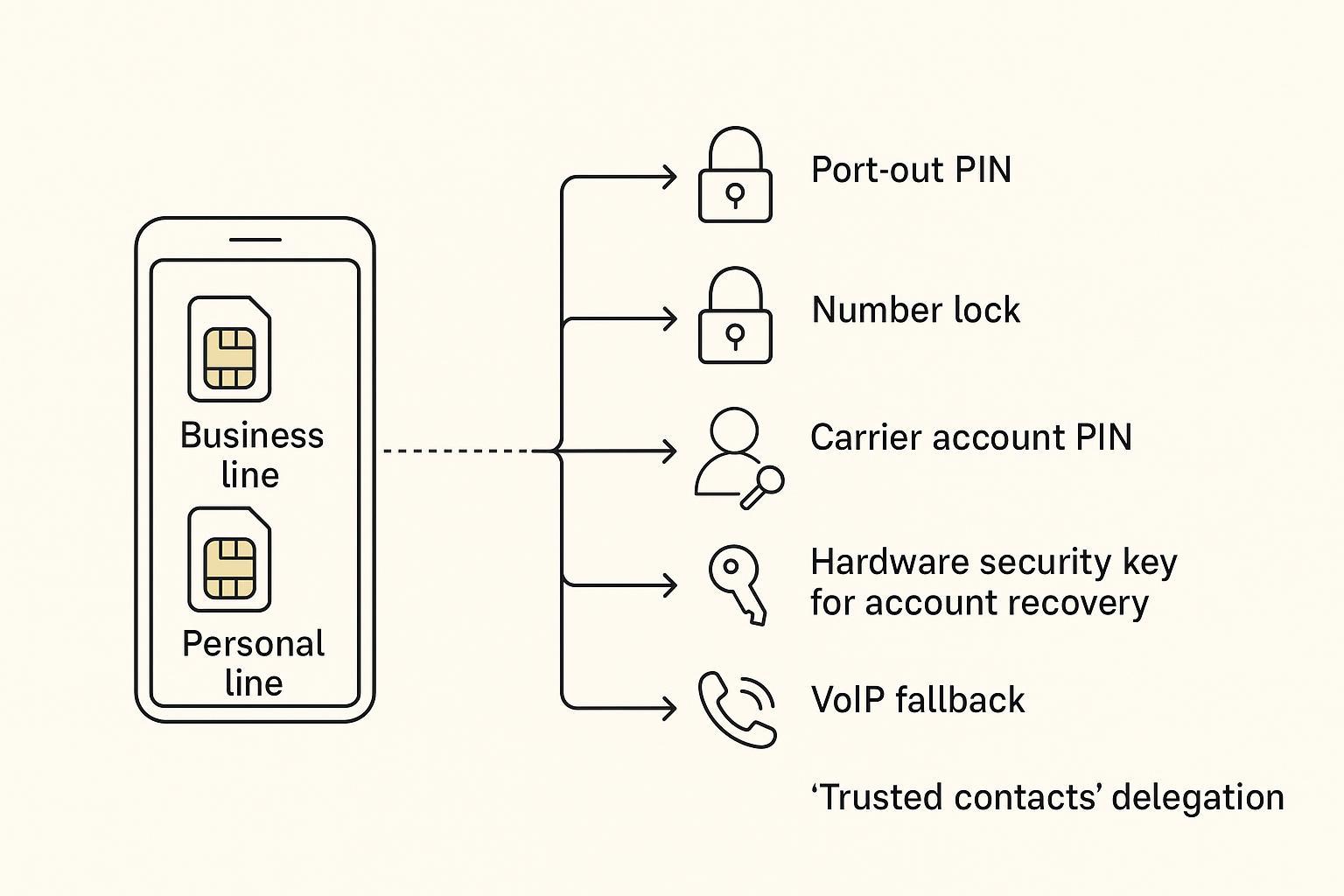
Dual-line design: business, personal, and travel separation
A clean executive model uses separation without turning the executive into a device juggler:
- Business linecorporate identity, managed apps, and audited access.
- Personal linefamily and personal services.
- Travel data eSIMconnectivity abroad, ideally data-only, so your primary numbers stay stable.
The point is blast radius. If one line is attacked or needs to be frozen, the executive doesn’t go dark.
Carrier safeguards: port-out PINs and number independence
Your carrier controls should be standardized across the executive group.
Minimum baseline in the U.S.:
carrier account PIN/passcode set and stored securely
port-out protection / number lock enabled
immediate alerts for SIM/eSIM changes and porting requests
The FCC’s guidance on port‑out fraud is a clean way to justify these requirements in policy language, especially when you’re explaining them to non-technical stakeholders.
Recovery and delegation: hardware keys and VoIP fallbacks
A private phone program that doesn’t plan for recovery is not a private phone program.
Design for:
hardware security keys (FIDO2) for key accounts
a documented “break glass” process approved by your security team
a VoIP fallback number protected by hardware keys, not SMS
Delegation is where most executive setups quietly fail. Your executive assistant needs a defined role in the recovery workflow that doesn’t require sharing master credentials.

MDM, attestation, and compliance
If the goal is one hardened phone, you can do it manually.
If the goal is an executive program, you need enforceable policy and auditable integrity.
Policy baseline: updates, allowlists, per-app VPN, DNS filtering
A practical baseline is boring by design:
updates enforced on a tight window
allowlists for managed apps
per‑app VPN for sensitive apps
DNS filtering to reduce exposure to known malicious infrastructure
NIST’s mobile security guidance emphasizes establishing secure configuration baselines and managing mobile devices across their lifecycle (see NIST SP 800‑124r2 draft).
Device integrity: Apple Managed Attestation, Play Integrity, Knox Attestation
Policy without integrity checks is guesswork.
Apple describes Managed Device Attestation as a mechanism for devices to request attestations from Apple’s attestation servers that can be used in trust evaluation for managed devices.
On Android, the Play Integrity API is designed to help verify that requests come from a genuine app installed via Google Play and running on a genuine, certified device.
On Samsung fleets, Knox attestation signals can help identify compromised devices before allowing access.
The program decision here is not “which attestation is best.” It’s “which signals can we enforce consistently, and what do we do when a device fails?”
Executive service enablement
Executives don’t want “more security.” They want fewer interruptions and fewer disasters.
A mature program builds a service layer that helps the executive follow the rules under pressure:
a structured hardening session (accounts, recovery methods, travel profile)
repeatable eSIM/travel provisioning support with changes documented
24/7 escalation for lost devices, suspected number takeover, and emergency credential rotation
A concierge-style support model can fit here when it’s used as operations, not marketing. For example, a 24/7 assistance channel like VERTU Concierge can be treated as an execution layer for approved playbooks, while your CISO retains policy ownership.
Secure communications and travel
Even with a hardened device, the weak points are usually accounts and habits.
Encrypted messaging: Signal, iMessage with CKV, WhatsApp settings
Standardize one “sensitive channel,” then configure it aggressively.
Signal is a common default for sensitive conversations.
iMessage + CKV can be relevant for a narrow, sophisticated threat model, especially in iPhone-standardized organizations.
WhatsApp can be used, but you should treat backup settings and device list reviews as the high-risk points.
How to verify: For your standard messaging app, confirm registration protection (PIN), device list review (remove unknown devices), and backup behavior (end-to-end encrypted where supported, or disabled for sensitive threads).
Executive identity and email: passkeys, security keys, minimal email risk
Email is still the universal recovery channel, which makes it a universal target.
Move high-value accounts toward passkeys and hardware keys where supported, and reduce what your lock screen reveals (subjects, preview text, and calendar details).
Travel playbook: clean phone, eSIM data-only, biometrics off at borders
The travel playbook should be written down and drilled.
A defensible baseline:
clean phone posture for higher-risk trips: minimize local data; sign out of non-essential accounts
- data‑only travel eSIMkeep primary numbers stable
- border posturecoordinate with legal counsel; minimize what’s locally accessible if the device is inspected
Conclusion
A private phone program isn’t one purchase. It’s a quarterly set of decisions that reduces risk while keeping the executive moving.
Key decisions to make this quarter:
choose and standardize your executive platform (iPhone hardening, Pixel/GrapheneOS posture, or Samsung Knox)
implement numbering controls (locks, PINs, alerts) and test recovery
enforce an MDM baseline with integrity signals
formalize a travel playbook and practice it
Measurable outcomes to track:
fewer account recovery incidents driven by number takeover
faster containment when a device is lost or suspected compromised
higher executive uptime with fewer security-driven interruptions
Next steps to operationalize:
run a 30-minute tabletop exercise with your CISO and executive assistant using this guide
pilot with one executive for 30 days, then roll out with a documented setup and recovery checklist
Disclosure: This article references a VERTU page. Editorial judgment remains the priority.
![Top 10 Tourbillon Watches for Men [2026 Latest]](https://cdn.sanity.io/images/e0gp1l2g/production/8cb6bc45133cf9453382fc7d074465af588bb610-1800x1080.webp?w=180&h=180&q=78&auto=format&fit=crop)
![Top 10 Tourbillon Watches for Men [2026 Latest]](https://cdn.sanity.io/images/e0gp1l2g/production/8cb6bc45133cf9453382fc7d074465af588bb610-1800x1080.webp?w=800&h=450&q=82&auto=format&fit=crop)

![Top 10 Anniversary Gift Watches for Men [Full Guide]](https://cdn.sanity.io/images/e0gp1l2g/production/00dfa030a876edbe6ea7b146f6b1d8197c7656b0-3840x1860.webp?w=800&h=450&q=82&auto=format&fit=crop)