


Introduction
World Cup week compresses a year’s worth of risk into a few hours: crowded transit, unfamiliar networks, VIP hospitality zones, and constant attention. If you’re responsible for executive protection or VIP handling, the phone is both a lifeline and a liability.
This guide is for protection teams, advance staff, and security directors who need a clear way to select secure devices and run them safely in the field.
You’ll leave with:
a practical threat model for stadium-scale events
defensible device selection criteria
a short list of device “picks” by use case
hardened settings and an operational playbook you can hand to the team
Primary focus: secure communication phones for World Cup VIPs and how to deploy them without turning the handset into a tracking beacon.
Key TakeawayTreat phones as part of the protective detail. The best device fails if custody, radios, and account access aren’t controlled.
Event threat model
Cellular interception and tracking
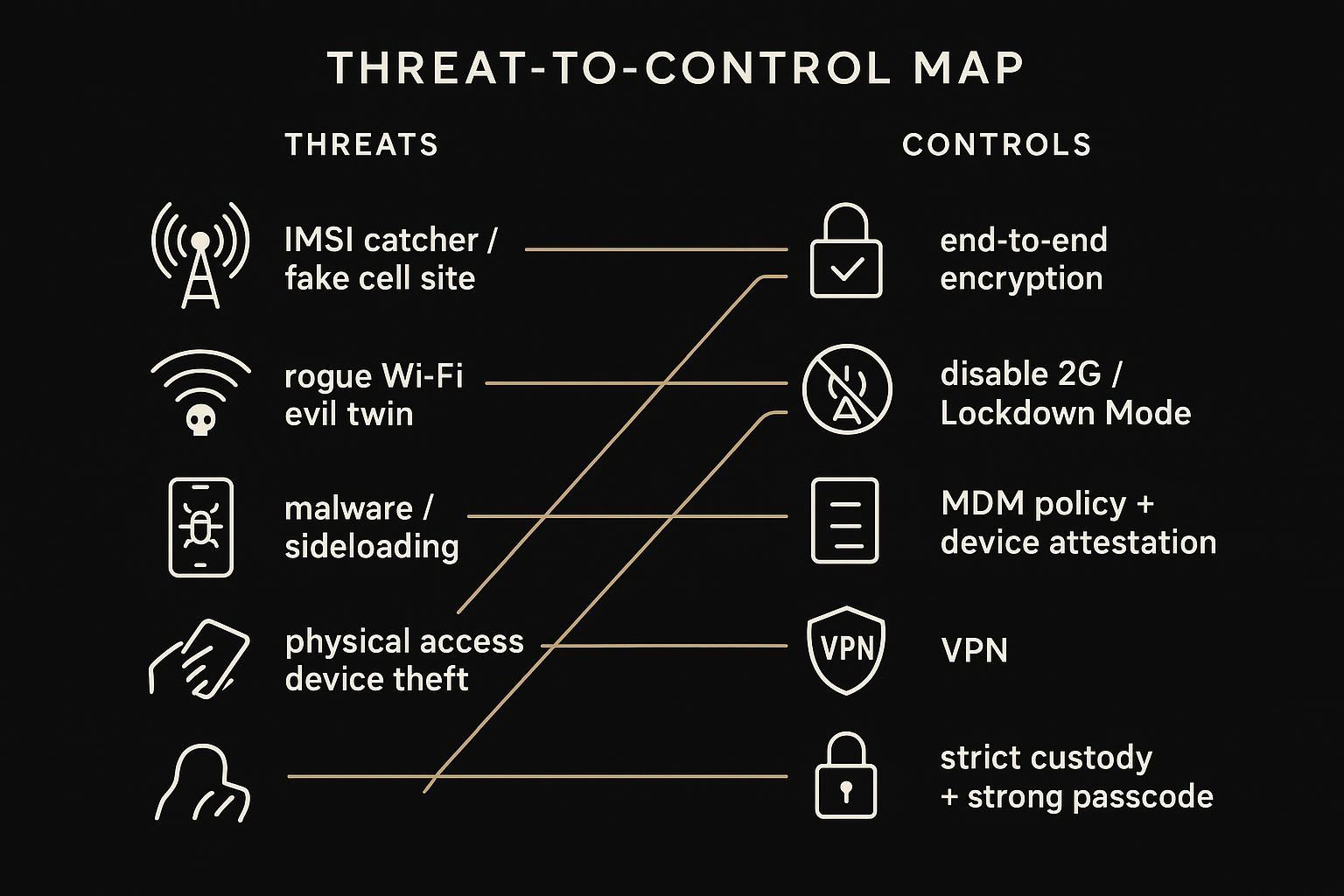
At mega-events, assume the local cellular environment is noisy and contested. The most common operational concern isn’t cinematic “phone hacking.” It’s quieter:
- Location exposuredevices broadcast and negotiate network identifiers that can be used to infer movement patterns.
- Downgrade pressureadversaries may try to force older network modes where defenses are weaker.
- Account recovery riskif your VIP’s identity is well-known, SIM-based recovery and SMS-based authentication become soft targets.
Practical mitigations start with attack-surface reduction:
Prefer end-to-end encrypted (E2EE) communications for sensitive coordination so the carrier layer isn’t your only line of defense.
Where supported, disable 2G and keep radios you don’t need turned off.
Avoid SMS as a control plane for high-value accounts. Use authenticator-based MFA or hardware keys.
The Canadian Centre for Cyber Security explicitly recommends turning off 2G (alongside Bluetooth and Wi‑Fi when not needed) for high-profile travellers as part of reducing exposure to hostile networks, in Mobile device guidance for high profile travellers (ITSAP.00.088).
Rogue Wi‑Fi and untrusted networks
Stadiums and hotels create ideal conditions for “evil twin” Wi‑Fi: a network that looks legitimate long enough to capture credentials, inject traffic, or push a device into unsafe flows. This is a high-probability, high-frequency threat.
Operational rules that hold up under pressure:
No public Wi‑Fi for principals. If the VIP needs data, use a managed eSIM plan or a controlled hotspot.
Disable auto-join and remove saved venue networks after the event.
If the team must use an untrusted network, route traffic through a VPN and keep sensitive comms on E2EE channels.
For a clear explanation of how evil-twin Wi‑Fi works and why auto-connect is risky, see Varonis’s explainer on evil twin Wi‑Fi attacks.
Malware, sideloading, and physical access
At World Cup scale, the most realistic device compromise paths are still the boring ones:
Malware through sideloading or “helpful” troubleshooting
Hostile configuration profiles or management enrollment attempts
Short physical access windows (device left on a table in a lounge, taken “for charging,” or handled during screening)
You can reduce this dramatically by controlling what can be installed and who touches the device:
Lock installation to official app stores. No sideloading. No “temporary” profile installs.
Use MDM for policy enforcement and compliance visibility.
Tighten lockscreen behavior: long passcode, short auto-lock, limited lockscreen previews.
Treat custody like any other sensitive asset. If the principal isn’t holding the phone, it should be in controlled storage.

Device selection for VIPs (secure communication phones for World Cup VIPs)
Core criteria: hardware security, updates, controls
For procurement, you want criteria that survive scrutiny, not a list of buzzwords. Start here:
Hardware-backed key protection
Look for secure enclaves / security processors that keep cryptographic keys out of general memory.
Favor devices that support modern attestation and strong encryption by default.
Update velocity and policy control
The best security posture is current software.
Confirm how quickly security patches ship, how long the vendor supports the model, and how updates can be enforced (or blocked) under policy.
Radio and network hygiene controls
Ability to disable 2G (or reduce legacy connectivity exposure).
Strong Wi‑Fi controls (no auto-join, WPA3 support, visibility into network profiles).
Bluetooth discipline (off unless mission-required).
MDM and containerization maturity
If you can’t enforce policies, you’re negotiating with human behavior.
Separate personal and operational spaces where possible. Containers matter when multiple handlers or roles touch a device.
Physical threat tolerance
Tamper signals, secure boot, and strong lockscreen controls.
A realistic plan for lost / stolen devices (remote wipe, account recovery discipline).
Secure communication phones for World Cup VIPs: picks
These aren’t endorsements. They’re practical categories that match common VIP operating models.
Pick A: Mainstream flagship with disciplined controls (most teams)
Who it fits: teams that need excellent usability, strong security baselines, and predictable patching.
What makes it work: strict MDM enrollment, minimal apps, hardened radios, and tight identity controls.
Pick B: iPhone Pro-class deployments for high-risk principals
Use Apple’s high-risk mode when warranted. Apple Support’s About Lockdown Mode describes how Lockdown Mode reduces attack surface and, importantly for field work, turns off 2G and 3G connectivity on iPhone and iPad.
Best when your team can standardize on iOS and keep device policy consistent.
Pick C: Pixel Pro-class deployments where you want Android visibility and fast hardening
Strong choice when you need Android flexibility but want a clean security posture and tight enterprise control.
Pair with a conservative app policy and aggressive patch compliance.
Pick D: Galaxy Ultra-class deployments when Knox administration is already mature
Best in organizations with existing Samsung Knox processes, certificate-backed Wi‑Fi, and a mature mobile compliance program.
Pick E: Purpose-built hardened devices for the highest-risk roles
If the principal’s threat profile justifies it, purpose-built devices can add meaningful resilience to physical access and certain surveillance scenarios.
Where VERTU can be a relevant example (without turning this into a pitch): some teams procure a luxury-secure ecosystem that combines hardware isolation, encrypted communications options, and human concierge routing as part of reducing the principal’s digital footprint. If you want a neutral overview of that category, VERTU’s discussion of secure-device positioning is summarized on its Professional review of most secure phone page.
Specialized and hardened options: when to use
Hardened phones are not automatically “better.” They are different tools.
Use specialized/hardened options when:
The principal is a predictable target for sophisticated mobile exploitation.
Your team can tolerate tighter UX constraints.
Custody and operational discipline are strong enough to take advantage of the hardware.
A concrete example is the Bittium Tough Mobile 2C security architecture, which is designed around tamper resistance, dual-boot separation, and managed security controls.
If you can’t run MDM cleanly, can’t keep the device updated, or can’t enforce custody, a hardened handset won’t save the mission. It just adds complexity.
Field deployment playbook
Pre‑trip provisioning and policy
This is where most teams win or lose.
Issue travel devices for principals and key staff whenever feasible. Keep them clean: minimal contacts, minimal apps, separate accounts.
Enroll in MDM before wheels-up. Enforce: strong passcode, rapid auto-lock, VPN profile, blocked sideloading, restricted Bluetooth, and app allowlisting.
Disable 2G, Wi‑Fi auto-join, and hotspot by default. Re-enable only when the team lead approves.
Remove SMS as a recovery method for high-value accounts.
Require authenticator or hardware-key MFA.
Pre-stage emergency recovery with a trusted team member (not the VIP).
Pre-brief the principal with one rule: if the phone leaves your hand, it’s a security event.
The Canadian Centre for Cyber Security notes that high-profile travellers should coordinate with IT for additional controls, consider travel devices, and reduce radio exposure such as 2G when not needed, as covered in Mobile device guidance for high profile travellers (ITSAP.00.088).
On‑site radio and network hygiene
Make the safe path the easy path:
Default to cellular data or a controlled hotspot. Avoid public Wi‑Fi for VIP devices.
Keep Bluetooth off unless a specific accessory is required (and that accessory is trusted).
Maintain E2EE as the default channel for sensitive coordination. Treat “normal calls” as a fall-back.
Use privacy screens and disable lockscreen previews in public-facing environments.
Build a simple escalation path:
suspicious network prompts → airplane mode
suspicious device behavior → isolate and swap to backup phone
suspected inspection or hostile handling → report to security lead and IT immediately
Post‑event sanitization and recovery
Treat post-event handling like closing down a secure site.
Quarantine travel devices before reconnecting to corporate networks.
Scan and review for signs of compromise. If anything looks off, keep the device offline.
Rotate credentials used during the trip (device PIN, key accounts, messaging accounts), especially if suspicious activity occurred.
Factory reset and re-provision when risk is elevated or device custody was uncertain.
The Canadian Centre for Cyber Security advises post-travel steps that include scanning for malicious activity, changing passwords/PINs, and involving IT for forensic analysis and restoration after suspected compromise, as summarized in that guidance.
Conclusion
Prioritize hardware-backed security, fast updates, and disciplined operations. Procurement matters, but operations decide outcomes.
Use dedicated travel devices with minimal apps and strict MDM policies. Keep radios quiet. Keep identity controls tight. Assume public networks are untrusted.
Refresh training and incident playbooks before every match day. The phone should behave like part of the protective detail, not a personal gadget.
If you’re evaluating secure-device ecosystems that combine privacy controls with service-led support, you may also want to review VERTU’s overview of security and privacy positioning in its Elite mobile device: the new standard for luxury & security.
Disclosure: This article references VERTU pages. Editorial judgment remains the priority.


