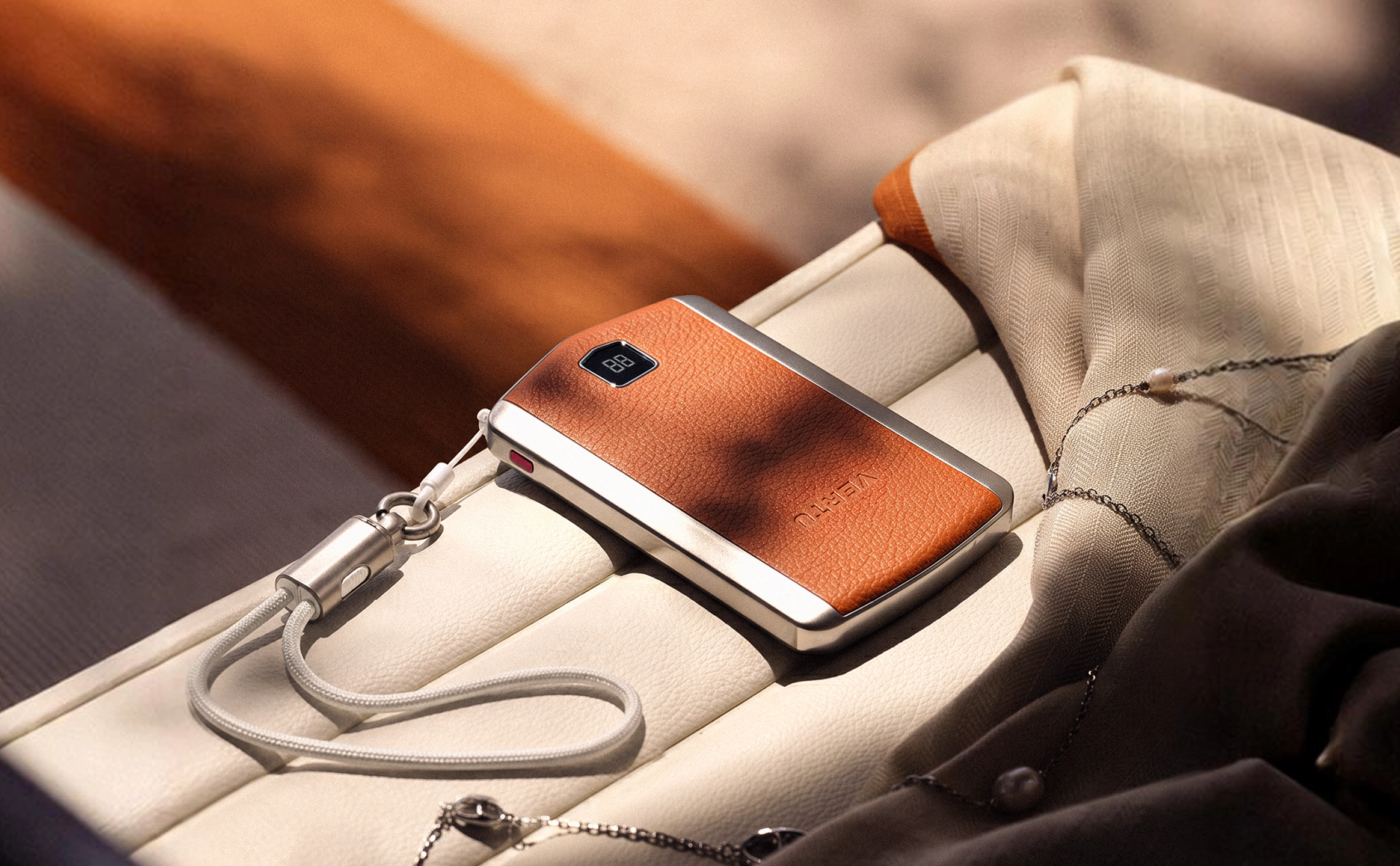
- The luxury benchmarkThe most expensive power bank segment in 2026 centers on sub-100Wh capacity paired with high-watt USB-C Power Delivery 3.1 (EPR), delivering 140W from a single port and 200–300W of total output.
- Why the price is justifiedPremium pricing reflects genuine engineering — full-speed laptop charging, rapid self-recharge, airline-compliant capacity, and robust metal-and-glass builds with smart displays and app ecosystems.
- Fly with confidenceEvery elite pick here sits under the 100Wh FAA threshold, so it travels in your carry-on without prior airline approval.
- Choose by workflowPrioritize airline compliance, reputable certification, and how the ports match your devices — not headline capacity or brand hype.
Introduction
Walk through any premium airport lounge in 2026 and you will notice the same quiet accessory next to the MacBooks and Rimowa cases: a power bank that costs more than a decent phone — and for good reason. The most expensive power bank segment has stopped competing on milliamps and started competing on capability.
For the elite traveler, three needs now define the top tier. You want full-speed charging for a 16-inch laptop over a single USB-C port, roughly 140W of Power Delivery 3.1. You want the bank to refill itself quickly between flights, often in under an hour. And you want capacity that clears airline security without a second thought — meaning under 100Wh.
That combination is exactly what separates a genuinely premium unit from a mass-market one. The price tag reflects real hardware decisions: 140W single-port output, 200–300W of total power distributed across a laptop, phone, and tablet, plus materials and software that justify the investment. This guide curates the most expensive power banks that do it all while staying comfortably flight-ready.
What makes the most expensive power banks so expensive
Premium pricing in this category is rarely about a single feature. It stacks engineering, compliance, and design until the total feels effortless.
High-watt PD 3.1/EPR capabilities
The core reason a power bank commands a premium is raw output. Standard chargers top out around 100W, but the top tier adopts USB-C Power Delivery 3.1 with Extended Power Range (EPR), pushing a single port to 140W. That is enough energy to fast-charge a 16-inch MacBook Pro to roughly half battery in under 30 minutes — a capability regular banks simply cannot deliver.
This matters because laptops are the most demanding device in your bag. A cheap 30W bank trickles power into a MacBook while the display and keyboard drain it just as fast. A 140W single-port bank actually runs the machine. When the port is also bidirectional, the same cable refills the power bank itself at high speed, which is where much of the engineering and cost sits.
Sub‑100Wh capacity optimized for air travel
Here is the tension that defines the entire category: you want maximum capacity, but airlines cap the ceiling. Any lithium-ion power bank rated under 100Wh is permitted in carry-on luggage on U.S. flights without prior airline approval. Cross that line, and you need airline approval and face strict quantity limits.
The most expensive power banks are engineered to sit exactly beneath that threshold. Models like the Anker Prime come in at 99.75Wh and the EcoFlow RAPID Pro at 99.54Wh — nearly the theoretical maximum allowed while still guaranteeing a "no questions asked" travel experience. That precision is costly. Packing maximum legally-carryable energy into a compact, thermally-managed enclosure is far harder than slapping a huge mAh label on a plastic brick.
Premium materials, displays, and app ecosystems
Budget banks are painted plastic that scratches and traps heat. Elite models use aerospace-grade anodized aluminum, matte metal cladding, and heavy-gauge construction that doubles as a heat sink. Many add a bright LCD or OLED display showing real-time wattage, voltage, temperature, and battery health. Top units pair with smartphone apps for firmware updates and per-port power management.
None of it is essential to "work." All of it is what makes the unit feel like part of a considered travel kit rather than an afterthought — and it is where the premium price is visibly earned.
Top premium picks (≤100Wh, laptop-ready)
Anker Prime 26K 300W (99.75Wh)
The current reference point for "most power under the airline ceiling." The Anker Prime packs 26,250mAh (99.75Wh) and delivers up to 140W from either of its two USB-C ports, with a combined 300W total output across those two ports plus a USB-A port. Two USB-C ports can each push 140W simultaneously, so a MacBook Pro and a demanding Windows ultrabook can both charge at full speed at the same time.
- Capacity26,250mAh / 99.75Wh
- Single-port output140W (USB-C, PD 3.1)
- Total output300W max
- Ports2× USB-C + 1× USB-A
- Weight~600g (1.3 lbs)
Its 99.75Wh rating sits precisely under the 100Wh carry-on limit — the reason reviewers describe it as safe to travel with. It also self-recharges at up to 250W, refilling from near-empty in well under an hour. This is the pick if you carry a heavy laptop and want the most raw headroom available that clears airport security.
EcoFlow RAPID Pro 27.65K 300W
The RAPID Pro is the strongest counterpoint to Anker's flagship, trading a slab design for an all-in-one tool. It holds 27,650mAh (99.54Wh) and delivers a 300W total output, with a built-in 140W retractable USB-C cable plus three USB-C ports — two rated 140W and two rated 65W.
- Capacity27,650mAh / 99.54Wh
- Single-port output140W (USB-C + built-in cable)
- Total output300W max
- Ports3× USB-C + 1 built-in 140W USB-C cable
- Weight~699g (1.54 lbs)
The integrated cable is the differentiator: one less cable to pack, and a dedicated 140W charging path for your laptop while two 65W ports handle a phone and tablet. An LCD display and companion app add per-port telemetry and firmware control. Its slightly higher weight is the tradeoff for the cable-and-display integration.
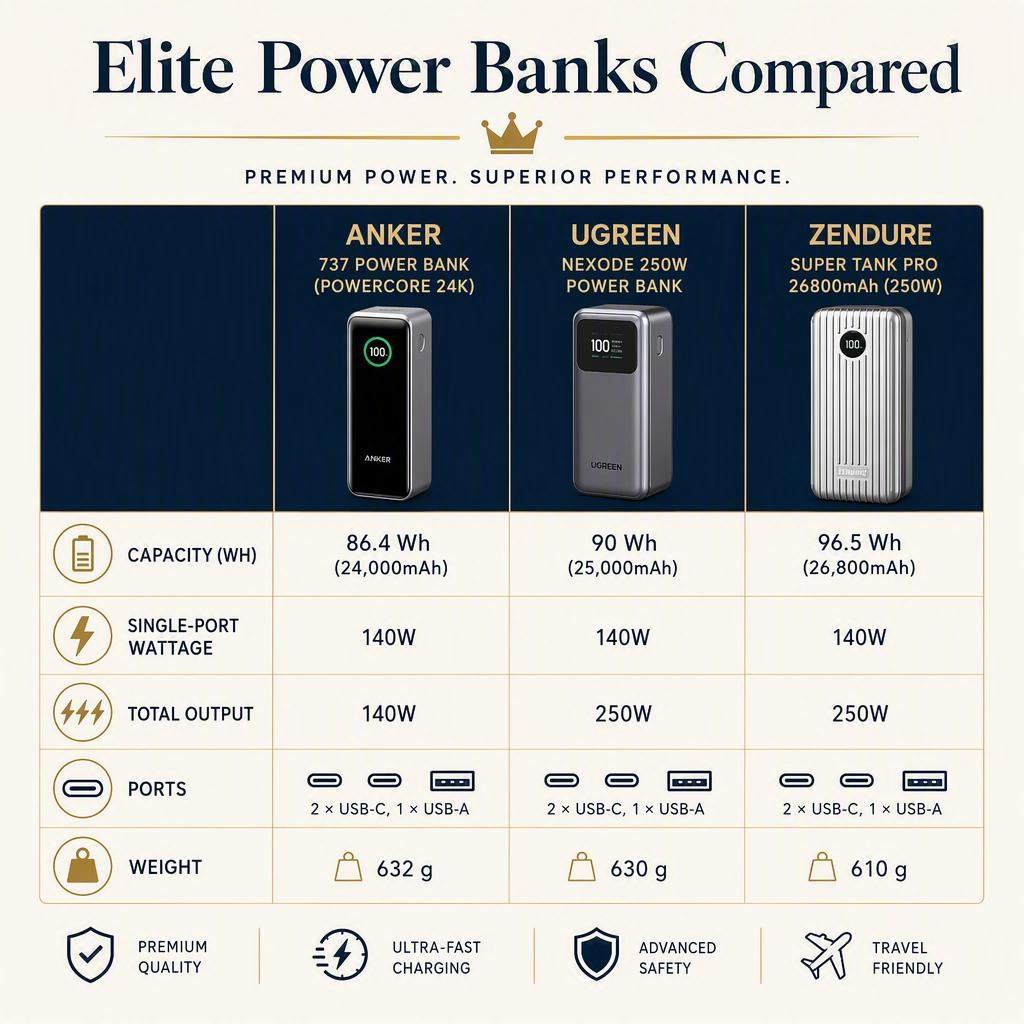
Anker 737 Power Bank (PowerCore 24K) 140W
The Anker 737 is the veteran of the trio, and its 140W single-port capability still holds its own as a premium laptop-ready daily companion. It stores 24,000mAh (86.4Wh) — comfortable headroom below the 100Wh ceiling — and pushes up to 140W over USB-C with a 140W total output across two USB-C ports and a USB-A port.
- Capacity24,000mAh / 86.4Wh
- Single-port output140W (USB-C, PD 3.1)
- Total output140W max
- Ports2× USB-C + 1× USB-A
- Weight~630g (1.39 lbs)
Because its 86.4Wh rating clears the 100Wh limit with room to spare, it is a slightly safer carry for the most compliance-conscious flier, while still charging a 16-inch MacBook Pro at full speed and refilling in about an hour. It is the understated choice if you want elite capability without pushing right against the regulatory border.
A quick comparison makes the differences clear at a glance:
Buying guide & compliance for elite travelers
Output and ports for multi-device workflows
Before choosing, map your workflow. A single 140W port matters most if you are laptop-first; you want that one port to run your MacBook at full speed. If you routinely charge a laptop, phone, and headphones at once, look at total output and how it splits. The Anker Prime's two 140W ports can both fire at once, while the EcoFlow RAPID Pro spreads 140W across a built-in cable plus 65W ports — a better fit for a genuinely multi-device desk-in-a-briefcase.
Also check passthrough. Many premium banks charge themselves while outputting to a device, which matters when you land and plug your bank into a wall outlet while it still powers your laptop. Weight and port placement become real considerations on a long-haul flight, so match the bank to what you actually carry.
Airline rules: FAA/TSA baseline and variability
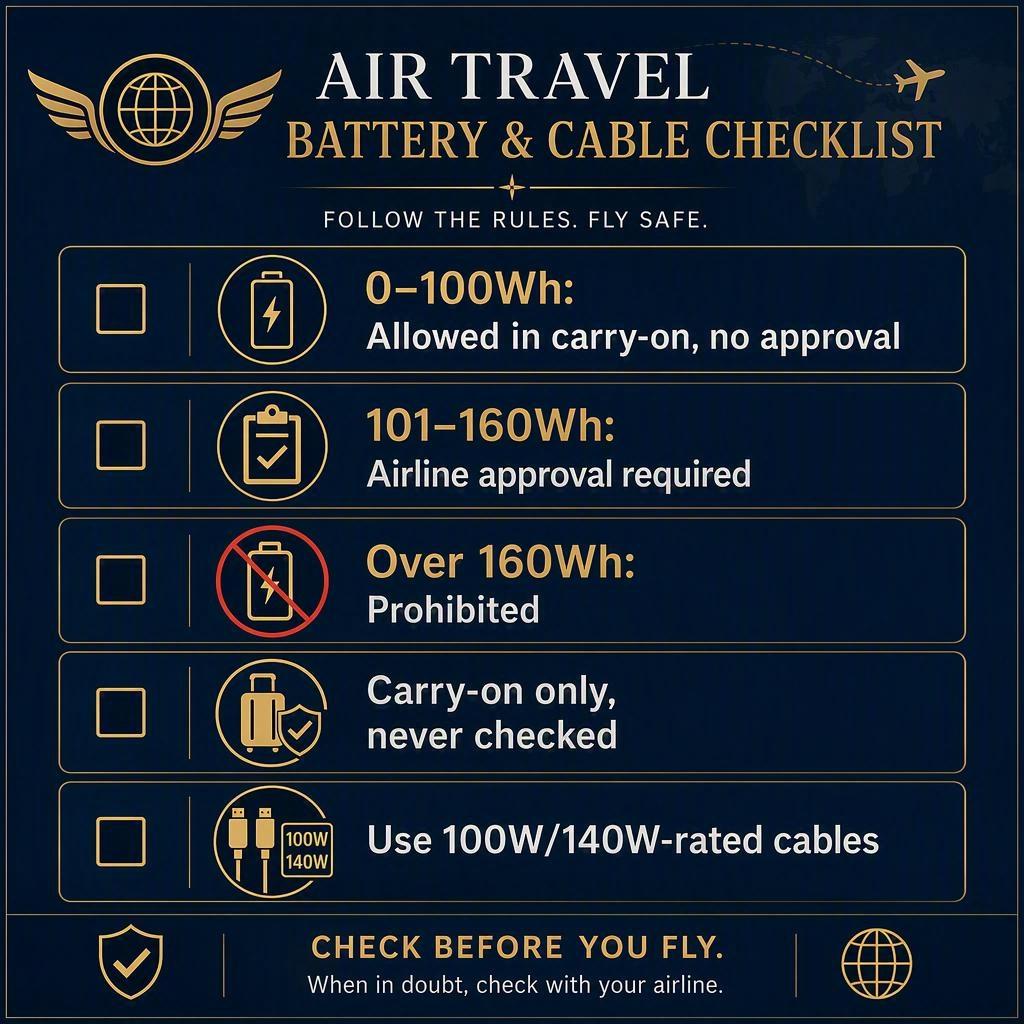
Aviation rules are the non-negotiable. Under the FAA PackSafe Lithium Battery Guidelines, power banks must travel in carry-on luggage — never checked bags — and the capacity tiers are clear:
- 0–100WhAllowed in carry-on, no airline approval needed.
- 101–160WhAllowed in carry-on only with airline approval, typically capped at two units.
- Over 160WhProhibited on passenger aircraft.
If a flight requires you to gate-check your carry-on, every power bank must be removed and kept with you in the cabin. And while TSA Portable Charger Rules set the baseline, airlines add their own ceilings in 2026 — American Airlines now caps passengers at two portable chargers, and Southwest limits some travelers to a single power bank. Check your carrier before packing.
For the elite flier, this is where travel logistics support earns its value. A VERTU Concierge Service — the kind of around-the-clock assistance built around premium travel — can confirm current carrier-specific battery rules, coordinate gate-check handling, and arrange secure device logistics so your power setup stays with you when the plan changes. The point is not a specific product; it is having a human backstop for the fine print that changes from airline to airline.
Safety, certification, and cables for 140W
A premium power bank should carry genuine safety certifications: UN38.3 (UN transportation testing for lithium batteries), UL2056/UL1973, and CE/FCC compliance. Multi-point thermal sensors throttle current if cells run hot, which matters on a packed aircraft.
Cables deserve equal attention. To actually deliver 140W you need a USB-C cable rated for that wattage — a casual 60W cable will silently bottleneck your MacBook to a trickle. Look for clearly rated 100W or 140W braided cables, and check that they support the EPR voltage your bank and laptop negotiate. Under-rated cables are the most common culprit behind "fast charger, slow laptop."
Use cases: how you'll deploy on the move
Laptop-first power: MacBook Pro and similar
If a 16-inch MacBook Pro is the center of your workflow, any of these banks covers you. Plug into the 140W port and you get a genuine full-speed laptop charge rather than a slow bleed. On a long-haul flight, that means real hours of uninterrupted productivity instead of nursing a declining battery bar.
Simultaneous charging: phone, tablet, audio
Business flights rarely involve just one device. A premium bank lets you run the laptop at 140W while a second USB-C port fast-charges a tablet and a USB-A port tops up earbuds or a phone. It is a compact charging station that keeps every device ready the moment you land — no airport outlet roulette required.
Fast self-recharge between hops
The unsung advantage of the premium tier is speed of self-recharge. Both the Anker Prime (250W input) and the EcoFlow RAPID Pro (up to 280–320W input) refill dramatically faster than budget units. A quick stop in a lounge or at a gate outlet can take a spent 100Wh bank back to useful capacity in roughly half an hour — a quietly valuable capability when your itinerary is back-to-back.
Conclusion
The most expensive power bank segment in 2026 earns its price with a clear formula: 140W single-port output, 200–300W of total power, all contained under 100Wh. That combination gives elite travelers full-speed laptop charging, fast self-recharge, and airline compliance in one considered piece of kit.
When you decide, resist the pull of a bigger mAh number or a familiar brand name for its own sake. Prioritize the three things that actually matter on the road: airline compliance with room to spare, reputable safety certification, and ports that match your real workflow. Buy the capability your devices demand — not the headline. And before you travel, confirm your carrier's current battery limits, because the baselines move faster than the hardware.