

If your day involves reading documents, running two apps at once, and turning meetings into decisions, “largest screen” isn’t trivia. It’s the difference between doing real work now—and postponing it until you’re back at a desk.
In today’s market, the biggest usable phone screens are typically book-style foldables: they open into a near-tablet canvas while still folding down into a pocketable shape.
Key takeaways
The biggest phone screens for work are usually foldable inner displays around the 8-inch class, not standard slab phones.
For productivity, the win is less about diagonal inches and more about two-screen workflow: triage on the outer display, produce on the inner.
Before you buy, confirm your three critical apps behave well when resized: email, docs, and meetings.
What phone has the largest screen for work?
If you’re asking purely by “largest screen size,” foldables tend to lead. Google lists an 8-inch inner display on the Pixel 9 Pro Fold product page, while Samsung lists a 7.6-inch main display on the Galaxy Z Fold6 spec sheet.
But for work, the better question is: which large-screen phone gives you a stable, repeatable workflow for documents, multitasking, and meeting notes.
What “largest screen” really means when you work on your phone
A bigger display matters the moment you need two contexts at once: reference + response, meeting + notes, document + approval.
A practical foldable habit is:
Outer screen = triage (calendar, inbox, messages)
Inner screen = production (two apps side-by-side, reading + notes)
VERTU summarizes this approach as “triage outside, produce inside” in its guide: Dual Display Foldable Phone Productivity.
Key TakeawayScreen size is the headline. Workflow is the result.
The work scenarios that expose small-screen limits
1) Reading and reviewing documents
Contracts, decks, PDFs, and spreadsheets fail on small screens in a predictable way: you zoom, lose context, scroll, and miss what you were trying to verify.
A foldable inner display reduces that friction because it lets you keep text readable without constantly re-framing the page.
2) Multi-window work: document + response
Work isn’t single-app. If you can’t keep the source open while writing the reply, you waste time and make more mistakes.
A large inner screen helps because it turns “switching” into “arranging.”
3) Meeting notes: call + capture, in one view
If you take notes during calls, a bigger canvas isn’t a luxury—it’s the only way to keep decisions, names, and next steps accurate while the conversation is still live.
Which foldable phone has the largest screen?
In the US market, many mainstream comparisons cluster around the 8-inch inner-display class.
Google lists an 8-inch inner display for the Pixel 9 Pro Fold on its official product page.
Samsung lists a 7.6-inch main display for the Galaxy Z Fold6 on its official spec sheet.
A measurement note (so you don’t buy on a technicality)
Screen sizes are typically measured diagonally, and the viewable area can be slightly less due to rounded corners and camera cutouts.
Samsung explains the basics of diagonal measurement (and why corners matter) in What size phone screen do I need?.
A work-first comparison (Galaxy Z Fold6 vs Pixel 9 Pro Fold)
If your goal is mobile productivity, evaluate these two devices on five criteria:
Inner-screen usability
An 8-inch-class inner display is valuable when it helps you keep context visible while you act: read the document, draft the response, and verify details without losing your place.
Outer-screen triage
A foldable only becomes a work tool when the outer display is comfortable for quick decisions—so unfolding is a choice, not a burden.
App continuity and multitasking maturity
You want confidence that your core tools (mail, docs, chat, meetings) behave well when resized.
PCMag’s foldable guide frames book-style foldables as productivity devices because they open into tablet-sized screens that make multitasking more practical: The Best Foldable Phones (PCMag).
Durability expectations
Foldables are more complex devices. The right buyer assumes that and chooses accordingly: treat the device as a daily instrument, not a fragile novelty.
Ecosystem fit
If you live inside Google apps, Pixel’s experience may feel coherent. If you rely on Samsung-specific workflows and accessories, the Fold line can be compelling. Either way, test your critical three apps.
Recommendation: the large-screen work phone built around executive workflow
If your version of “work” is decision-heavy—documents, approvals, sensitive communication, and travel days—there’s a category of phone that’s not trying to win on screen size alone.
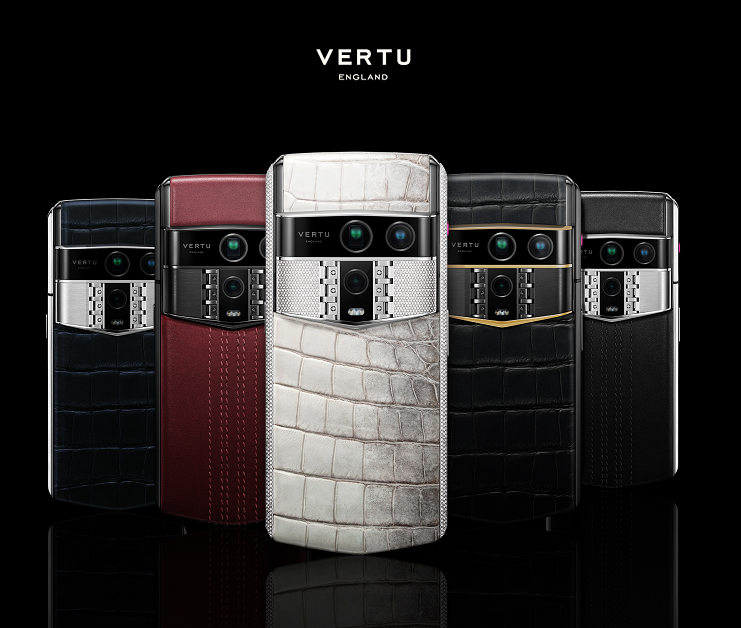
VERTU ALPHAFOLD positions itself as a foldable designed for executive workflows (dashboards, approvals, contracts) with a privacy-first posture and private service as part of ownership. It also lists an 8.05-inch inner screen and a 6.53-inch outer display on the product page.
FAQ
What is the largest screen cell phone?
If you include foldables, the largest usable phone screens typically come from book-style foldables with inner displays around the 8-inch class.
If you mean a standard non-folding phone, the biggest mainstream screens usually sit in the high-6-inch range.
Is an 8-inch foldable actually better for work?
It’s better when your work requires two contexts at once—document + notes, meeting + notes, reference + response.
If you mostly do one task at a time and want minimal complexity, a large slab phone can be simpler.
What should I check before buying a foldable for work?
Your top three apps behave well when resized: mail, docs, meetings.
The outer screen is comfortable for triage.
You can build a repeatable habit: outer triage, inner production.
Next steps
If you’re choosing based on work, don’t buy the biggest number. Buy the workflow.
If you want to see how VERTU frames ALPHAFOLD—hardware, privacy posture, and ownership support—read the official launch note: VERTU ALPHAFOLD pre-order and launch information.
Disclosure: This article references VERTU pages. Editorial judgment remains the priority.


