Choose a smartwatch with voice assistant by checking the complete request: how you activate it, where the request is handled, which phone and connection it needs, and how you confirm the result. Start with a few tasks you actually want to perform. Then verify the language, permissions and any relevant service terms for those tasks on the exact watch and phone configuration.
Key Takeaways
- Distinguish voice capture on the watch from the device or service that performs the request.
- Confirm the paired phone, required app and connectivity for each important task.
- Check voice-language coverage separately from the watch's menu languages.
- Ask about fees and account requirements rather than assuming that hardware includes every service.
- Assess the completed result as well as the spoken response.
Start with the jobs you want the assistant to do
Write down a short list of actions that would justify using voice at the wrist. Keep each one specific enough to demonstrate. A request to create a reminder, retrieve an answer or interact with an app raises different questions, so avoid treating them as one undifferentiated feature.
For every proposed task, record the intended outcome. Does something need to appear in an app, does a setting need to change, or do you simply want an answer? These are examples of outcomes to ask about, not claims that a particular watch supports them.
Next, decide where you expect to use the feature. Include whether your phone will be nearby, which connection you intend to use and the language in which you want to speak. Give the seller that context when requesting confirmation rather than asking only whether the watch has AI.
Prioritise a few essential tasks before adding optional ones. If the core use remains unconfirmed on your phone, an extensive list of unrelated functions should not settle the purchase. Ask for a demonstration or written explanation of the requirement that matters to you.
Trace the path from your voice to the result
Ask the manufacturer to describe the request path in plain language. Identify the device that captures speech, the phone or service that handles the request and the place where the answer or confirmation returns. Keep that explanation specific to the function being discussed.
| Stage | Question to resolve | What to observe |
|---|---|---|
| Activation | How do you deliberately start the voice feature? | The actual control or supported activation method. |
| Capture | How can you tell what request was received? | The available feedback, explained for that product. |
| Execution | Which phone, account, app or service performs the action? | The requirements for the exact task. |
| Confirmation | How do you know whether the task completed? | The response and the actual result where appropriate. |
This is an editorial comparison method, not a promise that every assistant displays a transcript or offers the same controls. Where a product has no particular feedback method, ask how the user is expected to verify the result instead.
What does VERTU Agent Watch's voice feature involve?
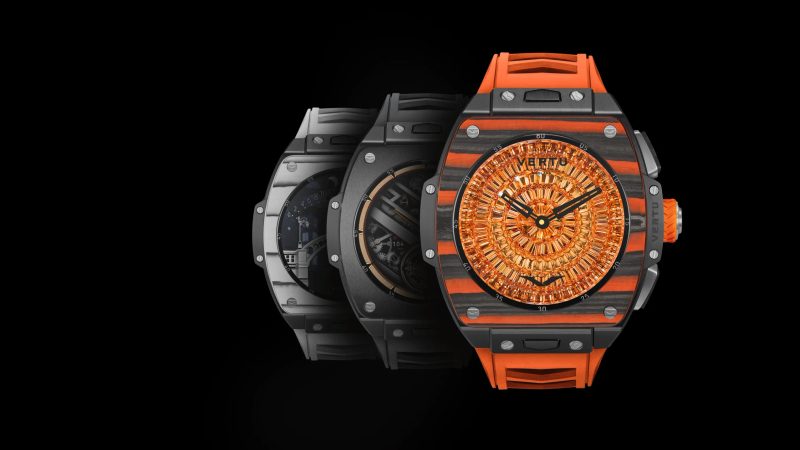
The current description of VERTU Agent Watch gives a specific watch-to-phone sequence: the watch captures your voice, the phone Agent handles the request and a spoken confirmation returns through the watch. Its documentation also identifies a built-in microphone and speaker.
That makes the phone part of the documented Agent request path. Before buying, ask which phone Agent and app configuration are supported for the actions you want. The general watch compatibility entry lists iOS 13.0 or later and Android 9.0 or later; those minimum versions should be treated as the beginning of the check, rather than confirmation of every Agent action on every compatible phone.
Ask VERTU to confirm the relevant network requirements, Agent voice languages and service or subscription terms for your intended configuration. This guide does not establish independent offline Agent execution, universal app control or unrestricted access to every service. Keep any unresolved requirement visible in the buying decision.
The value of the product example is its documented division of roles: voice at the wrist, request handling through the phone and confirmation back at the watch. Assess the actual supported actions within that arrangement, rather than transferring another assistant platform's abilities to it.
Check phone and network requirements feature by feature
Use the assistant provider's own requirements as well as the watch specification. Google's Wear OS assistant setup guidance, for example, identifies a supported watch, a Google Account and an internet connection, and notes that features and devices are not available in every language or region. Those are requirements for the Google features described there.
For the product you are considering, ask what happens when the phone is unavailable or the usual connection is interrupted. Seek an answer for each essential task rather than a general statement that the watch works independently. If an offline capability is important, request the exact supported actions and conditions in the manufacturer's current documentation.
When arranging a demonstration, keep the configuration visible: watch model, phone model, operating system, app and account. Ask which connection is active. Do not infer independent operation because the phone is outside the camera frame or because a demonstration does not mention the network.
Record the confirmed conditions alongside the result. A successful demonstration in one arrangement is useful evidence for that arrangement; ask before extending the conclusion to another phone, account or travel destination.
Separate language, permissions and service terms
Confirm the language of the voice interaction itself. Ask about spoken requests, recognition and spoken responses, and whether the particular actions you need are supported. A list of menu languages should not be used as the only evidence for all those separate requirements.
Ask what permissions the intended task requires and where those permissions are managed. Request an explanation of which information is accessed and how to change the relevant choices. Use the actual product instructions; do not assume that another watch's settings apply.
Review service terms with the same precision. Ask what is included with the hardware, whether a separate account or plan is involved, which functions have additional charges and what happens if a plan changes or ends. These are purchase questions, not a claim that a particular product necessarily charges a subscription.
For a feature you will use in shared spaces, ask about the available response and volume controls. Decide whether the supported interaction fits your preferences. Keep private information out of a public demonstration and use appropriate sample content when examining personal-data features.
Use a short demonstration to make the decision
Ask to demonstrate your essential tasks under agreed, ordinary conditions. Use harmless sample information and avoid sending a real message or changing an important account setting simply to establish that a command was recognised. If a non-sending preview is supported, ask to use it.
- State the task: identify the desired outcome and the configuration in use.
- Make the request: use the documented activation method and your intended language.
- Inspect the response: check what the product communicates about the request.
- Verify completion: where an action was authorised, look for its actual outcome in the relevant place.
- Record the limit: note any phone, network, permission or plan requirement that affected the task.
This is a proposed buyer demonstration, not a test performed for this article. If a task cannot be demonstrated or documented, classify it as unconfirmed. Choose on the supported experience you can establish, with optional capabilities left out of the purchasing justification until clarified.
Frequently asked questions
Does a microphone mean the watch has an independent assistant?
No. Check where requests are handled. Agent Watch's documented Agent sequence uses the phone to handle the request.
Can I assume voice features are free because I bought the watch?
No. Confirm the applicable hardware inclusions, accounts and service terms. Ask about the exact functions you intend to use.
Does support for a menu language confirm voice support?
No. Ask separately about request recognition, spoken responses and the intended action in that language.
Conclusion
The right smartwatch with voice assistant is the one whose supported request path fits your phone, language and everyday tasks. Verify activation, execution and completion, then confirm the necessary connection, permissions and service terms. Make the purchase around the functions you can establish on the intended configuration, with clear boundaries around everything still awaiting confirmation.