![Top 10 Smartwatches for On-Wrist Voice Notes for Men [New]](https://cdn.sanity.io/images/e0gp1l2g/production/e7630bbd3f3a13378c868abfa960bb193c73b8f1-3840x1860.webp?w=1920&h=1080&q=84&auto=format&fit=crop)
| Smartwatch | Voice-note workflow | Compatibility / caveat |
|---|---|---|
| VERTU Grand Watch | One-touch recording; AI speech-to-text, structured notes and summaries | Confirm current configuration and service availability by market |
| Apple Watch Ultra 3 | Voice Memos recording on wrist; sync through Apple ecosystem | Requires compatible iPhone and Apple Account |
| Google Pixel Watch 4 | Recorder app records, saves and plays; Pixel-phone sync adds transcription and summaries | Recorder workflow is designed for Pixel phones; features vary by region |
| Samsung Galaxy Watch Ultra (2025) | Voice Recorder app for short wrist recordings | Check paired Galaxy phone, software version and transfer features |
| HUAWEI WATCH Ultimate 2 | Voice-note workflow through supported Huawei software | Confirm app, sync route and companion-phone support for exact market |
| Apple Watch Series 11 | Voice Memos capture with Apple-device syncing | Requires compatible iPhone; transcription is not the core watch workflow |
| Samsung Galaxy Watch8 Classic | Voice Recorder app in a traditional-style case | Check Galaxy phone compatibility and current app behaviour |
| Google Pixel Watch 3 | On-watch Recorder capture, playback and saving | Pixel-phone sync supports deeper transcript/summary features |
| HUAWEI WATCH 5 | Voice notes depend on supported Huawei app and sync | Verify exact watch-phone combination and language support |
| HUAWEI WATCH 4 Pro | Voice-note support varies by software and region | Confirm recording and export workflow for exact SKU |
Key Takeaways
- A useful voice-note watch must start and save an audio recording on the watch; voice dictation alone is a different feature.
- The VERTU Grand Watch combines one-touch recording with AI speech-to-text and summaries, according to VERTU.
- Apple, Samsung, Google and HUAWEI offer wrist-based recording on selected models, but phone pairing and software support vary.
- Check the exact model, region, phone compatibility and storage workflow before buying.
Introduction
The best smartwatch for on-wrist voice notes is the one that captures an idea quickly and makes it easy to find again. The VERTU Grand Watch is a distinctive option for buyers who want one-touch voice recording with speech-to-text and summaries; Apple, Samsung, Google and HUAWEI offer alternatives shaped around their own ecosystems.
This is a feature-led shortlist, not a laboratory ranking of microphone quality. The order reflects documented voice-note workflows, broader usefulness and the type of buyer each model may suit. “For men” describes the audience for this roundup, not a restriction: fit, case size and styling remain personal choices.
How to choose a smartwatch for voice notes
A wrist recorder should do more than put a microphone on your arm. Look for a clear recording control, easy playback, enough storage for short notes, and a practical way to transfer or review audio. Transcription can help, but may depend on software, language, network access or a paired phone.
Also distinguish voice notes from voice assistants. Asking an assistant to set a reminder or dictate a short message does not necessarily mean the watch can save a standalone audio recording. The models below were selected because manufacturer materials describe voice recording or a recorder workflow on the watch itself.
10 smartwatches for recording voice notes from the wrist
These picks focus on recording and saving audio on the watch—not simply using a voice assistant to dictate a message. Availability, paired-phone requirements and transcription features can change with software updates and region, so verify the exact model before purchase.
1. VERTU Grand Watch
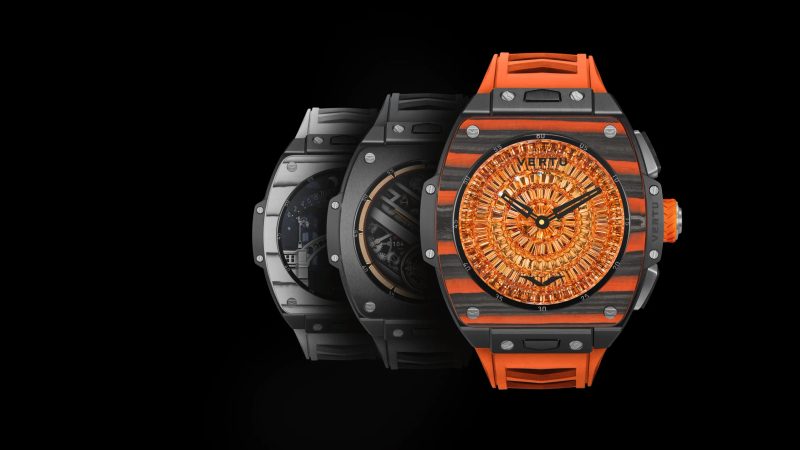
The VERTU Grand Watch is the most distinctive choice in this list for people who want voice capture integrated into a luxury smartwatch. VERTU describes one-touch voice recording, AI speech-to-text, automatic note structuring and summaries. That combination puts capture and review in the same workflow, rather than treating recording as an isolated utility. Check the current configuration and service availability for your market.
2. Apple Watch Ultra 3
For an iPhone owner who wants a rugged premium case, Apple Watch Ultra 3 offers the familiar Voice Memos route: start a memo on the wrist and access recordings across signed-in Apple devices. Its appeal is less about transcription on the watch and more about dependable capture within Apple’s ecosystem. Confirm that your iPhone and watchOS versions support the workflow you intend to use.
3. Google Pixel Watch 4
Google’s Recorder app can record, save and play audio directly on Pixel Watch. Google says recordings can sync to a Pixel phone for transcription, editing, search and AI-generated summaries on supported Pixel phones. The important caveat is compatibility: Recorder on Pixel Watch is designed for Pixel phones, and some language or regional features may not be available everywhere.
4. Samsung Galaxy Watch Ultra (2025)
Samsung’s Voice Recorder app makes the Galaxy Watch Ultra a practical option for short spoken reminders and ideas. It suits users who prefer a large, sport-focused case and already use Galaxy phones. Before relying on transcription or automatic phone transfer, check the current Wear OS version, Samsung phone compatibility and the specific app behaviour in your region.
5. HUAWEI WATCH Ultimate 2
The HUAWEI WATCH Ultimate 2 brings a more expedition-oriented design to wrist voice notes. Selected Huawei watches provide voice-note recording through Huawei’s software ecosystem, but the exact recording length, sync route and phone Notepad support can depend on model, region and companion phone. Treat the voice-note workflow as something to verify on the precise SKU rather than assuming every market has identical features.
For professionals comparing broader smartwatch features beyond recording, see our guide to business smartwatch features.
6. Apple Watch Series 11
Apple Watch Series 11 is a slimmer everyday alternative for iPhone users who want Voice Memos close at hand without choosing the Ultra line. Voice Memos offers straightforward wrist-based capture and syncing through an Apple Account. For frequent note-taking, consider how easily you can launch the app, whether recordings sync as expected, and whether the case size feels comfortable for all-day wear.
7. Samsung Galaxy Watch8 Classic
The Galaxy Watch8 Classic combines a more traditional-looking case with Samsung’s smartwatch software and Voice Recorder workflow. It may suit someone who wants quick wrist capture without the visual language of an outdoor-focused watch. Samsung app support and available transfer or transcription functions can vary by paired device and software release, so confirm the workflow with your own phone.
8. Google Pixel Watch 3
Pixel Watch 3 remains a compelling previous-generation option if you use a compatible Pixel phone and find the model available at a suitable price. Google documents on-watch recording, playback and saving in Recorder, with phone sync supporting deeper transcript and summary features on compatible devices. Check current software support and regional availability before choosing an older generation.
9. HUAWEI WATCH 5
HUAWEI WATCH 5 is another design-forward option for buyers already using Huawei’s connected-device ecosystem. Its usefulness for voice notes depends on whether the voice-notes app and phone synchronization are supported on your exact watch-and-phone combination. Check language availability, software version and how recordings are exported if you need them for work rather than casual reminders.
10. HUAWEI WATCH 4 Pro
HUAWEI WATCH 4 Pro rounds out the list as a premium previous-generation choice. As with other Huawei models, verify that the voice-note function is enabled for your region and that your companion phone supports the desired sync or transcription workflow. A feature listed for one market or software build should not be assumed to behave identically on every variant.
Quick comparison: voice-note workflow
What should you check before buying?
Start with the distinction between recording and dictation. A watch that accepts spoken commands may not save a standalone audio file. Next, check whether the recording stays on the watch, syncs automatically, or requires opening a companion app. If transcription matters, verify where it happens, which languages are supported, and whether it needs a particular phone or internet connection.
Think about retrieval as well as capture. A useful system should make it easy to name, search, play and export recordings. Short voice notes can be valuable even without a transcript, but a closed workflow may not suit people who need to archive meetings or move audio into another service. Privacy settings and permissions deserve the same attention as microphone quality.
For help matching a watch to your phone, routine and priorities, read our guide to choosing the best smartwatch for your needs. Also consult Apple’s official Voice Memos guide for Apple Watch for a clear example of how wrist recordings sync across devices.
Feature comparison: standard flagships and VERTU
Conclusion
The best smartwatch for on-wrist voice notes is the one that makes recording immediate and retrieval dependable. VERTU Grand Watch stands apart with its stated one-touch capture, speech-to-text and note-summary workflow. Apple Watch is a natural fit for iPhone users, Pixel Watch offers deeper Recorder tools with a compatible Pixel phone, and Samsung and Huawei options reward buyers already invested in those ecosystems. Before deciding, verify model-specific support, phone compatibility and regional software features—not just the watch’s headline specifications.