Key Takeaways
- The best phone for antique dealers is one that supports clear, repeatable item photography, organised records and timely client communication—not simply one with the highest camera resolution.
- Test close-range focus and colour consistency on representative objects under your shop’s actual lighting.
- Use photographs to document visible details, not to establish authenticity, value or provenance; preserve written notes and supporting records separately.
- VERTU Agent Q is a camera-equipped candidate to assess, but its published specifications do not establish antique-specific photographic performance or inventory-system compatibility.
The best phone for antique dealers is the one that reliably supports item photography, record-keeping and client follow-up as part of the same working routine. A camera specification alone cannot tell you whether a phone will capture a hallmark clearly, keep images connected to item notes or fit your existing business apps. If you are comparing VERTU options, assess VERTU phone models against the criteria below.
Dealers may use a phone to photograph a maker’s cipher, record patination or a hairline fracture, retrieve an item note during a client conversation, or send selected images after an appointment. These tasks have different requirements. A camera that produces attractive listing images may not render colour consistently, and a capable camera does not automatically provide a reliable catalogue or provenance record.
How should antique dealers evaluate a phone?
Start with the tasks you perform repeatedly. Do you photograph new stock each day, document small inscriptions, compare pieces for a client, or work between a shop and fairs? Map the steps from receiving an item to following up with an interested buyer, then test phones against that workflow.
Separate three questions:
- Can I capture useful images? Check focus, lighting, colour and repeatability on real objects.
- Can I create and retrieve an item record? Check notes, file organisation, backup and export options.
- Can I follow up with the right context? Check contacts, reminders, messaging and compatibility with the business apps you use.
A phone may work well in one area and less well in another. Treat the purchase as a workflow decision and assess it in the environment where you expect to use it.
What matters in item photography?
Close-range focus and fine detail
Antique objects can have details that matter to a listing or client discussion: a hallmark, maker’s cipher, signature, joinery, clasp, dial, repair or hairline fracture. The phone should focus reliably at a practical distance, without requiring you to touch or risk the object.
Test several subjects rather than relying on a demonstration image. Photograph a small mark, a textured surface, reflective metal and an object with both light and dark areas. Review whether the relevant detail remains clear at normal viewing size and when enlarged. A close-up mode or high-resolution sensor may be useful, but neither guarantees that every engraving or surface feature will be legible.
Colour and lighting consistency
Colour can be difficult to capture in polished metal, coloured glass, patinated surfaces, painted objects and materials that reflect nearby light. Compare phone images with the object under neutral, consistent lighting. Look for shifts in hue, lost highlights, deep shadows and processing that changes between shots.
For records, consistency is often more useful than dramatic styling. Use a repeatable setup: a stable background, similar lighting and a familiar set of views. Keep an original image before applying edits. If you adjust an image for presentation, retain the unaltered record image separately; do not use generative edits to add, remove or reconstruct object details.
A repeatable photo sequence
A simple sequence helps prevent important views from being missed. Depending on the object, it might include an overall front view, a side or reverse view, a detail of marks or signatures, and a close-up of visible wear or repair. Add a scale reference where useful and appropriate, taking care not to obscure or contact a delicate surface.
Choose a phone that makes this sequence easy to capture and review. The aim is not to create the largest number of images, but to record enough clear views to support the item entry and answer likely client questions.
Phone selection checklist for antique dealers
| Work requirement | What to assess | Why it matters |
|---|---|---|
| Item photography | Focus reliability, detail, colour consistency and performance under shop lighting | Images should help identify and discuss visible features without overstating what they prove. |
| Repeatable records | Camera controls, image review, file naming and ease of capturing consistent views | A repeatable method makes records easier to compare and retrieve. |
| Item notes | Notes, document access, storage, backup and export options | Photographs alone do not capture all the context a dealer may need. |
| Client follow-up | Contacts, calendar, reminders, messaging and required business-app compatibility | Follow-up is more reliable when the item and conversation context are easy to find. |
| Daily handling | Screen readability, battery behaviour, ergonomics and access to the apps you use | The phone has to work in the conditions of the shop, fair or appointment. |
Can a phone keep item and provenance records organised?
A phone can make information easier to capture and access, but a photo gallery is not an inventory system. Use a consistent item record that connects images to written details. Depending on your process, useful fields may include an internal reference or accession number, description, dimensions, materials where known, condition report, acquisition date where recorded, image date and citations or references for provenance documentation.
Keep observed details separate from attributed or unverified information. Record what is visible separately from a maker attribution or provenance statement supplied by another source. Attach or reference supporting paperwork where your system allows it, and preserve the original source rather than relying on a phone photograph as the only copy.
Before choosing a phone, check how easily you can name, group, back up and export images and notes. If you already use inventory software, confirm that the required app is available and works with the phone’s operating system. Do not assume that a particular handset includes a specialist antique catalogue, appraisal tool or provenance database.
Does client follow-up change the phone choice?
It can. Dealers may need to respond to an enquiry, arrange a viewing, share selected images or remember to contact a client when a relevant item becomes available. Useful features are those that fit your existing process: dependable contacts, calendar or reminder access, messaging, and compatibility with any business tools you already use.
Consider privacy and access as part of that workflow. Client details, purchase history and unpublished stock images may be commercially sensitive. Use appropriate device security, account controls and backup practices. Before sharing an image, check that it shows the intended item and does not expose unrelated stock, private records or another client’s information.
If your business relies on a separate CRM or inventory platform, test the exact app and account setup before purchase. General phone features should not be mistaken for a dedicated CRM integration.
VERTU Agent Q as a camera-equipped candidate
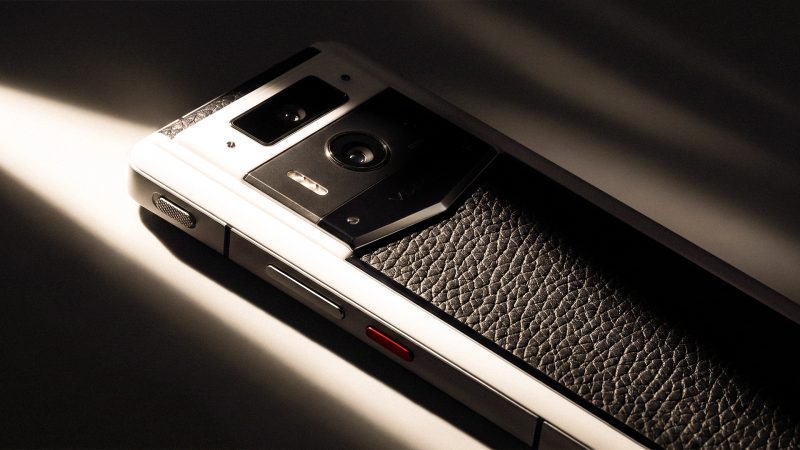
VERTU’s published Agent Q specifications list a 50MP main camera, a 64MP telephoto camera and a 50MP ultra-wide camera, alongside a mechanical zoom lens. Those details make it a candidate for hands-on evaluation, but they do not establish how it will reproduce a particular hallmark, patina, gemstone or reflective surface.
Assess the actual device with representative pieces and your normal lighting. Check close-range focus, consistency, colour, reflections and how quickly you can review and organise images. Separately verify that the apps and services you rely on for item records and client follow-up are compatible. The published camera information does not confirm a dedicated antique inventory or CRM workflow. The VERTU Agent Q camera specifications are a starting point for deciding what to test—not a substitute for that test.
Consider Agent Q on the same practical criteria as any other phone: how it handles your objects, records and daily communication. A specification sheet can help identify what to test; it cannot replace the test.
What should you test before choosing?
Run a short, structured trial in the shop or work environment where you expect to use the phone:
- Select representative objects, including one with a small mark, one reflective piece and one with a textured or uneven surface.
- Photograph each item using the same lighting and a consistent sequence of overall and detail views.
- Review the images at normal size and enlarged; check focus, colour, shadows and whether important details remain visible.
- Create a sample item record and link the images to it using your intended naming or reference-number method.
- Test backup or export, then confirm you can retrieve the record on the device or system you use for work.
- Try a realistic follow-up task: locate the item, retrieve the correct image and set a reminder or send a test message through your usual workflow.
This trial can reveal friction that a feature list will not: inconsistent close-ups, confusing file handling, missing app support or a process that takes too many steps. Use those results—not a single camera number—to compare devices.
Frequently Asked Questions
What phone features matter most for antique dealers?
The most important features are dependable close-range focus, colour consistency under shop lighting and a reliable way to link photos with item records. High resolution alone matters less than repeatable images and a record-keeping process that works for your business.
Is a macro camera essential for antique records?
No. What matters is whether the phone can focus consistently on the details you need to record at a practical distance. A macro label does not guarantee accurate colour, sharpness or useful documentation, so test it on representative objects.
Can phone photos establish an antique’s authenticity or provenance?
No. Phone photographs document visible condition and physical details; by themselves, they cannot establish authenticity, value, ownership or provenance. Preserve source records and supporting documents, and seek qualified physical assessment when a conclusion requires more than images.
Should a phone camera replace an inventory system?
No. A camera captures images; an inventory process connects them to item details, references and supporting records. Use a suitable record system and confirm that its apps and backup methods work with the phone you choose.
Is VERTU Agent Q suitable for antique-dealer photography?
It is a candidate to test because its published specifications include three rear cameras and a mechanical zoom lens. Antique-specific performance and compatibility with a dealer’s inventory or CRM tools should be assessed directly; the specifications alone establish neither.
Conclusion
Choosing a phone for antique dealing means looking beyond attractive product shots. Test close-range focus, colour consistency and repeatability, then check that images can be connected to organised item notes and a workable client follow-up process. Treat photographs as records of visible details—not proof of authenticity or provenance. If Agent Q is on your shortlist, compare your needs with VERTU Agent Q phones and assess the device against your own objects and workflow.
![How to Choose a USB-C Hub for a Foldable Phone [Full Guide]](https://cdn.sanity.io/images/e0gp1l2g/production/d12e57b33e2443abd67f9592fbb196b68c8d6aec-2180x1376.webp?w=800&h=450&q=82&auto=format&fit=crop)