
Introduction
In 2026, “best secure device for AI privacy” doesn’t mean a single phone or laptop. It means a layered stack: hardware that can be trusted, software that stays supported, and workflows that minimize what ever leaves the device.
This guide is for high-net-worth individuals, entrepreneurs, and the security advisors who support them—people who can’t afford ambiguity around where data goes, how access is granted, or how recovery works when a device is lost.
Use this guide in order. Start with criteria. Then look at the shortlists. Finally, choose an example stack and adapt it to your own travel pattern, risk profile, and tolerance for operational overhead.
What “best secure” means
Threat model and priorities
Security is only meaningful against a defined threat.
For most decision-stage buyers in 2026, the practical threat model includes:
Account takeover (phishing, adversary-in-the-middle attacks, SIM swap, credential stuffing)
Device loss or theft (airport, hotel, rideshare)
Targeted malware/spyware (the rare but high-impact scenario)
Cloud exposure (sensitive prompts, documents, and “assistant memory” living somewhere you don’t control)
Your “best” device is the one that makes your highest-probability, highest-impact threats expensive and noisy.
Key TakeawayIf you haven’t written down what you’re defending against, you’re buying vibes—not security.
Verifiable protections and audits
A secure device is not defined by marketing language. It’s defined by protections you can verify.
Look for:
Hardware-rooted trust (secure boot, protected key storage)
Public security documentation you can read and show to an advisor
Clear controls for permissions, telemetry, backups, and account security
When vendors publish technical security guides, they give you something rare: a way to check whether a protection is architectural, policy-based, or simply optional.
Update horizon and support quality
In practice, your risk rises as your device ages.
The most “secure” device today becomes a liability when:
security patches slow down or stop
firmware and baseband risks accumulate
your apps outpace your OS
For decision-stage buyers, update horizon isn’t a footnote. It is a buying criterion.
How to verify: Find the vendor’s official support commitment (or their lack of one), then confirm your exact model and region/carrier behavior before you commit.
AI-era buyer criteria for the best secure device for AI privacy
On-device AI vs cloud dependence
AI changes the privacy equation because it changes the default data flow.
The simplest decision rule is:
Prefer on-device AI when the task is sensitive, repetitive, or best kept offline.
Treat cloud AI as an escalation path, not the default—especially for negotiation, personal security details, medical information, family matters, or unreleased financial data.
The nuance is that “on-device” only helps if your device is locked down and your workflows prevent silent cloud fallbacks. A hybrid approach can be reasonable—local first, with explicit permission before anything leaves the device.
If you want a deeper decision framework, VERTU publishes an internal guide on on-device vs cloud AI privacy buyer’s tradeoffs.
Hardware isolation and encryption
In 2026, security buyers should ask a blunt question: Where do the keys live?
A decision-grade device stack has:
Hardware-backed key storage (so keys aren’t just files on disk)
Strong encryption at rest (device storage)
Strong encryption in transit (comms)
On phones, this typically means a secure subsystem or chip that isolates cryptographic operations from the main OS. On laptops, it usually means a TPM-class root of trust (or equivalent) paired with modern full-disk encryption.
Telemetry, permissions, and backups
Privacy fails quietly.
The most common leaks aren’t exotic zero-days. They’re:
assistant apps granted microphone, contacts, photos, and calendars “because it’s convenient”
cloud backups replicating sensitive material to places you don’t control
analytics/telemetry that is hard to audit
Before you buy, confirm you can:
restrict permissions without breaking core functions
control backup destinations (and encryption)
separate “daily life” apps from “sensitive work” apps
Smartphones shortlist
Flagship platforms (iPhone, Pixel, Galaxy)
Flagship phones are often the best default for a simple reason: the security baseline is high, and the ecosystem support tends to be mature.
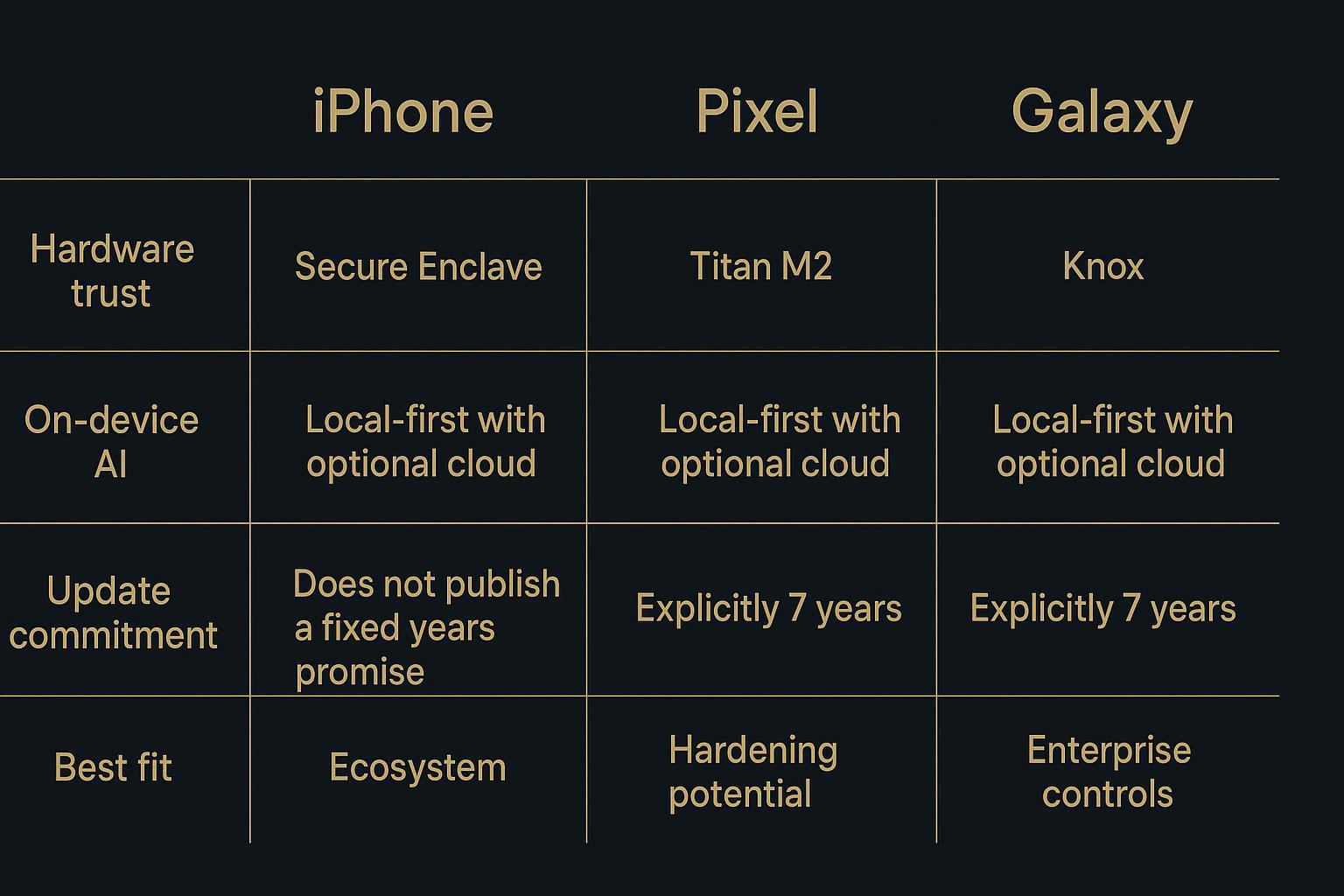
- iPhoneApple’s security architecture includes the Secure Enclave, a dedicated secure subsystem isolated from the main processor and designed to protect sensitive data and key management.
- PixelGoogle has been explicit about long support windows. Google’s announcement of 7 years of software support for Pixel 8 and Pixel 8 Pro is unusually clear—and clarity matters when you’re buying for longevity.
- GalaxySamsung positioned the Galaxy S24 series with extended support. In Samsung’s own announcement, the Galaxy S24 launch notes that availability and timing of updates can vary by model and market while outlining the new era of mobile AI and support expectations in its Galaxy S24 series newsroom post.
Collector’s note: Don’t confuse “secure hardware” with “secure outcomes.” Your outcome depends on configuration, key hygiene, and whether sensitive workflows are isolated from daily apps.
Hardened options (GrapheneOS, CalyxOS)
If you have a higher threat model—or you simply want more control—hardened Android options can be compelling.
The tradeoff is operational.
You may gain stricter app isolation and reduced default services.
You may lose some convenience integrations, and you’ll own more of the configuration and compatibility burden.
This path is best for buyers who either:
have a trusted advisor who can validate settings and operational habits, or
can personally maintain a disciplined, minimal app footprint.
Update horizons and on-device AI
Long support windows matter more in an AI era because the “AI surface area” keeps growing: on-device models, assistants that integrate across apps, and new system-level features.
For decision-stage buyers, focus on three things:
Is the support commitment explicit? Google’s Pixel 8 commitment is explicit; Samsung’s S24 messaging indicates a longer window; Apple’s support is historically strong but not framed as a single, fixed-year promise in the same way.
Is local AI truly local by default? Some systems offer “local-first” features with a cloud fallback path. Decide whether that fallback is acceptable for your sensitive workflows.
Can you harden without breaking your life? The most secure phone is useless if it forces workarounds that reintroduce risk.
A practical “decision-stage” move many UHNW buyers make is to treat setup and migration as part of the purchase, not an afterthought. That means:
mapping which accounts are “high consequence” (banking, messaging, identity, travel)
deciding what must not be backed up to consumer cloud services
migrating with a checklist rather than a same-day rush
This is also where concierge-grade support can be rational, not indulgent. For example, VERTU can be used for concierge-grade privacy configuration and secure migration guidance so the device you buy is aligned to your threat model—without turning the guide into a marketing exercise.
Laptops and OS
Mac with Apple silicon security
For many buyers, Mac with Apple silicon is a strong default because the platform is designed around integrated hardware and software security.
The decision point isn’t “Mac vs PC.” It’s whether you can:
keep sensitive work separated from casual browsing
use full-disk encryption and strong device unlock
maintain consistent updates
If your laptop runs local AI workloads, treat model files, transcripts, and “assistant memory” as sensitive local data. Lock down storage accordingly.
Windows Secured-core and Pluton
Windows can be a decision-grade choice when you buy the right class of hardware.
Microsoft’s definition of Secured-core PCs is essentially a higher baseline: integrated hardware, firmware, and OS protections aimed at reducing pre-boot and kernel-level risk.
On newer devices, Microsoft’s Pluton security processor is built into the CPU to protect credentials and encryption keys, with updates delivered via Windows Update.
Qubes OS and hardened Linux
If your threat model includes targeted compromise—or you manage sensitive assets that justify operational overhead—Qubes OS can be a serious option.
Qubes OS is built around compartmentalization: separate activities into separate “qubes,” so compromise of one doesn’t automatically compromise the rest. The official Qubes OS introduction and Qubes OS FAQ on compartmentalization explain the philosophy clearly.
The tradeoff is that Qubes and hardened Linux approaches demand discipline:
hardware compatibility matters
workflows must be designed around isolation
support is less “it just works” and more “it works because you made it work”
Keys, comms, and clean devices
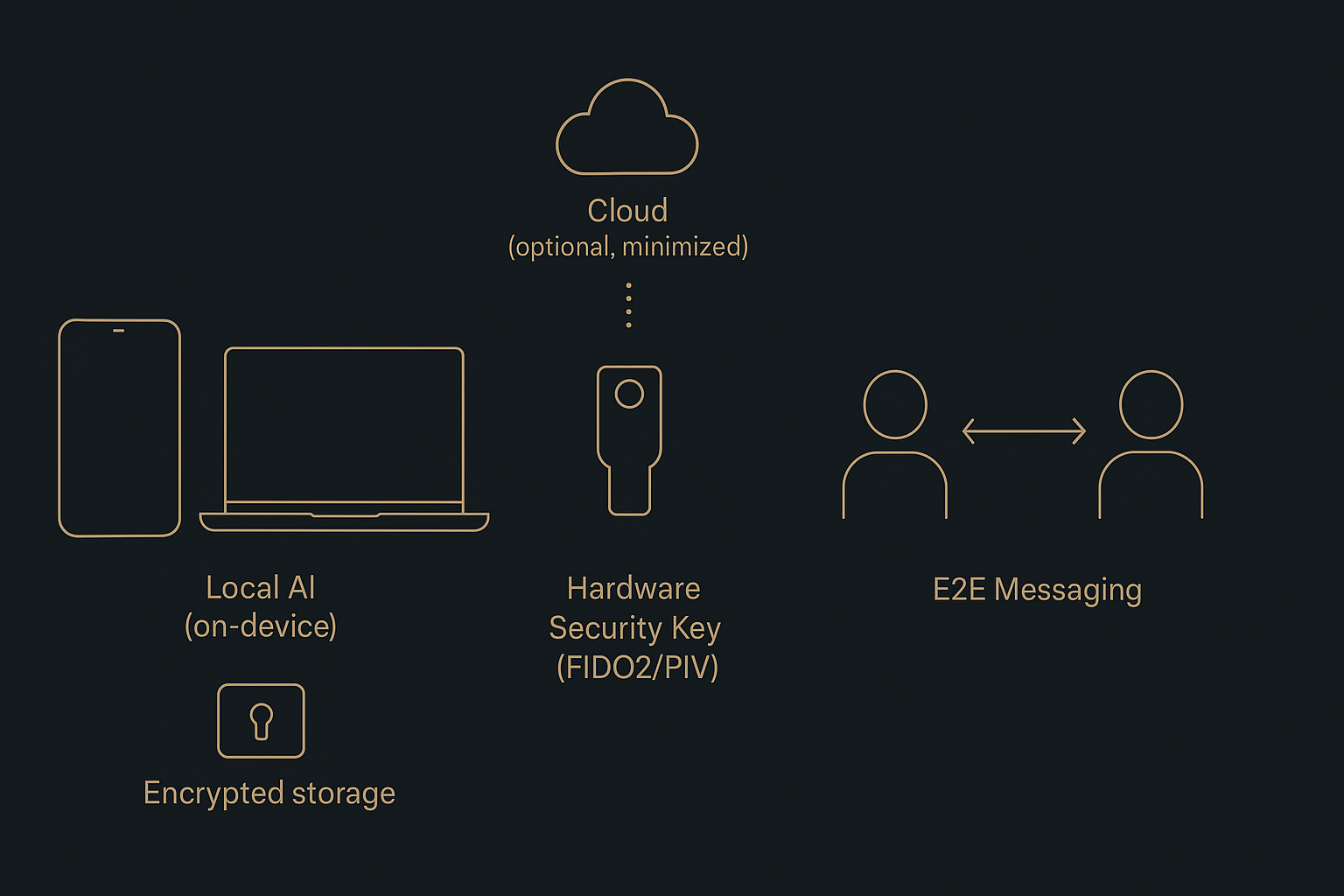
Hardware keys (FIDO2, PIV)
In most real-world breaches, the weak link is authentication.
Hardware-backed passkeys and security keys help because they are designed to resist phishing. The FIDO Alliance explains why passkeys are phishing resistant and how origin-bound authentication works in How FIDO works.
From a policy perspective, NIST’s guidance on phishing resistance is a good reminder: if a credential can be tricked into being handed to an impostor, it will be.
Decision-stage rule: if a service matters, it gets a key.
Encrypted communications practices
End-to-end encryption is table stakes for high-sensitivity conversations, but it’s not magic.
Signal’s support documentation explains that conversations are end-to-end encrypted and why Signal can’t read your messages.
The practical executive practices:
keep sensitive threads in a single trusted E2EE app
verify identities for high-risk conversations
use disappearing messages when retention is the risk
assume screenshots and unlocked devices are still exposure paths
Clean-device SOP for sensitive work
A clean device is a workflow, not a purchase.
Use a simple SOP:
- Separate contextsone device (or one profile) for sensitive work, one for daily life.
- Minimize appsfewer apps, fewer permissions, fewer surprises.
- Control cloud syncdecide what can sync and what must stay local.
- Keys by defaulthardware keys for primary accounts, stored and carried intentionally.
- Travel modea dedicated travel profile with reduced accounts and limited data.
Example secure stacks
Private-first travel kit
Built for loss/theft, hotel Wi‑Fi, and fast recovery.
- Phonea current-generation flagship with a long support window
- Laptopthin-and-light with full-disk encryption enabled and rapid lock
- Keystwo hardware keys (primary + backup), plus a recovery plan stored offline
- Commsone E2EE messenger for sensitive conversations; keep groups small
- Processtravel profile with minimal data; re-authenticate on return
How to verify: Before your next trip, do a dry run: lock the phone, confirm you can sign in with the hardware key, and confirm your backup/recovery path works without “I’ll do it later.”
Executive daily carry
Built for speed without compromising boundaries.
- PhoneiPhone/Pixel/Galaxy chosen by ecosystem fit and advisor preference
- Local AI posturelocal-first for notes, summaries, and draft thinking; cloud only with explicit approval
- Identityhardware key for primary email and password manager; passkeys where supported
- Backupsencrypted; minimal; reviewed quarterly
- Processseparate “board-level” and “casual” contexts via profiles or strict app discipline
Family office baseline
Built for repeatability across principals and staff.
Standardize on one or two device families to simplify patching and support
Mandate phishing-resistant authentication for high-consequence accounts
Segment communications: what belongs in E2EE, what can be email, what must be voice-only
Implement a clean-device policy for deal documents and sensitive negotiations
Audit quarterly: update status, key inventory, recovery paths, and permission creep
Conclusion
Key takeaways for choosing the best secure device for AI privacy in 2026
The “best secure device for AI privacy” is a stack: device hardware, update horizon, keys, comms, and backups.
Prefer verifiable protections and explicit support commitments over brand narratives.
In an AI era, privacy is about data flow: local-first by default, cloud escalation only when you choose it.
Next steps: validate support windows, configure local AI, and enforce keys/backups
Validate the support horizon for your exact model and region.
Set your AI posture: decide what stays local, what can escalate to cloud, and what never leaves the device.
Enforce keys and recovery: hardware keys for critical accounts, plus a tested backup plan.
If you want help turning these steps into a checklist and executing a clean migration, concierge-grade guidance can be useful—as long as it stays grounded in your threat model and verifiable settings.
Disclosure: This article references VERTU pages. Editorial judgment remains the priority.