| Tool | Key Strengths | Limitations | Best For | Pricing |
|---|---|---|---|---|
| Sapling AI Detector | High accuracy, user-friendly | Limited free version | Large enterprises, academic institutions | Starts at $25/month |
| Content at Scale Detector | Fast batch processing, customizable | Premium pricing, learning curve | Large publishers, marketing agencies | Starts at ~$44/month |
| Originality.AI | Specialized AI & plagiarism detection | Overkill for basic needs, premium pricing | Publishers, agencies, academic journals | Starts at ~$49/month |
| Writer.com AI Detector | Seamless integration, customizable | Premium pricing, setup required | Businesses, content teams | Starts at ~$45/month |

Looking for reliable content detection? Here are the 10 top alternatives to sapling AI detector: Winston AI, ZeroGPT, Originality.AI, Copyleaks AI Detector, GPTZero, Turnitin AI Detection, Scribbr AI Detector, Content at Scale Detector, GLTR, and Hive Moderation. While sapling AI detector offers strong precision and real-time analysis, you might want higher accuracy, more features, or better pricing. Educators, publishers, and businesses need dependable tools. Experts say Winston AI leads in accuracy, and AI detectors have cut low-quality content by 35% .
Key Takeaways
- Sapling AI Detector offers strong accuracy and ease of use but has limits like a restricted free version and higher pricing.
- Top alternatives provide features like batch processing, multilingual support, plagiarism checks, and detailed reports to fit different user needs.
- Accuracy matters most; tools like Winston AI and Copyleaks deliver near-perfect detection to trust your results.
- Choose a detector based on your role—educators benefit from GPTZero and Turnitin, businesses from Winston AI and Copyleaks, publishers from Originality.AI and Content at Scale.
- Try free trials or versions to find the best fit for your workflow, budget, and content type before committing.
Sapling AI Detector: Why Seek Alternatives
Limitations
You might like sapling AI detector for its high accuracy and easy-to-use interface. Still, you could run into some roadblocks. The free version feels pretty limited, especially if you need to scan lots of content or want advanced features. If you work with languages other than English, you may notice the tool doesn’t always meet your needs. Some users also find the pricing a bit steep when compared to other options.
Here’s a quick look at how sapling AI detector stacks up against a few popular alternatives:
You can see that while sapling AI detector does a great job with accuracy, other tools offer features like batch processing, deeper reporting, or better integration with your workflow.
User Needs
You want a content detector that fits your unique situation. Maybe you’re an educator who needs to check lots of student essays quickly. Or you run a business and want to make sure your team’s writing stays original and trustworthy. Some users need fast batch processing, while others care more about detailed reports or seamless integration with their favorite writing platforms.
Tip: Experts suggest using more than one tool and paying attention to authenticity scores for the best results.
Case studies show that switching to alternatives can save time and boost quality. For example, a media company cut review time in half with Content at Scale Detector. A news outlet reduced accidental AI-generated content by 30% using Originality.AI. These stories show that the right tool can make a big difference for your workflow and peace of mind.
Evaluation Criteria
When you compare AI content detectors, you want to know what really matters. Let’s break down the key things you should look for.
Accuracy
Accuracy is the heart of any content detector. You want a tool that can spot AI-generated text without making mistakes. Some detectors stand out for their high accuracy. For example:
| AI Content Detection Tool | Reported Accuracy (%) |
|---|---|
| Copyleaks AI Content Detector | 99% |
| ZeroGPT | Over 98% |
| DetectGPT | Up to 95% |
If you’re an educator, you need to trust the results before making decisions about student work. Businesses and publishers also rely on these numbers to keep their content original and credible.
Features
Features can make or break your experience. Some tools offer advanced options like multilingual support, sentence-level analysis, or integration with plagiarism checkers. These extras help you catch more subtle cases of AI writing and make your workflow smoother.
| AI Content Detector | Innovative Features | Accuracy & Validation Data |
|---|---|---|
| Winston AI | Works with all main language models, detects paraphrased content, multilingual | Up to 99.98% accuracy , highlights suspected AI sentences |
| GPTZero | Burstiness/perplexity metrics, sentence-level, color-coded highlights | Classifies AI vs human text, detailed readability metrics |
| Copyleaks | Human writing pattern recognition, detects mixed text, 30+ languages | Over 99% accuracy, low false positives |
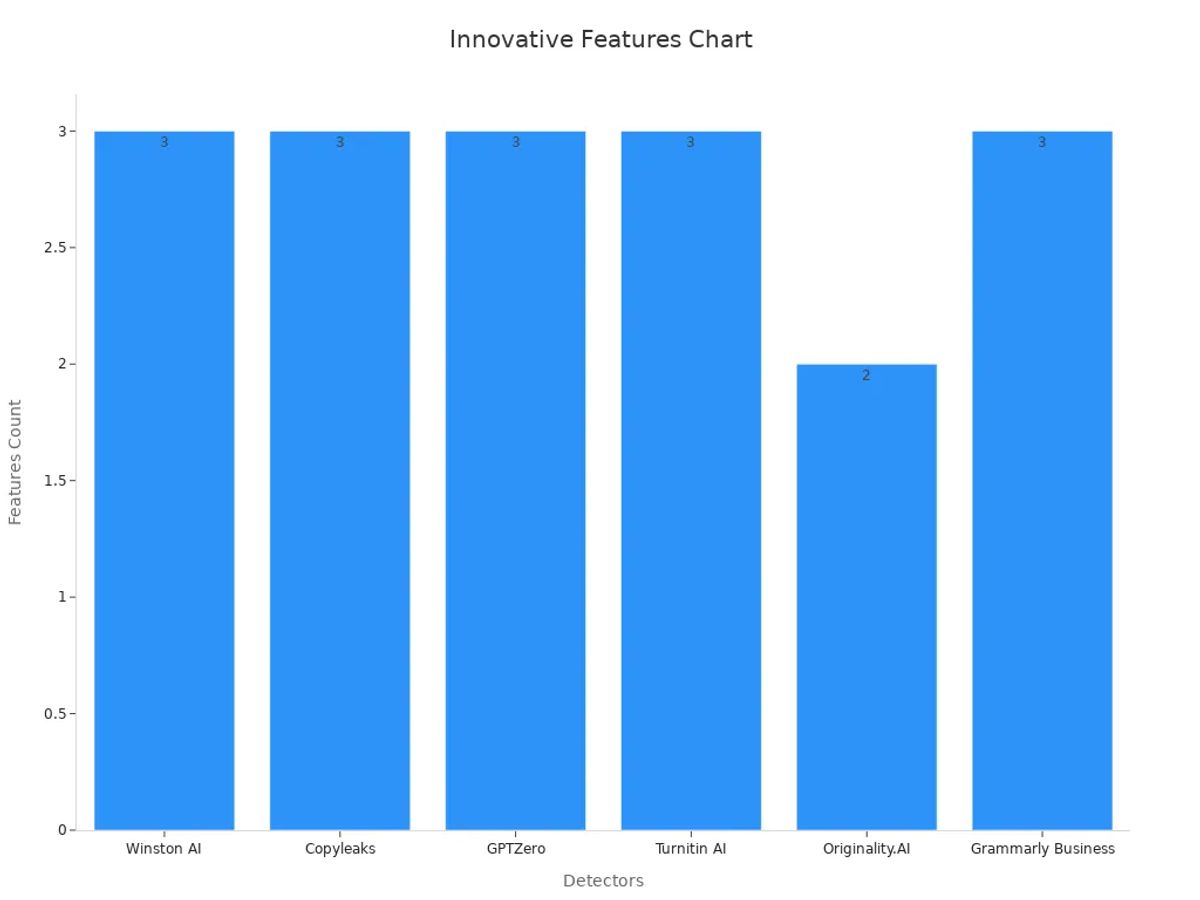
You’ll notice that tools with more features often deliver better accuracy and flexibility.
Usability
You want a detector that feels easy to use. A clean interface, fast results, and clear reports save you time. If you’re a teacher with a stack of essays or a marketer checking dozens of articles, usability matters. Some tools even let you upload batches of files or integrate with your favorite platforms.
Pricing
Cost always plays a role. Some detectors offer free versions with limits, while others charge monthly fees. If you’re a student or a small business, you might look for affordable plans. Larger organizations may pay more for extra features and support. Always match the price to the value you get.
Tip: Think about your main needs—accuracy, features, ease of use, or budget—before picking a tool. The right balance helps you get the most out of your AI content detector.
Top 10 Alternatives

Winston AI
Winston AI stands out if you want top-notch accuracy. This tool works with all major language models and can spot even paraphrased or mixed-content writing. You get sentence-level highlights, so you can see exactly which parts might be AI-generated. Winston AI supports multiple languages, making it a great pick for global teams or classrooms. Many users say it catches subtle AI writing that other detectors miss. If you need to check lots of documents, Winston AI offers batch processing and detailed reports.
Note: Winston AI reports up to 99.98% accuracy, which puts it among the leaders for reliable content detection.
ZeroGPT
ZeroGPT gives you a simple way to check if text comes from AI. You just paste your content, and the tool quickly tells you if it thinks the writing is human or machine-made. ZeroGPT uses advanced algorithms and supports over 30 languages. It’s a favorite for teachers and students because it’s easy to use and offers a free tier. The tool claims over 98% accuracy, so you can trust the results for most everyday needs.
- Key features : Multilingual support, fast results, free plan for basic use.
- Best for : Educators, students, and small businesses.
Originality.AI
If you work in publishing or run a content agency, Originality.AI could be your best friend. This tool checks for both AI-generated text and plagiarism in one scan. You can invite team members, manage projects, and get detailed analytics. Originality.AI is built for teams, so you can track who scanned what and when. It’s especially good for agencies that need to keep content original and trustworthy.
| Feature | Benefit |
|---|---|
| Plagiarism + AI check | Saves time, boosts confidence |
| Team collaboration | Easy project management |
| Analytics dashboard | See trends and scan history |
Originality.AI plans start at $14.95/month for 20,000 words, with options for larger teams.
Copyleaks AI Detector
Copyleaks AI Detector shines when you need high accuracy and lots of features. It offers customizable sensitivity, batch processing, and detailed reports. You can even white-label the tool for your business. Copyleaks excels at finding heavily modified or paraphrased AI content, which is a big plus for publishers and academic institutions. The tool supports over 30 languages and provides enterprise-level customization.
Tip: Copyleaks starts at $10/month after 5 free scans, making it affordable for most users.
GPTZero
GPTZero was built with educators in mind. It analyzes writing patterns, highlights sentences, and gives you burstiness and perplexity metrics. These features help you see if a student wrote the text or if it came from an AI. You can process batches of essays and even integrate GPTZero with learning platforms. The free tier covers up to 10,000 words per month, and premium plans start at $15/month.
- Unique strength : Color-coded highlights make it easy to spot AI-generated sections.
- Sector fit : Perfect for schools, colleges, and teachers.
Turnitin AI Detection
Turnitin is a trusted name in academic integrity. Its AI detection tool checks for both plagiarism and AI-generated content. You get detailed similarity reports and clear feedback. Turnitin works well for schools and universities that already use its plagiarism checker. The tool integrates with learning management systems, so you can check student work without extra steps.
Many educators rely on Turnitin for its strong track record and easy integration.
Scribbr AI Detector
Scribbr AI Detector focuses on helping students and academic writers. It checks for AI-generated text and offers suggestions to improve your writing. Scribbr also provides plagiarism checking and citation help. The interface is simple, so you can upload your document and get results fast. If you want to polish your essays or research papers, Scribbr is a solid choice.
- Best for : Students, researchers, and academic writers.
- Extra help : Writing tips and citation tools included.
Content at Scale Detector
Content at Scale Detector is built for publishers and marketing teams who need to scan lots of content quickly. You can process batches of articles, get customizable reports, and even set up automated checks. The tool uses advanced AI to spot subtle patterns in writing. Many media companies use Content at Scale Detector to cut review time and keep quality high.
| Feature | Benefit |
|---|---|
| Batch processing | Saves time on large projects |
| Customizable reports | Tailored insights |
| Automation | Less manual work |
Content at Scale Detector starts at about $44/month, which fits larger teams and agencies.
GLTR
GLTR (Giant Language Model Test Room) takes a different approach. It shows you how predictable each word in your text is, using color-coded highlights. If a passage looks too predictable, it might be AI-generated. GLTR is a free, open-source tool, so you can use it without signing up. It’s popular with researchers and anyone who wants a visual way to spot AI writing.
GLTR works best for short texts and quick checks, not for large-scale scanning.
Hive Moderation
Hive Moderation offers more than just AI content detection. It checks for spam, hate speech, and other harmful content. You can use it to scan text, images, and even videos. Hive Moderation is a good fit for social media platforms, forums, and online communities. The tool uses real-time updates and supports multiple languages.
- Key features : Multi-format detection, real-time monitoring, broad language support.
- Best for : Online platforms and businesses that need to keep their communities safe.
Many organizations choose Hive Moderation for its speed and ability to handle different types of content.
You have many strong options besides sapling AI detector. Each tool brings something unique, whether you need top accuracy, team features, or fast batch processing. The right choice depends on your workflow, your team size, and the kind of content you handle every day.
Comparison Table

Choosing the right AI content detector can feel overwhelming. You want a tool that fits your needs, budget, and workflow. To help you decide, here’s a handy table that compares sapling AI detector and its top 10 alternatives. You’ll see their standout features, accuracy, pricing, and best use cases—all in one place.
| Tool | Key Features & Strengths | Accuracy | Pricing (Starting) | Best Use Cases | Main Drawback |
|---|---|---|---|---|---|
| Sapling AI Detector | Real-time analysis, user-friendly, strong precision | High | $25/month | Enterprises, academics | Limited free version |
| Winston AI | Multilingual, detects paraphrasing, batch processing, sentence-level highlights | Up to 99.98% | $18/month | Global teams, educators | Fewer integrations |
| ZeroGPT | Fast, supports 30+ languages, simple interface, free tier | Over 98% | Free/$8.99/month | Teachers, students, small business | Fewer advanced features |
| Originality.AI | AI + plagiarism check, team management, analytics dashboard | 99%+ | $14.95/month | Agencies, publishers | Premium pricing |
| Copyleaks AI Detector | Customizable, batch processing, 30+ languages, white-label | 99%+ | $10/month | Publishers, academics | Limited free scans |
| GPTZero | Burstiness/perplexity, color-coded highlights, batch uploads | High | Free/$15/month | Schools, teachers | Limited analytics |
| Turnitin AI Detection | Plagiarism + AI check, detailed reports, LMS integration | High | Institutional pricing | Universities, colleges | Not for individuals |
| Scribbr AI Detector | AI detection, writing tips, citation help, plagiarism check | High | $19.95/document | Students, researchers | Pay-per-use |
| Content at Scale Detector | Batch processing, customizable reports, automation | High | ~$44/month | Publishers, marketing teams | Learning curve |
| GLTR | Visual predictability analysis, open-source, color-coded highlights | Moderate | Free | Researchers, quick checks | Not for large batches |
| Hive Moderation | Multi-format (text, image, video), real-time, spam/hate speech detection | High | Custom pricing | Online platforms, communities | Complex setup |
Tip: Look for features like real-time data processing, interactive dashboards, and advanced analytics if you want deeper insights and faster decisions. Many tools offer user-friendly interfaces and quick learning curves, so you can get started without much training.
You might notice that sapling AI detector offers strong real-time analysis and a simple interface, but some alternatives give you more advanced analytics, batch processing, or better pricing for teams. If you need to handle lots of documents or want extra compliance features, check out options like Winston AI or Copyleaks. For students or teachers, ZeroGPT and GPTZero keep things simple and affordable.
Choosing the Best Tool
Picking the right AI content detector can feel tricky, but you can make it easier by focusing on your main needs. Start by thinking about your role. Are you a teacher, a business owner, or a publisher? Each group looks for something different.
- Educators often want tools that check essays fast and give clear reports. You might like GPTZero or Turnitin AI Detection. These tools work well with student writing and offer easy-to-read results.
- Businesses usually need batch processing and team features. Winston AI and Copyleaks AI Detector help you scan lots of documents and manage users. If you work with global teams, look for multilingual support.
- Publishers and agencies care about both plagiarism and AI detection. Originality.AI and Content at Scale Detector give you both in one place. These tools also offer analytics and project management.
Tip: Try out a few tools before you decide. Many offer free trials or demo versions. This way, you can see which one fits your workflow best.
You should also think about your budget. Some tools, like ZeroGPT and GLTR, have free options. Others, such as sapling AI detector, charge a monthly fee but offer more advanced features. Always match the price to the value you get.
Check if the tool integrates with your favorite platforms. Fast results and easy reports save you time. If you need help, look for tools with good customer support.
In the end, the best AI content detector is the one that fits your daily tasks and helps you work smarter. Take your time, test a few, and choose the one that feels right for you.
You have plenty of choices beyond sapling AI detector. Each tool stands out for different reasons—some shine in accuracy, others in features or team support. You should look for a detector that matches your workflow and adapts quickly to new AI models. Industry tests show that accuracy, false positives, and real-time updates matter most. As AI keeps changing, you’ll want a solution that grows with your needs. Try a few tools and see which one fits best.
- Extensive testing across many AI models and topics shaped these recommendations.
- Top tools offer batch processing, team features, and integration options.
- The best pick depends on your use case—education, business, or publishing.
FAQ
What makes an AI content detector accurate?
You want a detector that spots AI writing without many mistakes. The best tools use advanced algorithms and check for patterns in the text. High accuracy means you can trust the results.
Can I use these tools for free?
Some tools, like ZeroGPT and GLTR, offer free versions. Others give you a free trial or a few free scans. If you need more features, you might need to pay for a plan.
Which tool works best for teachers?
Teachers often like GPTZero or Turnitin. These tools check essays fast and give clear reports. You can spot AI writing in student work without much hassle.
Do these detectors support languages other than English?
Yes! Many detectors, such as Winston AI and Copyleaks, support over 30 languages. You can check content in Spanish, French, German, and more.
How do I choose the right AI detector for my needs?
Start by thinking about what matters most—accuracy, price, or features. Try a few tools with free trials. Pick the one that fits your workflow and feels easy to use.