

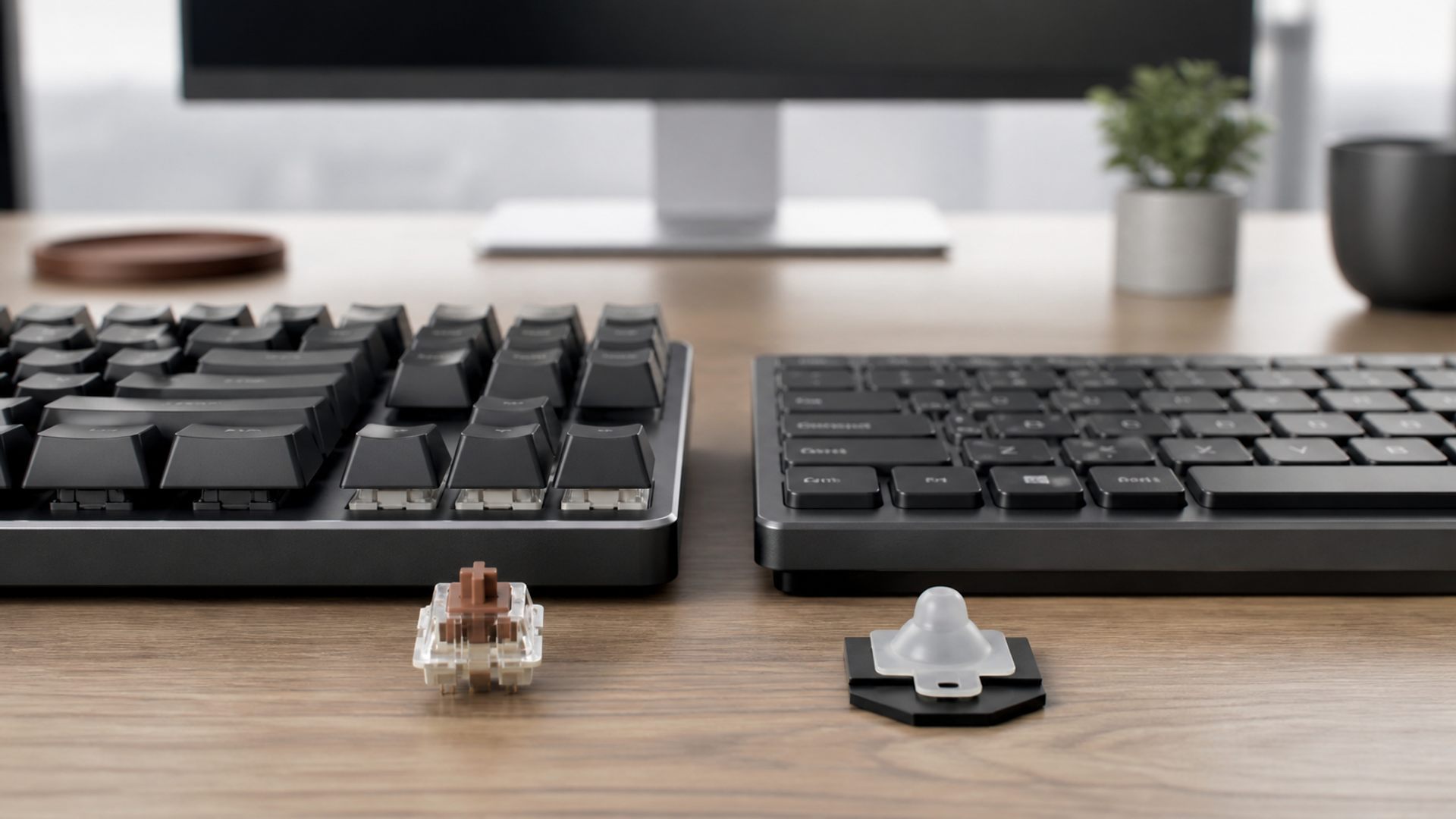
Mechanical and membrane keyboards describe different ways of registering a press, but neither label determines a good working day. Switch force, key travel, layout, stabilisers, firmware, desk acoustics and wrist position interact. A loud enthusiast board can be worse for shared work, while a poor membrane board can conceal an otherwise suitable low-profile design.
Start with the work, not the switch colour
Choose mechanical when defined switch feel, repairable components and controlled customisation improve real work. Choose membrane when low cost, quiet operation, sealing or a slim integrated design matters more. Keep and tune the current setup when posture, shortcuts, placement or worn keycaps—not the registration system—is the measured problem.
| Decision factor | Mechanical keyboard | Membrane keyboard | Keep and tune the current setup |
|---|---|---|---|
| Typing feel | A chosen force and tactile profile reduces errors | Consistent soft actuation suits the user | Adjust placement and technique first |
| Acoustics | Switch, case and desk treatment meet the room limit | Lower noise is proven in the actual office | Keep the current board until noise is measured |
| Repair | Replaceable switches or parts extend service | Low replacement cost is acceptable | Clean or replace worn caps first |
| Travel | Weight and cable plan are acceptable | Thin integrated hardware is easier to carry | Use the laptop keyboard on short trips |
| Software | Remapping works without unsafe dependence | Standard shortcuts cover the workflow | Automate the task before buying hardware |
| Ergonomics | Height and wrist position remain neutral | Low profile suits the desk geometry | A tray, rest or split layout is the real fix |
This mechanical keyboard vs membrane matrix is the article's working value object. Read the mechanical keyboard vs membrane rows together: the decisive failure mode depends on this topic's evidence, operating context and reader objective.
What the two key systems change
Evidence 1. CHERRY's technology reference distinguishes individual mechanical switches from membrane contact switches with an elastomer dome.
Evidence 2. Mechanical is not synonymous with loud: switch type, bottom-out force, keycaps, stabilisers, case and desk surface all shape sound.
Evidence 3. Hot-swap support, switch compatibility and firmware vary by exact model, so repairability cannot be inferred from appearance.
Evidence 4. Typing comfort is influenced by board height, key spacing, posture, repetition and breaks; a switch purchase does not treat an ergonomic injury.
Reader-visible sources checked for this article:
cherry.de — reader-visible current or official evidence
cherry.de — reader-visible current or official evidence
For mechanical keyboard vs membrane, these sources establish only the claims inside their documented scope. Recheck every changeable specification, availability condition, price, policy or service term in the relevant market before acting.
Run a controlled typing week
The decision changes at typing feel. Choose the first path only if a chosen force and tactile profile reduces errors; move to the second when consistent soft actuation suits the user; use the third when adjust placement and technique first. Save the downside that would make this row fail.
For acoustics, the first route works when switch, case and desk treatment meet the room limit; the second requires lower noise is proven in the actual office. The control for the third is keep the current board until noise is measured. Verify this row against the exact product, property, account or environment before it can reverse the decision.
The repair row exposes a practical boundary. Route one assumes replaceable switches or parts extend service, while route two is defensible only when low replacement cost is acceptable. Route three depends on clean or replace worn caps first. If that evidence is absent, keep the more reversible option.
Read travel as a stop/go test: weight and cable plan are acceptable supports the first option; thin integrated hardware is easier to carry supports the second; and use the laptop keyboard on short trips supports the third. Record which source proves the condition and when it was checked.
A buyer can resolve software without starting from a brand preference. Ask whether remapping works without unsafe dependence; compare that with whether standard shortcuts cover the workflow; then use automate the task before buying hardware as the third route's safeguard. An unknown condition stays unknown.
On ergonomics, popularity is not enough. The evidence for option one is that height and wrist position remain neutral. Option two means low profile suits the desk geometry. Option three is rational where a tray, rest or split layout is the real fix. Recheck any changeable term immediately before commitment.
Facts that would reverse the current choice
Reversal control 1 — Typing feel. Before choosing Mechanical keyboard, write down how the decision changes if “A chosen force and tactile profile reduces errors” proves false. Do the same for Membrane keyboard and “Consistent soft actuation suits the user”. Keep the Keep and tune the current setup route available until “Adjust placement and technique first” is verified. This control belongs to mechanical keyboard vs membrane; update it from the cited source or exact supplier rather than copying a generic checklist.
Reversal control 2 — Acoustics. Before choosing Mechanical keyboard, write down how the decision changes if “Switch, case and desk treatment meet the room limit” proves false. Do the same for Membrane keyboard and “Lower noise is proven in the actual office”. Keep the Keep and tune the current setup route available until “Keep the current board until noise is measured” is verified. This control belongs to mechanical keyboard vs membrane; update it from the cited source or exact supplier rather than copying a generic checklist.
Reversal control 3 — Repair. Before choosing Mechanical keyboard, write down how the decision changes if “Replaceable switches or parts extend service” proves false. Do the same for Membrane keyboard and “Low replacement cost is acceptable”. Keep the Keep and tune the current setup route available until “Clean or replace worn caps first” is verified. This control belongs to mechanical keyboard vs membrane; update it from the cited source or exact supplier rather than copying a generic checklist.
Reversal control 4 — Travel. Before choosing Mechanical keyboard, write down how the decision changes if “Weight and cable plan are acceptable” proves false. Do the same for Membrane keyboard and “Thin integrated hardware is easier to carry”. Keep the Keep and tune the current setup route available until “Use the laptop keyboard on short trips” is verified. This control belongs to mechanical keyboard vs membrane; update it from the cited source or exact supplier rather than copying a generic checklist.
Reversal control 5 — Software. Before choosing Mechanical keyboard, write down how the decision changes if “Remapping works without unsafe dependence” proves false. Do the same for Membrane keyboard and “Standard shortcuts cover the workflow”. Keep the Keep and tune the current setup route available until “Automate the task before buying hardware” is verified. This control belongs to mechanical keyboard vs membrane; update it from the cited source or exact supplier rather than copying a generic checklist.
Reversal control 6 — Ergonomics. Before choosing Mechanical keyboard, write down how the decision changes if “Height and wrist position remain neutral” proves false. Do the same for Membrane keyboard and “Low profile suits the desk geometry”. Keep the Keep and tune the current setup route available until “A tray, rest or split layout is the real fix” is verified. This control belongs to mechanical keyboard vs membrane; update it from the cited source or exact supplier rather than copying a generic checklist.
Define the work sample
Use the same 1,000-word edit, spreadsheet task, shortcuts and call notes on each board. Record errors, corrections, speed and fatigue without chasing a typing-test record.
Measure office sound
Place the board on the intended desk and record at the listener's position during normal typing, not deliberate pounding. Include calls and nearby colleagues in the acceptance test.
Audit failure and recovery
Remove a keycap, inspect cleaning access, check cable and wireless fallback, confirm firmware export and price a failed switch or whole-board replacement.
Set the desk geometry
Measure elbow height, board thickness, reach to pointing device and wrist extension. Test without a rest, then with the intended support and chair position.
Three desk profiles
Private writing office
A carefully chosen mechanical switch can reward long work when sound and height are controlled. Define the fact that would reverse this recommendation before committing.
Shared open-plan desk
A proven quiet membrane or low-noise mechanical board should be selected by neighbour impact, not enthusiast status. Define the fact that would reverse this recommendation before committing.
Frequent traveller
A light membrane or laptop keyboard can beat a heavier board when setup time and luggage are real constraints. Define the fact that would reverse this recommendation before committing.
Action checklist
Record switch force.
Use one work sample.
Count corrected errors.
Measure desk sound.
Test two-hour comfort.
Check hot-swap claims.
Export key maps.
Price spare parts.
Measure board height.
Keep a wired fallback.
Continue the decision
The linked VERTU articles expand adjacent parts of the mechanical keyboard vs membrane decision. They do not substitute for the external evidence above.
The mechanical-membrane verdict
Choose mechanical when defined switch feel, repairable components and controlled customisation improve real work. Choose membrane when low cost, quiet operation, sealing or a slim integrated design matters more. Keep and tune the current setup when posture, shortcuts, placement or worn keycaps—not the registration system—is the measured problem.
Keep the mechanical keyboard vs membrane decision reversible until its material cost, safety, access, privacy and compatibility facts are verified. Unknown evidence stays unknown; it is never silently scored as favourable.



