| Evidence | Description |
|---|---|
| Vulnerabilities | Weak security habits make phones easy for cybercriminals. |
| Cybercriminal Strategies | Hackers use bad apps and fake messages to attack phones. |
| Outdated Software Risks | Old software makes it easier for someone to break in. Encryption helps keep data safe. |
| Sophistication of Threats | Attacks on phones get smarter every year. |
Image Source: unsplash
You face risks every day when you use phones. Hackers and malware can attack your device. Many people lose their identity and data. This happens because they use weak passcodes or old software. Look at these facts:
More people want encrypted phones now. Privacy rules are getting stricter. Secure Phone models are popular in places with lots of surveillance. North America and Asia-Pacific are examples. People who work in defense, law, and finance want more safety for their data.
Key Takeaways
- Encrypted phones use strong encryption to keep your data safe. This makes it hard for hackers to get your information.
- You should update your phone often. Updates fix security problems and help stop malware.
- Check what permissions your apps have often. Limiting app access helps keep your personal data safe.
- Pick a phone with end-to-end encryption for calls and messages. This means only you and people you trust can see your conversations.
- Think about your privacy needs. Encrypted phones are great for people at high risk. But they also help anyone who cares about data security.
Security Basics of Encrypted Phones
What Makes a Phone Encrypted
Encrypted phones keep your data much safer. They use strong encryption to protect your calls, messages, and files. Encryption mixes up your information. Only you and someone you trust can read it. This makes it hard for hackers to steal your data.
Encrypted phones usually have a secure operating system. This system lets you control your privacy settings. You can choose which apps can use your data. Many secure phones block unknown apps. They also limit what can run on your phone. This helps stop bad apps and malware.
Here is a quick look at how secure phone features compare to standard smartphones :
| Feature Type | iOS Features | Android Features |
|---|---|---|
| Hardware | Secure enclave, Face ID, Touch ID | Variety of biometric authentication options (fingerprint scanning, facial recognition) |
| Software | Stringent app permissions, strong encryption standards | Google Play Protect, variable security features depending on manufacturer |
| Data Encryption | Default encryption using advanced encryption standards, covers iMessage and FaceTime | Standardized encryption varies by device manufacturer and model |
Secure Phone Hardware Features
A secure phone uses special hardware to keep your data safe. You get things like secure enclaves or hardware-backed security modules. These protect your passwords and important files from attacks. Biometric authentication, like fingerprint or face recognition, adds more safety. You can unlock your phone fast, but others cannot.
Tip: Update your phone often to fight new threats. Keeping your device up to date gives you the best protection against malware.
Many encrypted phones use a secure boot process. This means your phone checks itself for changes every time it starts. If someone tries to change your system, the phone will not load unsafe software. Parental or admin controls help you manage who can use the phone and what they can do. This is good for families and businesses.
Encrypted phones give you strong protection from malware and people who should not get in. You can feel safe knowing your information stays private.
Standard Smartphones: How Secure Are They?
iOS vs. Android Security
People use standard smartphones every day. The security depends on which system you pick. Both iOS and Android try to keep your phone safe. They do this in different ways. iOS is a closed system. Apple controls both the hardware and software. You get updates often. This means fewer bad apps can get in. Android lets you change more things on your phone. You can make it your own. But this freedom can bring more risks if you are not careful.
Here is a quick look at how iOS and Android compare:
| Operating System | Pros | Cons |
|---|---|---|
| Android | Open-source code allows for customization and innovation . | Increased customization can introduce security vulnerabilities. |
| Regular updates address vulnerabilities and add new features. | Some manufacturers may be slow to roll out security updates. | |
| Global popularity caters to different preferences and budgets. | Widespread adoption can make an appealing target for cyberattacks. | |
| iOS | A closed ecosystem helps tighten security controls. | Less customization and limited availability of third-party apps. |
| Frequent operating system updates covering many devices. | Fewer device options means Apple devices are more expensive. |
Android lets you change lots of settings. This can make your phone easier to attack. iOS does not let you change as much. This helps keep your data safe. Both systems have app stores. iOS checks apps more strictly. This lowers the chance of getting a bad app.
Security Updates and App Controls
Security updates are very important for your phone. Updates fix problems that hackers might use. Some brands send updates every month. Others take longer to send them. Look at this chart to see how often big brands update their phones :
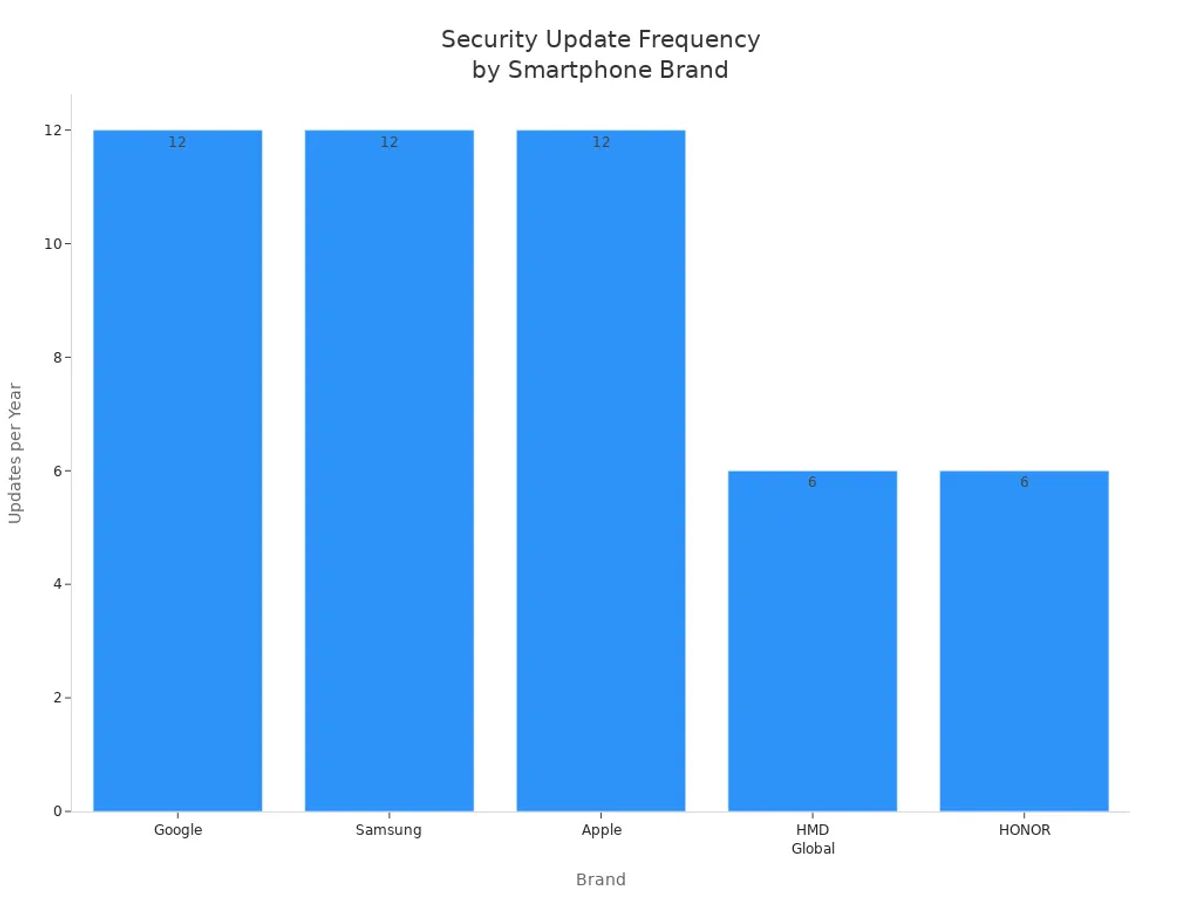
If you have a phone from Apple, Google, or Samsung, you get updates more often. This helps keep you safe from new threats. Phones from other brands may not get updates as fast. This can make your phone easier to attack.
Many attacks happen because of simple mistakes. Here are the most common problems:
- Not installing updates leaves your phone open to problems .
- Tricks like phishing can steal your data.
- Not setting up security features can make your phone unsafe.
- Lost or stolen phones can let others see your information.
- Weak passwords make it easy for someone to get in.
- Malware can get on your phone through apps or links.
App permission controls help you decide what apps can do . You should check these settings often. If you let apps have too many permissions, they might see your health or location data. Some apps ask for more than they need. This can lead to your data being taken or even identity theft. By checking permissions, you can stop apps from sharing too much.
Tip: Always check app permissions before you install or update an app. This easy step can help keep your data safe.
Standard smartphones give you many ways to stay safe. But you must use these tools the right way. Unlike encrypted phones , you need to watch updates, passwords, and app settings closely to keep your phone safe from threats.
Malware Protection and Threat Resistance
Image Source: pexels
Encrypted Phones vs. Standard Devices
Phones face many dangers every day. Malware tries to get in through bad apps or links. Encrypted phones protect your data better than standard devices. They use encryption to keep your files and messages safe. Hackers cannot read your stuff without your okay.
A secure phone blocks unknown apps. It limits what can run. You pick which apps you want. This helps you avoid risky downloads. Standard smartphones let you get apps from many places. This makes it easier for malware to attack.
Encrypted phones use special security checks. They scan for threats before you open files or apps. If something is dangerous, the phone warns you or blocks it. The phone watches for problems all the time. You stay safer because of these checks.
Note: Always update your phone. Updates fix security problems. They help your phone fight malware.
Controlled Environments and Pre-Installed Apps
Encrypted phones work in controlled environments. The system checks every app before you install it. You get fewer pre-installed apps. This means less risk. Many secure phones only allow trusted apps. You decide what goes on your phone.
Here is how controlled environments help you:
- iOS uses a closed system . Every app gets checked before you can use it. This lowers the chance of malware.
- Android lets you install apps from many places. This open system brings more risk. You have a bigger attack surface. Sometimes you wait longer for updates.
- Android phones come in many types. This makes updates slower. Some phones stay open to attacks for longer.
Encrypted phones give you more control. You choose which apps to trust. You avoid risky pre-installed apps. These apps may collect your data. Standard smartphones often come with many apps you cannot remove. Some may share your information or cause security problems.
Tip: Check your app list often. Remove apps you do not use or trust. This helps keep your phone safe.
Encrypted phones give you a safer place to use your device. You face fewer threats from malware and risky apps. You control what happens, so your data stays private.
Communication Privacy
Encrypted Messaging and Calls
You want your chats to stay private. Secure phones help by using strong encryption. This scrambles your messages and calls. Only you and the person you trust can read or hear them. This is called end-to-end encrypted calls and messaging. Many apps have this feature, but some protect you better than others.
Here is a table showing how popular apps use encryption and keep calls private:
| Application | Encryption Protocol | End-to-End Encryption | Metadata Collection |
|---|---|---|---|
| Signal | Signal Protocol | Yes | Minimal |
| Signal Protocol | Yes | Detailed | |
| Telegram | MTProto | Only for Secret Chats | Possible access |
Some secure phones, like the Blackphone PRIVY 2.0, give extra safety. You get encrypted voice calls and secure messages. This phone uses a special Android system with more security. It uses the ZRTP protocol for end-to-end encrypted calls and messages. You choose who can contact you. Your private talks stay safe .
- You face fewer risks from hackers.
- You keep secrets away from people who should not know.
- You decide who can reach you.
Metadata and Carrier Protection
Encryption does not always hide your metadata. Metadata means things like who you call and when you send messages. Carriers and other groups can sometimes see this information. Your message content may be safe, but some details are still visible.
Encrypted phones mostly protect what you say, not your metadata. New systems, like one from MIT , try to keep metadata safe too. These systems are still new and have some problems with speed and use.
Metadata is often very sensitive and not protected. Just sending a message can show information that encryption does not hide.
Even with a secure phone, some call and message details may be seen by others. If you want the most privacy, look for phones and apps that protect both your message and your metadata. You stay safer when you know what is protected and what is not.
Secure Phone vs. Encrypted Messaging Apps
Hardware-Level Security
You might think secure messaging apps on normal phones are just as safe as encrypted phones. But a secure phone protects your data with special hardware. The device has chips and systems that lock your information away. If someone tries to break in, the hardware stops them from getting your secrets.
Phones with hardware-level security use special parts for encryption keys. These keys stay in a safe area and never leave it. Hackers cannot get to them, even if they break into your software. You are protected as soon as you turn on your phone. This is called pre-boot authentication. Your phone checks itself before loading anything else. This keeps you safe from early attacks.
Tip: Hardware-level security helps you feel calm. Your data stays safe, even if your phone is lost or stolen.
App-Based Encryption Limits
Secure messaging apps help keep your chats private. They use encryption to mix up your messages so only you and your friend can read them. But these apps have some limits. They work inside your phone’s software, not the hardware. If your operating system has a problem, hackers might steal your keys or read your messages.
Sometimes your phone slows down when apps encrypt or decrypt messages. This happens because the main processor does all the work. Hardware-level encryption uses special chips to keep things fast.
Here is a table showing the main differences :
| Aspect | App-Based Encryption Limitations | Hardware-Level Encryption Advantages |
|---|---|---|
| Performance | Can slow down your phone when encrypting messages. | Stays fast by using special hardware chips. |
| Security | Can be hurt by software problems, risking your keys. | Keeps keys safe from attacks on software. |
| Pre-Boot Authentication | Needs the operating system to load first, which is risky. | Protects your data right from the start. |
You get more choices with secure messaging apps, but you also face more risks. A secure phone gives stronger protection because it guards your data at every step. If you want the best privacy, pick a device with both hardware and software security.
How to Choose an Encrypted Phone
Key Features to Look For
When you want an encrypted phone , look for strong protection. Some features are more important than others. Here is a list to help you pick:
- End-to-end encryption keeps your calls and messages private. Only you and the person you talk to can see or hear what you share.
- Custom operating systems, like SYC™, Samsung Knox, or Apple iPhone, help stop hackers from finding weak spots.
- Secure hardware, like hardware-based encryption and biometric locks, adds extra safety. These features protect your data even if someone takes your phone.
- Remote wipe lets you erase everything if your phone is lost or stolen. You can keep your information safe from far away.
- Zero data logging means your phone does not save records of what you do. This helps you stay private.
Tip: Always check if the secure phone you want has these features. They help keep your information safe.
Cost, Usability, and Limitations
Encrypted phones usually cost more than regular phones. For example, the Blackphone 2 costs more than many other smartphones. You pay extra for privacy and security. These phones are made for people who care about keeping their data safe.
Using an encrypted phone feels like using a normal Android device. You can change privacy settings easily. Some secure phones may have weaker cameras or simple designs. Sometimes, Wi-Fi is not as strong as on other phones.
If you use secure messaging apps, you still need to think about the phone’s hardware and software. Not all phones protect you the same way. When you choose an encrypted phone, look at the features and the trade-offs. Pick a phone that fits your needs and keeps your data safe.
Who Needs an Encrypted or Secure Phone?
High-Risk Users
Some people need encrypted phones more than others. If you work in emergency services, you must keep calls safe. Doctors and nurses have to protect patient data. They follow privacy laws and keep trust. Police officers use encrypted calls to hide important details. This keeps them safe during their work. Crisis support workers talk to people who need help. They use private lines to keep talks secret. These groups use secure phones to keep data and talks private.
- Emergency services use secure phones for safety.
- Healthcare workers keep patient data safe.
- Police use encrypted calls to stay secure.
- Crisis hotlines need private calls.
If you are in one of these jobs, you face big privacy risks. You need strong protection to do your work well.
Everyday Privacy Concerns
You do not have to be in a risky job to need privacy. Spyware and malware can get on your phone and steal your data. Phishing tricks can make you give away personal info. Some apps ask for too many permissions. This can let them see your data without asking. Data breaches can show your private info to others. GPS tracking can follow where you go without you knowing.
Encrypted phones help stop these problems. They use end-to-end encryption to keep your calls and messages safe. Secure phones block bad apps and stop data stealing. You can send messages that delete themselves after reading. These tools help you control your privacy and keep your data safe.
You do not have to be a police officer or doctor to care about privacy. Encrypted phones help everyone keep their information safe from threats.
You get different risks with each phone type. Encrypted phones protect your data better and give you more privacy. Check the table below to see how they compare:
| Feature | Encrypted Phones | Conventional Phones |
|---|---|---|
| Data Encryption | Strong, always on | Basic or missing |
| Operating System | Secure, updated often | Common, slower updates |
| Malware Protection | Controlled, safer apps | More risk from bad apps |
| Call and Message Privacy | End-to-end, military-level | Basic, may store metadata |
| Extra Security Features | Remote wipe, self-destruct messages | Fewer protections |
If you want strong security, pick an encrypted phone. You get safe calls, group chats, and files. Burn timers and secure voice memos help keep your data safe. For normal use, a regular smartphone is fine if you update it and pick safe apps. Choose the phone that fits your privacy needs. You can keep your information safe.
FAQ
What is the main difference between an encrypted phone and a regular smartphone?
Encrypted phones keep your data much safer. They use special hardware and software to protect you. Regular smartphones have basic security. Encrypted phones add more layers to stop hackers.
Can you use popular apps on encrypted phones?
Most encrypted phones let you use only certain apps . You might not find every app you want. This helps keep your phone safe. Always check which apps work before you buy one.
Do encrypted phones protect you from all types of hacking?
Encrypted phones protect you well, but not from everything. You still need to update your phone and use strong passwords. Hackers always try new tricks to get in.
Are encrypted phones legal to use?
In most countries, you can use encrypted phones. Some places have rules about strong encryption. Always check your local laws before you buy or use one.
Will an encrypted phone slow down your daily tasks?
You might notice small delays with some features. Extra security checks can take a little more time. Most people think the wait is worth the extra privacy.

![Executive Health Management: CEO Longevity Secrets [2026 Guide]](https://statics.myquickcreator.com/upload/aaaovujuj4apultn/2026/09/21/21751-v9yy9q2x.png)