What Is ClawdBot and Why Should You Care?
ClawdBot is a self-hosted personal AI assistant that has exploded across Silicon Valley, achieving 50,000+ GitHub stars in under 20 days and driving unprecedented Mac mini sales. Unlike traditional AI chatbots that wait passively for questions, ClawdBot functions as a 7×24 digital employee that proactively monitors, executes, and completes tasks autonomously. It integrates directly into messaging apps like WhatsApp, Telegram, and iMessage—requiring no separate app installation—while running locally on your device or cloud server to ensure complete data privacy. What makes ClawdBot revolutionary is its shift from "AI gives advice" to "AI does the work": it monitors stock prices and sends alerts, automatically organizes files, generates weekly reports, and even negotiates car purchases on your behalf. With persistent memory that remembers conversations from weeks ago, multi-agent routing for task isolation, and a plugin ecosystem enabling unlimited customization, ClawdBot represents the evolution from passive chatbots to active digital employees—all deployable in 30 minutes for as little as $20-25/month.
The Phenomenon: How ClawdBot Became Silicon Valley's New Obsession
Unprecedented Growth Metrics
In early 2026, ClawdBot emerged as an unexpected dark horse in the AI space, demonstrating explosive growth that caught even seasoned industry observers by surprise.
GitHub Statistics :
- Initial stars: A few hundred
- 20-day total: 50,000+ stars
- Single-day spike: 30,000 stars gained in 24 hours
- Forks: Thousands indicating widespread experimentation
Market Impact :
- Mac mini sales surged unexpectedly
- Silicon Valley developers racing to purchase hardware
- Previously moderate-selling device became supply-constrained
- Apple's Q1 sales unexpectedly boosted
This growth trajectory is remarkable even in the fast-paced AI industry where new projects emerge daily and attention spans are short.
The Mac Mini Connection
The correlation between ClawdBot's popularity and Mac mini sales reveals an interesting hardware-software symbiosis:
Why Mac Mini Became the Go-To Device :
- Low configuration requirements make it accessible
- 24/7 operation capability with minimal power consumption
- Quiet operation suitable for home deployment
- Sufficient processing power for AI operations
- Affordable entry point compared to high-end servers
The Phenomenon : Developers purchasing Mac mini specifically to run ClawdBot, treating it as dedicated AI infrastructure rather than general-purpose computing.
Breaking the "Shell Application" Stereotype
ClawdBot's explosive growth stems from its fundamental difference from typical AI projects:
Typical AI Projects :
- "Shell" applications wrapping existing models like ChatGPT
- Concept-stage projects lacking practical implementation
- Limited real-world utility beyond demonstrations
ClawdBot's Distinction :
- Genuine execution capabilities beyond conversation
- Production-ready for daily use
- Continuously improving through open-source collaboration
- Nicknamed "open-source JARVIS" by enthusiastic users
The JARVIS comparison—referencing Tony Stark's AI butler from Marvel—indicates how users perceive ClawdBot's capabilities: not just answering questions, but actively managing tasks and controlling systems.
Core Innovation: From "AI Finds You" to "AI Works for You"
The Traditional AI Limitation
Historical AI assistant interactions followed a predictable pattern:
Human-Initiated Contact :
- User opens specific AI application
- User types question or request
- User waits for response
- User manually implements AI's suggestions
This "human finds AI" model improved information retrieval efficiency but remained fundamentally limited in scope and application scenarios.
ClawdBot's Revolutionary Reversal
ClawdBot inaugurates the "AI finds human" era, transforming passive tools into proactive assistants:
Proactive Monitoring :
- Watches stock prices continuously, alerting when thresholds are reached
- Monitors weather conditions and suggests schedule adjustments
- Tracks important events and sends timely reminders
- Reviews emails and prioritizes urgent communications
Autonomous Execution :
- Organizes computer files with simple voice commands
- Generates comprehensive weekly reports from activity logs
- Negotiates with car dealers to secure better pricing
- Completes complex multi-step workflows without supervision
Persistent Availability : Operating 24/7 through familiar messaging platforms like WhatsApp and Telegram, making AI assistance as natural as texting a colleague.
Technical Architecture: The Gateway Control Plane
What Makes ClawdBot Different Architecturally
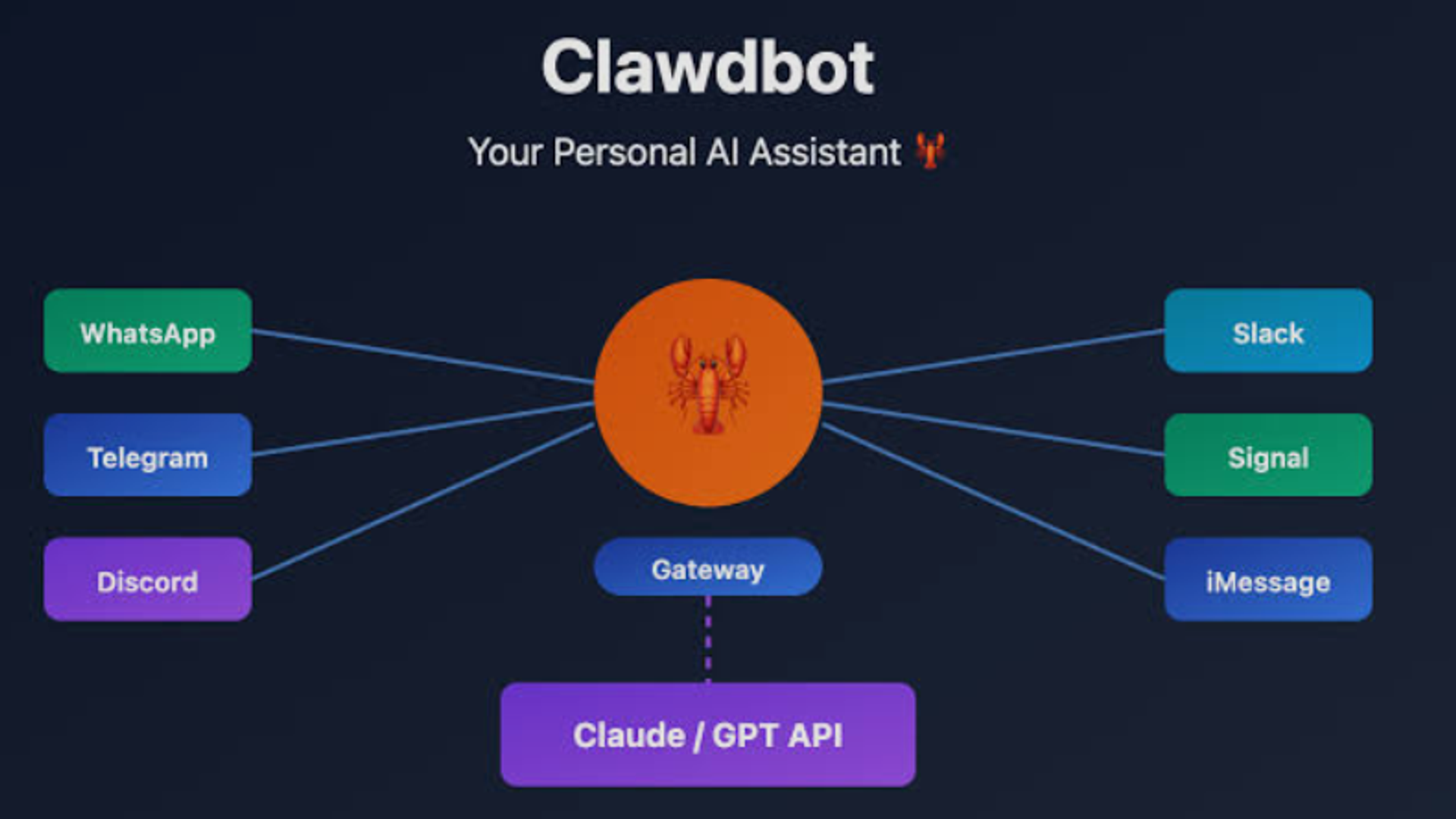
Unlike traditional AI with simple "chat UI + model calls" architecture, ClawdBot implements a sophisticated Gateway control plane design.
Gateway as Central Brain :
- Manages all chat channels uniformly
- Coordinates agent sessions across platforms
- Controls tool capabilities and access
- Synchronizes client interactions
Unified System Benefits :
- Consistent operations regardless of entry point
- WhatsApp messages and CLI commands processed identically
- No need to learn different interfaces for different platforms
- Seamless experience across all interaction methods
Technical Scalability
The Gateway architecture provides exceptional extensibility:
Easy Channel Addition : New chat platforms integrate by simply hooking into the Gateway—no core code modifications required
Kubernetes-Inspired Design : Similar to how Kubernetes manages cluster resources through control planes, ClawdBot's Gateway manages AI assistant system components
Future-Proof Architecture : As new communication tools emerge, ClawdBot adapts easily without fundamental restructuring
This architectural clarity establishes a solid foundation for continuous feature expansion and optimization.
Six Core Advantages That Drive Adoption
1. From Passive Response to Active Execution
Traditional AI Pattern : Student waiting for teacher's question—only responds when prompted
ClawdBot Pattern : Proactive employee requesting assignments—acts independently without constant supervision
Real-World Example :
- Evening : User instructs ClawdBot to "analyze website data, write blog post, update metadata, then post on LinkedIn"
- User Action : Goes to sleep
- Morning Result : All tasks completed with comprehensive daily report summarizing work and key findings
This autonomous operation fundamentally changes the AI-human relationship from tool usage to employment delegation.
2. Local Execution with Permanent Memory
Privacy Protection :
- All data stored locally on your device
- No cloud upload of chat records, files, or commands
- Complete control over information security
- Zero third-party access to sensitive data
Persistent Memory Capabilities :
- Remembers preferences mentioned weeks ago
- Maintains context across all conversations
- Continuously builds personalized knowledge base
- Stored as Markdown files in local folders
Comparison to Competitors :
- Siri : Frequently "forgets" previous interactions
- ChatGPT : Limited session-based memory
- ClawdBot : True long-term memory that accumulates over time
Example : Tell ClawdBot you dislike cilantro on Monday; when ordering food the following week, it automatically excludes cilantro from suggestions—without reminders.
3. Multi-Agent Routing for Security and Efficiency
Multiple Isolated Agents : Single Gateway running different agents with separate workspaces, skills, permissions, and models
Scenario-Based Permission Assignment :
Work Agent :
- Responds to work group messages
- Has file operation permissions
- Can execute commands and scripts
- Handles professional tasks
Personal Agent :
- Responds to family group messages
- Limited permissions (read-only primarily)
- Handles casual Q&A and light tasks
- Cannot access work resources
Benefits :
- Prevents context pollution between domains
- Eliminates permission abuse risks
- Maintains clear task boundaries
- Ensures controlled multi-tasking
This isolation design makes complex workflows manageable and secure—like a well-organized factory where each worker has specific responsibilities.
4. Default Pairing Mechanism for Security
The Stranger Danger Problem : When connecting AI to messaging platforms, malicious actors could potentially send harmful commands
ClawdBot's Security Solution :
Pairing Code System :
- Unknown senders trigger 8-character pairing code generation
- Confusing characters excluded for clarity (e.g., ABC12345)
- Time-to-live (TTL) expiration for codes
- Limits on pending request quantity
Whitelist Requirement : Only users providing correct pairing codes enter whitelist and gain ClawdBot access
Additional Security Layers :
- Strict file storage permission controls
- Atomic replacement operations preventing corruption
- Safety boundaries for untrusted content
- Isolation of potentially malicious files or links
These security measures eliminate risks at the source, allowing safe integration with real accounts.
5. Lightweight Plugin Ecosystem
Contract-Based Extension Architecture :
Standardized Adapters :
- Config (configuration)
- Setup (initialization)
- Security (access control)
- Message handling
- Event processing
Modular Benefits :
- Extending channels becomes straightforward
- No complex if/else code trees required
- Core codebase remains clean and efficient
- Developers follow unified contracts
Extension Management :
- Long-tail channels (Matrix, BlueBubbles) in extensions directory
- Independent packages users install selectively
- Simple integration via api.registerChannel() function
- Core remains lightweight while ecosystem expands
Ecosystem Growth :
- Increasing developer participation
- Expanding functionality and use cases
- Virtuous cycle of innovation
- Community-driven feature development
6. No Separate App Required
Integration Philosophy : ClawdBot connects to existing messaging apps rather than requiring new software installation
Supported Platforms :
- Telegram
- iMessage
- Signal
- Discord
- Slack
- Microsoft Teams
User Experience Benefits :
- No new interface to learn
- Familiar chat environment
- No additional device memory consumption
- Seamless workflow integration
This approach reduces friction dramatically—users interact with ClawdBot exactly like messaging a colleague.
30-Minute Deployment Guide
Step 1: Preparation—Choose Your Infrastructure
Budget Option (Recommended for most users):
Cloud Server Rental :
- AWS Free Tier: Free for new users within limits
- DigitalOcean: $5-10/month for sufficient resources
- Qiniu Cloud overseas nodes: ~$3/month (¥20)
Recommended Specs :
- 2 CPU cores
- 4GB RAM
- Ubuntu operating system
What You'll Receive : Server IP address and password—ClawdBot's new "home"
Premium Option :
Dedicated Hardware :
- Mac mini (if budget permits)
- Idle computer running 24/7
- Old laptop repurposed as server
- Raspberry Pi (with limitations)
Advantages : Complete control, no monthly fees, maximum privacy
Step 2: One-Command Installation
SSH Connection :
- Use Termius (cross-platform, user-friendly)
- Or native terminal on Mac/Linux
- Windows users can use PuTTY or Windows Terminal
Installation Command (copy and paste):
curl -fsSL https://clawd.bot/install.sh | bash
What Happens :
- Automatic environment setup
- Dependency installation
- Configuration preparation
- System optimization
Duration : 3-5 minutes typically
Success Indicator : "Installation complete!" message appears
Step 3: Model Configuration
Supported AI Models :
- Claude (Anthropic)
- GPT (OpenAI)
- MiniMax
- Other compatible models
Configuration Options :
Direct API Access :
- Obtain API keys from model providers
- Configure in ClawdBot settings
- Direct model integration
Aggregation Platforms :
- Atlas Cloud and similar services
- Cost reduction benefits
- Flexible model switching
- Centralized billing and management
Cost Considerations :
- Claude Pro: $20/month
- API pay-per-use: Variable based on usage
- Typical monthly range: $20-100
Step 4: Chat Channel Configuration
Telegram Example (most popular choice):
Bot Creation :
- Search "@BotFather" in Telegram
- Send /newbot command
- Follow prompts for bot name and username
- Receive Token (bot's "identity card")
- Configure permissions (receive/send messages)
- Invite bot to desired groups
Other Platforms :
- WhatsApp: QR code pairing process
- Discord: Developer portal bot creation
- Slack: Workspace app installation
- Signal: Similar authentication flow
Step 5: Onboarding Wizard
Launch Command :
clawdbot onboard
Wizard Capabilities :
- System environment detection
- Path selection (QuickStart or Manual)
- Configuration validation
- Error correction suggestions
- Risk disclosure
- Step-by-step guidance
QuickStart Mode : Automated configuration for quick deployment
Manual Mode : Detailed control over every setting
Beginner-Friendly : Even non-technical users can succeed by following instructions carefully
Real-World Applications and Use Cases
Morning Briefing Automation
Setup : Configure ClawdBot to generate daily summaries
Delivered Content :
- Important email highlights
- Daily schedule overview
- Priority to-do items
- Relevant news and updates
- Weather forecasts
- Traffic conditions
Benefit : Clear thinking before getting out of bed—start day organized rather than reactive
Health Tracking Integration
Command : "Connect to my WHOOP fitness tracker and report daily data"
Implementation : 5-minute setup for lifetime automated health insights
Automated Analysis :
- Daily activity summaries
- Sleep quality trends
- Recovery metrics
- Exercise recommendations
- Long-term pattern identification
Email Management Automation
Request : "Unsubscribe me from all these newsletter emails I never read"
Execution Process :
- ClawdBot logs into email account
- Identifies newsletter subscriptions
- Locates unsubscribe links or mechanisms
- Processes unsubscription automatically
- Reports results
Time Saved : Hours of tedious manual work eliminated
Research Assistant
Example Query : "Find 5 best-rated restaurants near hotels in Tokyo"
ClawdBot's Process :
- Searches multiple review platforms
- Compares ratings and review counts
- Analyzes price points
- Checks proximity to hotels
- Synthesizes recommendations with reasoning
Delivery : Comprehensive report in chat interface—no browser tabs or note-taking required
File Organization
Simple Command : "Organize my Downloads folder by file type"
Automatic Actions :
- Analyzes all files in directory
- Creates categorical subfolders (Images, Documents, Videos, etc.)
- Moves files to appropriate locations
- Reports completion with statistics
Traditional Approach : 30+ minutes of manual sorting
ClawdBot Approach : Completed in seconds
Weekly Review Automation
Initial Setup : "Every Friday at 5 PM, send me a weekly review"
Ongoing Execution :
- Automatically triggers at scheduled time
- Analyzes week's activities
- Generates comprehensive review
- Delivers to messaging app
Configuration : Set once, runs indefinitely
Scalability : Apply pattern across dozens of recurring tasks
Content Creation Pipeline
Advanced Example : User manages tea business for parents
Automated Operations :
- Employee scheduling optimization
- Enterprise customer follow-up
- Inventory management and alerts
- Customer service response drafting
Learning Capability : ClawdBot improves over time, learning business patterns and customer preferences
Prediction : Within months, capable of managing businesses of any scale with minimal oversight
Cost Analysis: Affordable AI Employment
Total Monthly Investment Breakdown
Software : $0 (open source)
Infrastructure :
- Option 1: Existing computer ($0)
- Option 2: Budget VPS ($5-10/month)
- Option 3: Premium VPS ($20-50/month)
- Option 4: Mac mini (one-time ~$600)
AI API Costs :
- Claude Pro subscription: $20/month
- Alternative: Pay-per-use API pricing
- Typical usage: $20-100/month depending on activity
Total Range : $25-150/month for complete AI assistant
Value Comparison
Traditional AI Consultants : $10,000+ for basic chatbot setup
ClawdBot Alternative : $25-150/month for genuinely capable assistant that:
- Works 24/7 without breaks or overtime
- Never forgets conversations or context
- Executes real tasks autonomously
- Continuously improves understanding
- Maintains complete privacy
- Scales capabilities through plugins
ROI for Businesses : Even minimal automation saves hundreds of hours monthly—cost becomes negligible compared to human salaries
Technical Requirements: Who Can Deploy ClawdBot?
Honest Skill Assessment
Minimum Requirements :
- Ability to follow written instructions carefully
- Comfort with copy-pasting command-line text
- Basic file system understanding
- Patience for 30-60 minute initial setup
NOT Required :
- Programming or coding expertise
- Deep system administration knowledge
- Networking configuration experience
- Advanced technical background
Difficulty Rating : Between "one-click simple" and "rocket science"—achievable for motivated non-developers
Learning Curve Realities
Potential Obstacles for Beginners :
API Key Acquisition :
- Requires account creation on AI platforms
- May involve verification steps
- Payment method setup
- Understanding usage limits
Channel Configuration :
- Telegram bot creation has specific steps
- Each messaging platform differs slightly
- Error messages may be cryptic initially
Mitigation Strategies :
- Read official documentation thoroughly
- Search community forums for solutions
- Ask experienced users for help
- Follow video tutorials when available
The "Wait and Improve" Option
Current State : Setup requires some technical comfort
Future Trajectory : Weekly community improvements making installation simpler
When to Revisit : Check back in 3-6 months if current process feels overwhelming—likely significant simplification by then
Security Considerations and Risk Mitigation
High Permission Requirements
System Access Needed :
- Terminal/shell command execution
- File system read and write operations
- Browser control capabilities
- Network access for API calls
- Application launching and management
Potential Risks :
- Compromised accounts could issue harmful commands
- Misconfigured permissions might delete important files
- Malicious actors could exploit access
Best Practices :
- Deploy on dedicated hardware or isolated systems
- Never use on primary computer with sensitive data
- Consider virtual machine deployment
- Implement strict permission boundaries
- Regular security audits of activities
The Dedicated Device Recommendation
Why Isolation Matters :
- ClawdBot requires significant system access
- Mistakes could cause data loss
- Compromised messaging accounts pose risks
- Production systems need protection
Recommended Approaches :
- Use old/spare computer
- Deploy on isolated virtual machine
- Rent dedicated cloud server
- Never mix with critical work systems
Platform Limitations
Currently Unsupported :
- WeChat (strict third-party restrictions)
- Douyin/TikTok (platform security policies)
- Most Chinese social platforms (compliance concerns)
Account Risk : Attempting forced integration could result in:
- Account suspension or permanent ban
- Violation of platform terms of service
- Legal compliance issues
Recommended Platforms :
- Telegram (excellent support, widely used)
- WhatsApp (good integration)
- Discord (developer-friendly)
- Slack (business-focused)
Complex Task Resource Consumption
High-Intensity Operations :
- Simultaneous large file processing
- Multi-task parallel execution
- Extensive data analysis
Potential Consequences :
- API call spikes increasing costs
- Device performance degradation
- System slowdown or crashes
Mitigation Strategies :
- Use sub-agent functionality for task splitting
- Monitor API usage and set budgets
- Regular cache and log cleanup
- Resource allocation planning
The Future: AI Revolution Led by ClawdBot
From Tools to Digital Partners
ClawdBot's explosion signals a fundamental shift in AI development direction:
Historical Pattern : Passive conversation mode where AI waits for user initiation
Emerging Reality : Active execution mode where AI proactively addresses needs
Evolution Stages :
- Current : AI answers questions when asked
- ClawdBot : AI monitors and acts autonomously
- Future : AI anticipates needs before articulation
Self-Improvement Capabilities
Real Example : User asks ClawdBot to diagnose Slack response issues
ClawdBot's Actions :
- Identifies bug in system
- Writes fix code independently
- Submits pull request for review
- Implements approved solution
Implication : "AI fixing AI" transitions from science fiction to operational reality
Future Projection : This capability will strengthen, enabling AI assistants to:
- Optimize workflows based on usage patterns
- Self-diagnose and repair issues
- Adapt to user feedback automatically
- Make autonomous decisions in complex scenarios
The Personalized AI Era
Vision : Every individual possesses a dedicated AI partner that:
- Understands interests, work habits, and lifestyle patterns
- Provides precise, thoughtful service across scenarios
- Integrates seamlessly into daily life
- Becomes indispensable rather than optional
Applications :
- Work : Project assistance, meeting management, research support
- Life : Schedule coordination, errand automation, wellness tracking
- Learning : Personalized education, skill development, knowledge management
Open Source Ecosystem: Everyone Can Build JARVIS
Community-Driven Development
Open Source Advantages :
- Transparent codebase anyone can inspect
- Global developer contributions
- Rapid feature iteration
- User-driven improvements
Localization Opportunities :
Chinese Office Integration (Future Development):
- Feishu (Lark) integration for team collaboration
- Enterprise WeChat support for business communication
- DingTalk connectivity for organizational workflow
Imagine : Feishu work group message triggers ClawdBot to:
- Automatically organize meeting minutes
- Assign tasks to team members
- Generate daily/weekly reports
- Provide professional client responses
The Skills Marketplace Vision
Current Challenge : Not everyone can write code
Future Solution : Skills marketplace where users can:
- Browse pre-built functionality plugins
- Download and install with one click
- Customize for personal needs
- Share creations with community
Use Case Examples :
Student : Study material organization + learning plan generation plugin
Photographer : Batch photo processing + watermark addition plugin
Writer : Content research + grammar checking + SEO optimization plugin
Small Business Owner : Customer management + inventory tracking + invoicing plugin
Implementation : Download from marketplace, install easily, configure preferences—instant custom AI assistant
Decentralized Software Evolution
Traditional Model :
- Large companies control development
- Users passively accept provided features
- Limited customization options
- Slow update cycles
ClawdBot Model :
- Global developers participate in development
- Users influence direction and priorities
- Unlimited customization potential
- Rapid iteration through community
Impact : Accelerated innovation meeting diverse needs rather than one-size-fits-all approaches
Conclusion: Should You Try This Digital Employee?
Honest Assessment
ClawdBot Isn't Perfect :
- Occasional command misinterpretation
- Efficiency challenges with extremely complex tasks
- Learning curve for optimal usage
- Requires some technical comfort
Why It Matters Anyway :
- Shows clear direction for AI assistant evolution
- Demonstrates practical AI beyond conversation
- Solves real problems people actually face
- Continuously improving through community
Who Should Deploy ClawdBot?
Developers :
- Open-source platform for creativity
- Technical skill showcase opportunity
- Plugin development possibilities
- Contribution to meaningful project
Efficiency Enthusiasts :
- Proactive task execution saves time
- Multi-scenario applications boost productivity
- Automation reduces repetitive work
- Life and work become more manageable
AI Explorers :
- Real-world AI application insights
- Hands-on learning experience
- Understanding practical limitations and possibilities
- Gateway to AI-augmented future
The Investment Decision
Time Investment : 30 minutes for initial setup
Financial Investment : $25-150/month operational costs
Learning Investment : Patience for configuration and optimization
Potential Return : Significant time savings, enhanced productivity, future-ready skills
The Bigger Question
Will ClawdBot be the next "ChatGPT moment"—fundamentally changing how people interact with AI and triggering a new wave of AI adoption?
Arguments For :
- Revolutionary shift from passive to active AI
- Open source enabling rapid innovation
- Practical utility beyond novelty
- Growing ecosystem and community
Arguments Against :
- Technical barriers limiting mainstream adoption
- Platform restrictions in some markets
- Security concerns requiring resolution
- Maturation needed for consumer readiness
Take Action
Don't just read about the revolution—participate in it:
- Spend 30 minutes following the deployment guide
- Experience firsthand what digital employees can do
- Join the community to learn and share
- Shape the future of AI-human collaboration
Official Resources :
- Website: https://clawd.bot
- GitHub: https://github.com/clawdbot/clawdbot
- Documentation: Comprehensive guides and tutorials
- Community: Active forums and Discord channels
The era of 7×24 digital employees has arrived. The question isn't whether AI will transform work and life—it's whether you'll be among those leading or following the transformation.
Your Turn : What task would you most want ClawdBot to handle? Share in the comments and join the conversation shaping AI's future.