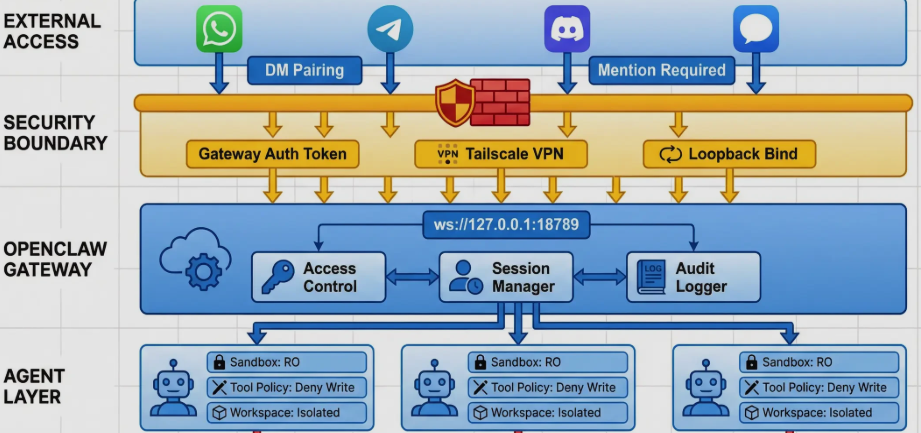
This article provides a comprehensive breakdown of the OpenClaw (Clawdbot) architecture, exploring its engineering-first approach to solving common AI agent failures like state drift, messy logs, and security risks. It details the transition from simple prompt engineering to a robust, system-level execution framework designed for production environments.
OpenClaw (also known as Clawdbot) is an open-source TypeScript CLI process and gateway server designed to execute AI agentic workflows with high reliability and observability. Unlike traditional “chatbots,” it functions as a controlled environment for running tools (Shell, File System, Browser) across multiple channels like Telegram or Slack. Its core architectural innovation lies in the “Lane Queue” system—which defaults to serial execution to prevent race conditions—and “Semantic Snapshots” for web browsing, which reduces token costs and increases accuracy by parsing accessibility trees instead of relying solely on screenshots.
The Shift from “Magical” AI to Engineering Reality
In the current landscape of AI development, the model itself is rarely the only bottleneck. Most developers building agents encounter systemic engineering failures: messy concurrency, unreadable logs, lack of security boundaries for tools, and non-reproducible states. OpenClaw addresses these by treating the agent not as a “thinking” entity, but as a structured pipeline with clear boundaries.
The Core Definition of OpenClaw
OpenClaw is categorized as a system that runs on your machine to perform three specific tasks:
-
Message Interception: Receiving inputs from various communication channels (Telegram, Discord, Slack).
-
LLM Orchestration: Calling Large Language Model APIs (OpenAI, Anthropic, or local models).
-
Controlled Tool Execution: Running Shell commands, file operations, or browser tasks in local or sandboxed environments and returning the results.
The 6-Stage Execution Pipeline
To ensure controllability and failure traceability, OpenClaw processes every message through a strictly defined assembly line:
-
Channel Adapter: Standardizes inputs from different platforms (e.g., Discord or Telegram) into a unified message format while extracting necessary attachments.
-
Gateway Server: Acts as a session coordinator, determining which session a message belongs to and assigning it to the appropriate queue.
-
Lane Queue: A critical reliability layer that enforces serial execution by default, allowing parallelism only for explicitly marked low-risk tasks.
-
Agent Runner: The “assembly line” for the model. It handles model selection, API key cooling, prompt assembly, and context window management.
-
Agentic Loop: The iterative cycle where the model proposes a tool call, the system executes it, the result is backfilled, and the loop continues until a resolution is reached or limits are hit.
-
Response Path: Streams final content back to the user channel while simultaneously writing the entire process to a JSONL transcript for auditing and replay.
Comparison: OpenClaw vs. Traditional Agent Frameworks
| Feature | Traditional Agent Approach | OpenClaw (Clawdbot) Approach |
| Concurrency |
Random Async/Await (leads to race conditions)
|
Lane Queue (Serial by default for stability)
|
| Observability |
Intertwined, messy logs
|
JSONL Transcripts (Structured, replayable logs)
|
| Security |
Prompt-based “Please be safe” instructions
|
Allowlist + Shell Structure Blocking
|
| Web Browsing |
Vision-heavy screenshots (Expensive/Slow)
|
Semantic Snapshots (Accessibility Tree/ARIA)
|
| Memory |
Opaque Vector Database only
|
JSONL + Markdown Files (Editable and hybrid search)
|
Engineering Reliability: The “Lane Queue” Concept
A major pitfall in agent development is the “messy yarn” of logs caused by uncontrolled asynchronous tasks. OpenClaw adopts a “Default Serial, Explicit Parallel” philosophy:
-
Session Isolation: Each session has its own “lane”.
-
Serial Execution: By default, tasks within a lane happen one after another to prevent state corruption.
-
Controlled Parallelism: Only idempotent or low-risk tasks (like scheduled background checks) are moved to parallel lanes.
-
Reduced Debugging: This structure ensures that failures are isolated and logs remain readable, significantly lowering the long-term cost of maintenance.
The Agent Runner: A Context Assembly Line
The Agent Runner treats prompt engineering as a mechanical assembly task rather than a “religious” art form. Its core components include:
-
Model Resolver: Manages multiple LLM providers. If a primary model fails or a key is rate-limited, it automatically cools down that key and switches to a backup.
-
System Prompt Builder: Dynamically merges system instructions, available tools, skills, and relevant memories into a coherent prompt.
-
Session History Loader: Pulls previous interactions from the JSONL transcript to provide context.
-
Context Window Guard: Monitors the token count. Before the window “explodes,” it triggers summarization or stops the loop to prevent incoherent model behavior.
Demystifying Agent Memory: Files and Hybrid Search
OpenClaw avoids overly complex memory architectures in favor of simple, explainable, and portable files.
Two-Tiered Memory System
-
JSONL Transcripts: A factual, line-by-line audit of what happened (User messages, tool calls, execution results).
-
Markdown Memory: Stored in a
MEMORY.mdfile or a specific directory. It serves as a repository for “what should be remembered”—summaries, experiences, and distilled knowledge.
Hybrid Retrieval Strategy
Relying solely on vector search often leads to “semantic noise” where similar-looking but incorrect information is retrieved. OpenClaw uses:
-
Vector Search: For broad semantic recall.
-
Keyword Matching (SQLite FTS5): For precision. For example, searching for “authentication bug” will hit both semantic synonyms (like “login issues”) and exact technical phrases.
-
Smart Syncing: When the agent writes to a memory file, a file monitor automatically triggers an index update, ensuring the “experience” is immediately available for the next prompt.
Robust Security: Beyond Prompt Instructions
True security for an agent with shell access cannot rely on the model “behaving”. OpenClaw implements a multi-layered security barrier:
-
Allowlist Configuration: Every command must match a pattern in a pre-approved list (e.g.,
npm,git,ls). -
Structure-Based Blocking: Even if a command is allowed, OpenClaw parses the shell structure and blocks dangerous patterns:
-
Redirections (
>): To prevent overwriting critical system files. -
Command Substitution (
$(...)): To stop agents from nesting dangerous commands inside safe ones. -
Sub-shells (
(...)): To prevent escaping the intended execution context. -
Chained Execution (
&&,||): To stop complex, multi-step exploits.
-
Web Browsing via Semantic Snapshots
Traditional agents “see” the web through screenshots, which are token-heavy and often imprecise. OpenClaw utilizes Semantic Snapshots based on the Accessibility Tree (ARIA):
-
Dimension Reduction: It converts a visual webpage into a structured text tree (e.g.,
button "Sign In" [ref=1]). -
Cost Efficiency: A screenshot can be 5MB; a semantic snapshot is often under 50KB.
-
Higher Precision: Agents can select nodes by specific references rather than guessing pixel coordinates.
-
Speed: Textual parsing is significantly faster than computer vision processing for standard navigation tasks.
10 Actionable Takeaways for Agent Engineering
To build a stable agent system, consider adopting these principles from the OpenClaw implementation:
-
Prioritize serial execution until the workflow is stable.
-
Make concurrency a system-level decision using explicit lane queues.
-
Componentize the Runner to separate model quality from system quality.
-
Treat tool calls as events and record them in replayable JSONL formats.
-
Structure tool outputs as “evidence” (JSON/Tables) rather than raw logs.
-
Use file-based memory (Markdown) for better human auditability and control.
-
Combine vector and keyword search to avoid semantic hallucinations.
-
Start security with an allowlist and hard-block dangerous shell structures.
-
Prefer semantic snapshots for web tasks unless visual detail is strictly required.
-
Ensure failure is explainable, distinguishing between environment errors, policy blocks, and model failures.
Concise FAQ
What is the main difference between OpenClaw and a standard AI chatbot?
A standard chatbot primarily focuses on text generation. OpenClaw is a process that operates as a tool-execution environment, prioritizing system stability, security, and the ability to run Shell, File, and Browser commands safely.
Why does OpenClaw prefer serial execution in its Lane Queue?
Serial execution prevents race conditions and ensures that logs are readable and reproducible. By making serial execution the default, OpenClaw reduces the complexity of debugging “ghost” bugs that occur in highly concurrent async environments.
How does the security allowlist work?
Instead of asking the model not to do bad things, the system uses a configuration file that lists exactly which commands (like git or npm) are permitted. It also automatically rejects any command containing dangerous shell structures like redirections or sub-shells.
What are Semantic Snapshots in web browsing?
They are structural text representations of a webpage derived from the Accessibility Tree. They allow the agent to “read” the structure of a site (buttons, inputs, links) with much lower token costs and higher precision than analyzing screenshots.
How does OpenClaw handle memory?
It uses a hybrid approach: JSONL for an audited history of every event and Markdown files for summarized “long-term” knowledge. Searching this memory involves both vector retrieval (semantic) and keyword matching (exact) via SQLite.