What are Google Antigravity Skills?
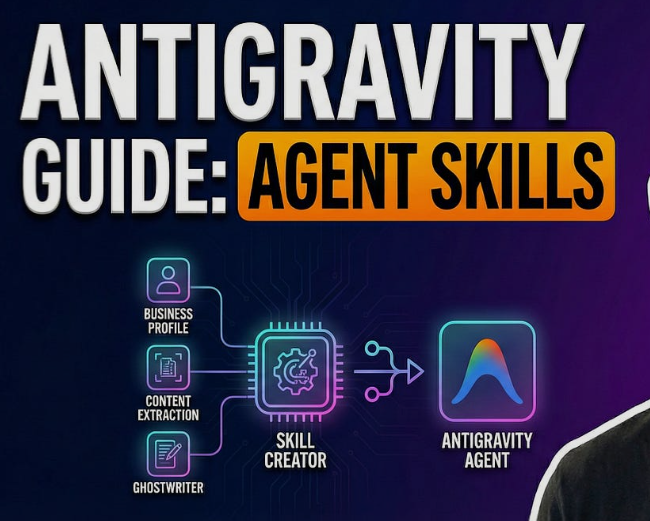
Google Antigravity Skills are modular, file-based extensions that transform the Antigravity AI agent from a simple coding assistant into a functional autonomous engineer. By utilizing a specialized framework centered around a SKILL.md definition file, these skills allow the agent to perform real-world actions—such as executing terminal commands, querying databases, interacting with APIs, and managing local files—with surgical precision. Unlike traditional system prompts that clutter the context window, Antigravity Skills are semantically triggered; the agent only loads the specific logic and scripts required for the current task. This architecture significantly improves reliability, reduces “AI hallucinations,” and enables developers to automate “tribal knowledge” directly within their repositories.
1. The Dawn of the Agentic IDE: Why Skills are Necessary
In the early days of AI-assisted coding, developers relied on large, static system prompts or “custom instructions.” While helpful, these suffered from “instruction fatigue,” where the AI would forget specific rules as the conversation grew longer. Google Antigravity solves this by introducing a modular architecture where the AI’s capabilities are not built into the model itself but are instead “equipped” as needed.
Antigravity Skills allow the IDE to function as a Reasoning Engine rather than just a completion engine. By providing the AI with a toolbox of skills, the developer shifts from writing every line of code to supervising a swarm of agents that know how to use the specific tools of the project. This shift is the cornerstone of “Vibe Coding,” where the human provides the intent, and the AI handles the execution via specialized skills.
The modular nature of these skills means that your IDE becomes more intelligent the more you use it. You can build a library of skills for your specific tech stack, deployment pipeline, and documentation standards, ensuring that the AI always operates within the context of your unique business logic.
2. Anatomy of a Skill: The File-Based Framework
A Google Antigravity Skill is not a complex binary or a compiled plugin; it is a human-readable folder located within your repository. This design makes skills easy to version control via Git and simple for developers to audit. According to the official Antigravity documentation, a standard skill consists of three primary components:
-
إن
SKILL.mdFile: This is the “brain” of the skill. It contains YAML metadata (name, description, and triggers) and Markdown-based instructions that tell the agent how and when to use the skill. -
The Scripts Folder: Optional but powerful, this folder contains Python, Bash, Node.js, or Go scripts that the agent executes to perform actions on the local machine or remote servers.
-
The Resources Folder: This contains templates, documentation snippets, or configuration files that the skill might need to reference during its execution.
By keeping these components in a single directory (usually under .agent/skills/), Antigravity ensures that the skill is portable. You can copy a skill from one project to another, or even share a repository of skills with your entire engineering team.
3. Understanding Semantic Triggering: How the Agent “Decides”
One of the most advanced features of Google Antigravity is its ability to automatically identify which skill to use without the user needing to call it by name. This is achieved through Semantic Triggering, a process where the agent compares the user's natural language input against the description field in the SKILL.md metadata.
When you type a command like “Check if the staging server is healthy,” the Antigravity engine scans its available skills. If it finds a skill with a description like “Validates staging environment health and reports status,” it dynamically loads that skill into the current context. This “just-in-time” loading keeps the AI’s memory clean and focused on the task at hand.
This mechanism allows for a seamless user experience. You don't need to remember complex CLI flags or specific keywords; you simply talk to the IDE, and the IDE “knows” which of its equipped skills is the right tool for the job. This is what separates Antigravity from traditional command-line interfaces.
4. Step-by-Step: How to Author a SKILL.md Definition
Creating a skill begins with the SKILL.md file. This file acts as the interface between the human developer and the AI agent. It must be written with clarity to ensure the agent understands its boundaries and objectives. A well-authored skill definition follows a specific structure:
-
Metadata (YAML Frontmatter): At the top of the file, you define the
name(a unique identifier) and thedescription(the semantic trigger). Accuracy in the description is vital for the agent's trigger logic. -
The Mission Statement: A brief section explaining the “Why” behind the skill. For example, “This skill ensures all API endpoints follow the RESTful naming convention.”
-
Detailed Instructions: A step-by-step guide for the AI. You can use conditional logic here, such as “If the file is a Python file, apply the PEP 8 formatting skill; otherwise, skip.”
-
Examples (Few-Shot Prompting): Providing 2-3 examples of a user prompt and the expected agent action significantly increases the skill's success rate.
By following this structured approach, you reduce the risk of the AI misinterpreting your intent. The SKILL.md file is essentially the “Employee Handbook” for that specific agentic task.
5. Integrating Scripts: Moving from Text to Action
While text-based instructions are useful for formatting or style checks, the true power of Antigravity Skills lies in Script Execution. Within a skill, the agent can be granted permission to run local scripts. This allows the AI to interact with the “real world” beyond the text editor.
For instance, a “Database Migrator” skill might include a Python script that connects to a local PostgreSQL instance. When the user says, “Run the latest migrations,” the agent doesn't just write the command; it executes the script, parses the output, and reports back whether the migration was successful or if an error occurred.
Safety is a primary concern in script execution. Antigravity provides different modes of operation: Manual, where the agent asks for permission before running any script; and Auto, where trusted skills can execute silently. This granular control allows developers to balance speed with security.
6. Practical Use Cases: Examples from the Community
The community repository guanyang/antigravity-skills on GitHub provides a wealth of examples that demonstrate the versatility of the framework. These “real-world” skills help developers understand how to bridge the gap between AI reasoning and practical utility.
-
Conventional Commits Skill: This skill analyzes staged changes in Git and generates a commit message following the “Conventional Commits” standard. It ensures consistency across a large team without manual effort.
-
GitHub Search Skill: An agent equipped with this skill can use the GitHub API to search for similar code patterns across other repositories in an organization, helping developers avoid “reinventing the wheel.”
-
Technical Debt Auditor: This skill can be triggered to scan a specific directory for “TODO” comments or deprecated API calls, generating a summary report of the project's technical debt.
-
Docker Container Manager: A skill that allows the agent to start, stop, and inspect local Docker containers through natural language commands like “Restart the redis container.”
These examples show that skills can be as simple as a linter or as complex as a DevOps orchestrator. The only limit is the scripts you can write and the instructions you can provide.
7. Workspace vs. Global Skills: Managing Your Library
Google Antigravity allows for two levels of skill management: Workspace Skills and Global Skills. Understanding the difference is key to maintaining a clean and efficient development environment.
Workspace Skills are stored within a specific project’s .agent/skills/ directory. These are highly specific to the project at hand—for example, a skill that knows how to run the unique build pipeline for a specific React app. Because they are part of the repository, they are shared with every developer who clones the project.
Global Skills are stored in the user's home directory (e.g., ~/.antigravity/skills/). these are “utility” skills that you want available in every project you work on. Examples include a “Unit Test Generator,” a “JSON Formatter,” or a “README Optimizer.” Global skills allow you to carry your “personal AI superpowers” from one project to the next.
8. Best Practices for Developing High-Quality Skills
To get the most out of the Antigravity framework, developers should adhere to several best practices. High-quality skills are predictable, safe, and easy to maintain.
-
Keep it Atomic: A skill should do one thing well. Instead of a “DevOps” skill, create separate skills for “Staging Deploy,” “Log Analysis,” and “Health Check.”
-
Use Precise Verbs: In your
SKILL.mddescription, use active verbs like “Generate,” “Verify,” “Execute,” or “Format.” This helps the semantic engine match prompts more accurately. -
Include Error Handling: Tell the agent what to do if a script fails. For example: “If the test script returns a non-zero exit code, analyze the log and suggest a fix.”
-
Document Dependencies: If a skill requires a specific Python library or a CLI tool (like
kubectl), list it in theSKILL.mdso other developers know what to install.
Following these practices ensures that your skills remain robust as your codebase evolves and as the underlying Gemini models are updated.
9. Security Considerations in the Agentic Era
Giving an AI agent the ability to run scripts on your machine introduces significant security risks. Google Antigravity addresses this through a “Sandbox” and “Permission” model. Developers must be conscious of the permissions they grant to their skills.
The agent generally operates with the permissions of the logged-in user. This means a malicious or poorly written skill could theoretically delete files or leak environment variables. To prevent this, the Antigravity documentation recommends auditing any third-party skills before adding them to your global library.
Furthermore, the “Always Ask” mode is the safest default. By requiring a manual confirmation for terminal commands, you ensure that you remain “in the loop” for any destructive actions. As AI agents become more autonomous, the human role shifts from “coder” to “security auditor” and “architect.”
10. The Future of Antigravity: Multi-Agent Collaboration
Looking forward, the next evolution of Antigravity Skills involves Multi-Agent Orchestration. In this scenario, a single user prompt might trigger multiple skills that work in sequence. For example, a request to “Deploy the latest changes” might trigger a “Test Runner” skill, followed by a “Documentation Updater” skill, and finally a “Cloud Deployer” skill.
This “chaining” of skills allows for complex, multi-step workflows that are entirely autonomous. The agent becomes a project manager, delegating sub-tasks to specialized “sub-agents” defined by their skills. This is the ultimate goal of agentic AI: a system that doesn't just help you write code but actively manages the lifecycle of the software.
As the ecosystem grows, we can expect to see “Skill Marketplaces” where developers can download and share pre-verified skills for popular frameworks like Next.js, Django, or Kubernetes, further accelerating the speed of modern software development.
Conclusion: Transforming the Developer Experience
Google Antigravity Skills are more than just a new feature; they are a fundamental rethink of the developer's interface with their tools. By moving away from generic chat interactions and toward a modular, skill-based architecture, Antigravity provides a roadmap for the future of AI-native engineering.
By investing time in authoring high-quality skills, you are effectively “training” your IDE to become a senior partner in your specific domain. This not only increases productivity but also preserves the “Tribal Knowledge” of your team in a format that is immediately actionable. Whether you are automating a simple Git commit or a complex cloud deployment, Antigravity Skills are the key to unlocking the true power of agentic AI.