You face new dangers every day when you use your phone. Hackers and cybercriminals try to take your personal information. They also try to get into your devices. In 2025, many people want better ways to protect their data. The market for secure phones is getting bigger. More people need privacy for things like mobile banking, work, and talking with friends. Companies now add things like encryption and biometric authentication to keep you safe. Governments and businesses also pick secure phones to guard important data. If you want the most secure smartphone for privacy, you should think about your own needs and how you live before you choose.
Key Takeaways
-
Pick a smartphone that uses strong encryption. This keeps your messages and calls safe from hackers. – Find phones that get regular software updates. Updates help protect you from new dangers. – Think about privacy controls like hardware kill switches. These let you control your phone’s features and what data you share. – Look at how you use your phone every day. Choose a device that fits your privacy needs and your lifestyle. – Compare different secure smartphones. This helps you find one that matches your budget and security needs.
Most Secure Smartphone for Privacy: Top 5 Picks
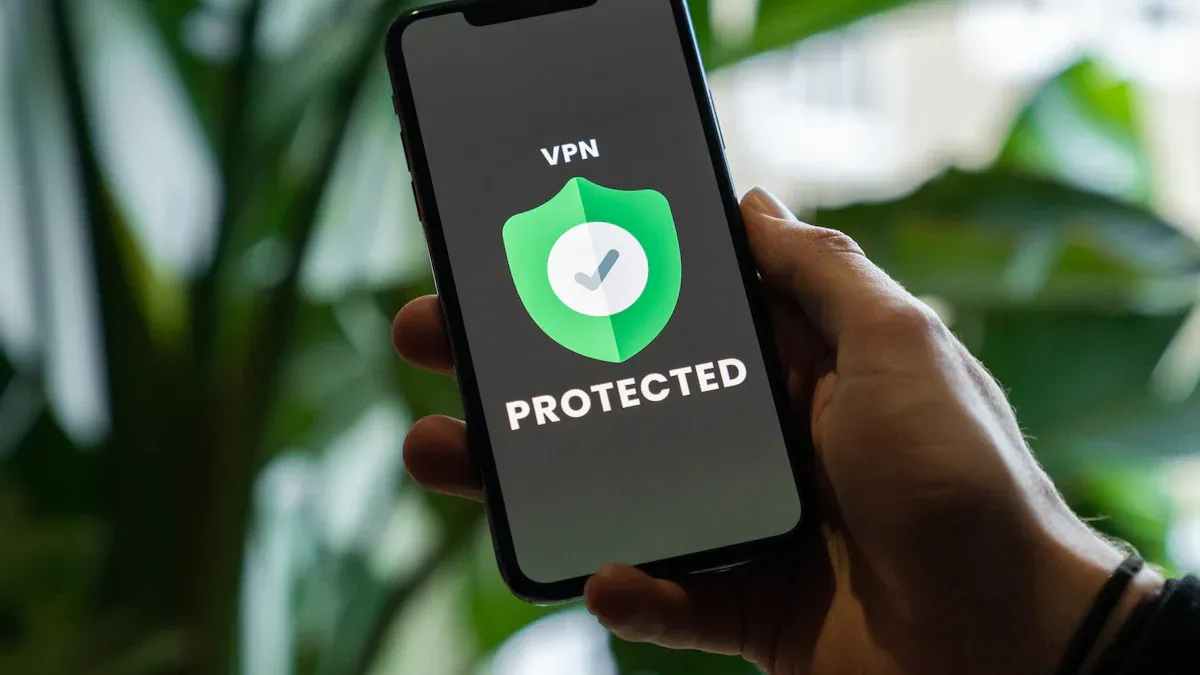
If you want a phone that keeps your privacy safe, you should look for special features. These phones have strong security and use encrypted communications. Experts check these phones using different rules. You need to look for a hardened operating system and strong encryption. A secure boot process and trusted execution environment are important too. Some phones have physical kill switches and get updates often. These things help keep your data safe.
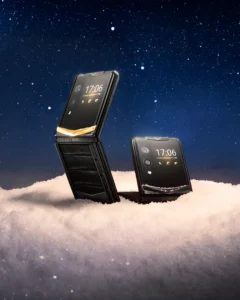
Vertu Quantum Flip
The Vertu Quantum Flip is a secure phone with a fancy look. It is made from titanium alloy, so it is strong and tough. The phone uses the Snapdragon 8 Elite chip. This chip makes the phone fast and saves battery. The screen is 6.9 inches, and there is a smaller screen outside. You can see important things quickly on the small screen. The phone lets you use encrypted communications and has one-touch data destruct. This helps you keep your privacy safe. There is a ruby button for a private assistant. The assistant helps you with tasks and special services. The battery lasts up to 35 hours if you watch videos. It also charges fast, so you can use it all day. If you want a secure phone that looks good and works well, this is a great choice.
Blackphone PRIVY 2.0
Blackphone PRIVY 2.0 keeps your calls and messages safe. It uses end-to-end encryption for all your chats. This means only you and the other person can read them. The phone has apps like PRIVY Chat and PRIVY Vault. These apps help you store files and send messages safely. You get a multi-IMSI SIM card. This lets you use data anywhere in the world. No third party can see your data. The phone scrambles your voice during calls. Secret messaging keeps your texts private. If you need safe chats for work or home, this phone is a good pick.
|
Privacy Technology |
Description |
|---|---|
|
End-to-End Encryption |
Encrypts communication using cryptographic protocols for secure messaging and VoIP calls. |
|
Secure Communication Apps |
Includes applications like PRIVY Chat and PRIVY Vault for secure messaging and file storage. |
|
Multi-IMSI SIM Card |
Provides unlimited data coverage worldwide while eliminating third-party involvement. |
Purism Librem 5
Purism Librem 5 is a good choice if you want control over your data. The phone keeps the cellular modem away from the main system. This is called hardware isolation. You can use kill switches to turn off the radio, Wi-Fi, Bluetooth, camera, and microphone. The phone runs on PureOS, which is open source. Anyone can check the code for problems. You get strong security and encrypted communications. Hackers will have a hard time getting your information.
|
Feature |
Description |
|---|---|
|
Hardware Isolation |
The cellular modem is isolated from the main system, reducing the risk of data access through cellular vulnerabilities. |
|
Physical Kill Switches |
Users can disable cellular radio, Wi-Fi/Bluetooth, and camera/microphone with physical switches for enhanced control. |
|
Open Source Software |
Runs on PureOS, allowing anyone to audit the code for security flaws, promoting faster identification and resolution of issues. |
Sirin Labs Finney U1
Sirin Labs Finney U1 keeps your digital assets and chats safe. It has a cold storage wallet built in. This wallet protects your cryptocurrency from online dangers. The phone uses a secure boot process and trusted execution environment. Only safe software can run on the phone. You can use encrypted communications for calls and messages. The phone gets updates often to stop new threats. If you use blockchain or want safe transactions, this phone is a good choice.
Tip: If you use digital assets or cryptocurrencies, you should choose a phone with a secure wallet and advanced security features.
Bittium Tough Mobile 2C
Bittium Tough Mobile 2C is made for people who need very strong security. The phone can spot if someone tries to break in. It uses advanced tamper detection. You get strong encryption for texts, calls, and data. The phone lets you control security settings from far away. It meets strict security rules like Common Criteria and FIPS 140-2. You can use your fingerprint or face to unlock the phone. You can also set strong passwords and PINs. The phone supports encrypted communications. It is a top pick for professionals and organizations.
|
Security Feature |
Description |
|---|---|
|
Advanced Tamper Detection |
Identifies tampering attempts and takes protective actions to secure data. |
|
Cutting-edge Encryption Technology |
Safeguards data transfers, texts, and calls, ensuring privacy against eavesdropping. |
|
Remote Management Capabilities |
Allows centralized monitoring and management of security configurations and device settings. |
|
Common Criteria Certification |
Complies with ISO/IEC 15408, ensuring thorough testing and adherence to security standards. |
|
FIPS 140-2 Compliance |
Meets US government standards for cryptographic modules, enhancing data protection. |
|
End-to-end Encryption Capability |
Encrypts communications from sender to receiver, ensuring privacy. |
|
Biometric Authentication |
Uses fingerprints or facial recognition for secure access to the device. |
|
Strong Password and PIN Options |
Offers complex password and PIN settings for additional security layers. |
Pick the phone that fits your privacy needs and how you live. Each phone has strong security and encrypted communications. You can keep your data safe in 2025.
Best Encrypted Phones: Security Criteria
When you want a safe phone, you need to know what makes it secure. You want to keep your personal information safe. You also want your conversations to stay private. Here are the main things to look for when picking a phone for strong security and data protection.
Encryption Standards
Check if your phone uses strong encryption. End-to-end encryption keeps your messages and calls safe from hackers. Encrypted voice calls help you talk without worry. Many privacy apps use strong encryption to protect your data. Secure messaging depends on these standards. If you want safe communications, look for phones with advanced encryption protocols.
Hardware Security
Hardware security helps protect your data. Some phones have special chips that keep sensitive data safe. Secure ways to unlock your phone, like fingerprint or face unlock, add more safety. Devices with tamper-resistant hardware make it hard for anyone to steal your information. Look for phones with strong encryption at the hardware level. This helps with secure transactions and handling sensitive data.
Software Updates
Regular software updates keep your phone safe from new threats. You need a phone that gets updates often. Updates fix security problems and make privacy features better. Phones with a good update policy help you stay protected. Always check how often a phone gets updates before you buy it. This is a key part of smartphone security.
Privacy Controls
Privacy features let you control what your phone shares. You can turn off location tracking. You can block apps from using your camera and microphone. Data privacy is easier with these controls. Some phones let you manage permissions for each app. This helps you keep your sensitive data private. Pick a phone that gives you strong privacy controls for secure communications.
Tip: Always check the privacy settings on your phone. This helps you keep your data safe and lets you control your information.
Most Secure Cell Phone Reviews
Vertu Quantum Flip
This phone mixes luxury and strong data protection. Vertu Quantum Flip is made with titanium, so it is tough and looks nice. The Snapdragon 8 Elite chip makes it run fast. You can take clear photos with the 50MP AI camera. One-touch data destruct helps keep your information private. The ruby button lets you use a private assistant for secure communications. The battery lasts a long time and charges fast. If you want privacy features and the best encrypted phones, this phone matches your lifestyle.
Pros:
-
Strong build quality
-
Fast processor
-
Advanced privacy features
Ideal for:
You like luxury and want the most secure cell phone for everyday use.
Blackphone PRIVY 2.0
This phone keeps your messages and calls safe. Blackphone PRIVY 2.0 uses end-to-end encryption for chats and calls. You get PRIVY Chat and PRIVY Vault for secure messaging and file storage. The multi-IMSI SIM card lets you use data anywhere in the world. The phone scrambles your voice during calls for extra protection. If you want the best encrypted phones for work or travel, this phone helps you stay private.
Pros:
-
Global data coverage
-
Secure messaging apps
-
Strong encryption
Ideal for:
You travel a lot and need secure communications for business.
Purism Librem 5
This phone gives you control over your privacy. Purism Librem 5 uses hardware isolation to keep the modem away from the main system. Physical kill switches let you turn off Wi-Fi, Bluetooth, camera, and microphone. The phone runs PureOS, which is open source. You can check the code for problems. If you want privacy features and data protection, this phone helps you feel safe.
Pros:
-
Hardware isolation
-
Physical kill switches
-
Open source software
Ideal for:
You want full control over your device and like transparency.
Sirin Labs Finney U1
This phone is good for digital assets and secure transactions. Sirin Labs Finney U1 has a cold storage wallet for cryptocurrency. The phone uses a secure boot process and trusted execution environment. You get updates often to protect against new threats. If you use blockchain or want strong data protection, this phone supports your needs.
Pros:
-
Secure wallet
-
Trusted execution environment
-
Frequent updates
Ideal for:
You manage digital assets and want the most secure cell phone for transactions.
Bittium Tough Mobile 2C
This phone gives you the highest level of security. Bittium Tough Mobile 2C has multilayered security and hardware privacy mode. You get a dedicated secure element and dual-boot functionality, which other secure phones do not have. The table below shows how it compares:
|
Feature |
Bittium Tough Mobile 2C |
Other Secure Phones |
|---|---|---|
|
Dedicated Secure Element |
Yes |
Varies |
|
Dual-Boot Functionality |
Yes |
No |
|
Hardware Privacy Mode |
Yes |
Limited |
|
Multilayered Security |
Yes |
Varies |
You can change security settings from far away. The phone meets strict rules for data protection. If you work in government or need advanced privacy features, this phone is a great choice.
Pros:
-
Multilayered security
-
Remote management
-
Certified for high security
Ideal for:
You need the best encrypted phones for work or organizations.
Secure Cell Phones Comparison Table
You should look at secure cell phones before picking one. The table below shows how each phone is different. You can see security features, operating systems, hardware, and privacy controls. This guide helps you choose the best phone for your privacy.
|
Smartphone |
Security Features |
Operating System |
Hardware Highlights |
Privacy Controls |
|---|---|---|---|---|
|
Vertu Quantum Flip |
One-touch data destruct, encrypted communications, private assistant |
Custom Secure OS |
Titanium alloy, Snapdragon 8 Elite chip |
Bespoke privacy assistant, rapid data wipe |
|
Blackphone PRIVY 2.0 |
End-to-end encryption, secure messaging apps, multi-IMSI SIM card |
Hardened Android |
Tamper-resistant build |
Secure chat, encrypted vault |
|
Purism Librem 5 |
Hardware kill switches, hardware isolation, open source PureOS |
PureOS (Linux-based) |
Isolated modem, physical kill switches |
Full hardware control, tracking blockers |
|
Sirin Labs Finney U1 |
Cold storage wallet, secure boot, trusted execution environment |
Sirin OS (Android-based) |
Secure wallet, advanced chip |
Encrypted calls, frequent updates |
|
Bittium Tough Mobile 2C |
Tamper detection, multilayered encryption, remote management |
Hardened Android |
Dedicated secure element, dual-boot |
Hardware privacy mode, remote settings |
Each phone has its own privacy controls. Purism Librem 5 lets you use hardware kill switches. You can turn off Wi-Fi, mobile network, and camera with a switch. This gives you more control over your privacy. Bittium Tough Mobile 2C lets you change security settings from far away. It uses multilayered encryption and hardware privacy mode.
Vertu Quantum Flip and Blackphone PRIVY 2.0 focus on keeping your messages safe. They use encrypted communications and fast data protection. Sirin Labs Finney U1 has a secure wallet for digital assets. It gets updates often to stop new threats.
The operating system is important for privacy. PureOS is open source, so anyone can check the code. Hardened Android adds more security layers. Custom secure operating systems, like Vertu Quantum Flip’s, have special privacy features.
Good privacy controls include hardware kill switches, encrypted messaging, and quick data wipe. Tracking blockers and differential privacy help protect your data. You should pick phones that let you control what apps and services can use.
Tip: Use the table to find the phone that matches your privacy needs. You get better safety when you pick a phone with strong privacy controls and regular updates.
How to Choose the Most Secure Phone
Picking the most secure phone can seem hard. You want to keep your data safe. But you also want a phone that fits your life. Here are some tips to help you choose.
Key Features
When you look for a secure phone, check for these things:
-
App Store Management: Phones like iOS check apps before you download them. This helps stop bad apps from getting on your phone. Android phones with good rules for developers also help keep you safe.
-
Security Updates: Choose a phone that gets updates often. Updates fix problems and help protect your phone from new dangers.
-
Data Encryption: Your phone should use strong encryption. This keeps your messages, photos, and files private.
-
Strong Passwords: Use a strong password or PIN. This makes your phone harder to break into.
-
Install Apps Cautiously: Only get apps from places you trust. Some apps can hide malware and hurt your phone.
Tip: See if your phone lets you change app permissions. You can turn off the camera or microphone for some apps. This helps keep your information safe.
User Needs
Think about how you use your phone each day. Your needs will help you pick the right phone:
-
If you want a phone that is easy and safe, try an iPhone or Pixel. These phones are simple and have strong security.
-
If you need more privacy, you might want a phone like the Purism Librem 5. These phones give you more control but can be harder to use.
-
Parents may want phones with tools for kids and ways to watch what they do.
-
Too many security features can slow your phone down. McAfee Labs found that lots of security can make your phone 20% slower.
Budget Considerations
Secure phones cost different amounts. Some fancy phones have top security and special help. Other phones give you privacy for less money. Think about what features you need most. Try to match your budget with your need for privacy. You do not have to buy the most expensive phone to stay safe.
You have lots of options when looking for the most secure smartphone for privacy. The table below lists the best phones and who should use them:
|
Smartphone Model |
Key Features |
Target Users |
|---|---|---|
|
Blackphone PRIVY 2.0 |
Fully secure communication device |
Privacy-focused users |
|
Bittium Tough Mobile 2C |
Rugged design for extreme conditions |
Field professionals |
|
Sirin Labs Finney U1 |
Blockchain integration for secure transactions |
Cryptocurrency enthusiasts |
|
General smartphones |
Can enhance privacy with security steps |
Budget-conscious users |
Always think about privacy first when picking a secure smartphone. Use the table and tips to help you choose what works best for you. Follow these tips to stay safe:
-
Never update apps when using public Wi-Fi.
-
Make strong passwords and keep your software up to date.
-
Watch out when sharing personal information online.
Watch out for new privacy risks. Keep your device names and location private so others cannot see them.
FAQ
What makes a smartphone secure?
A secure smartphone uses strong encryption and privacy controls. It gets regular updates to stay safe. These things help protect your data and calls. The phone stops hackers from stealing your information.
Can you use regular apps on secure phones?
Most secure phones let you use popular apps. Some phones limit which apps you can get. This helps keep your privacy safe. Always look at the app store before you buy a phone.
How often should you update your secure phone?
You should update your phone when you see a new update. Updates fix problems and add new features. This helps keep your phone safe from new dangers.
Do secure phones protect you from all cyber threats?
No phone can stop every cyber threat. Secure phones make you safer, but you must use good habits.
Tip: Never share your passwords or click on strange links.